Recent Software Developments
Listed below are a number of the key enhancements that have been added to axis diplomat and axis payroll.
Showing 44 enhancements covering:
- Kernel (Core) Software
- Business Intelligence
- Sales Ledger, CRM & Sales Order Processing
- Purchase Ledger & Purchase Order Processing
- Stock Ledger, Bill of Materials & MRP
- Warehouse Management
- eBusiness
- Service Contract Management
- Workshop Job Management
- axis payroll
Kernel (Core) Software
Support for WIA (Windows Image Acquisition) Scanners
Available to Software Assurance customers with axis diplomat 2024 or above
Release Date: 30/07/2025
Support has been added to axis diplomat for WIA (Windows Image Acquisition) scanners in addition to existing TWAIN scanner support. This makes it easier to connect a wider range of scanning devices to the software, especially entry-level and consumer-grade scanners that do not include a TWAIN driver.
The WIA interface is built into Windows and is ideal for straightforward scanning tasks. It offers a simplified interface with fewer configuration steps, making it ideal for quick one-off scans or environments where users do not need to adjust detailed scanner settings. Adding support for WIA expands hardware compatibility, reduces setup time, and gives users more flexibility when choosing scanning equipment.
TWAIN is still the better choice for advanced scanning requirements such as multi-page document handling, duplex scanning and integration with auto-feeders. If your business regularly scans invoices, purchase orders, or uses batch scanning features, a TWAIN-compatible scanner is recommended. For quick tasks like scanning a single signed document or a proof of delivery, WIA may be more convenient and quicker to use.
Please note that some axis diplomat features, such as Delivery Note Scanning and Sales Order Release, are designed specifically with TWAIN scanners in mind. These functions often require more control over scan behaviour, such as prompting for scans at specific workflow stages or saving directly to linked transactions. In those cases, a TWAIN-compatible device will still be necessary to use all of the functionality.
Copy to clipboard (as PDF)
Available to Software Assurance customers with axis diplomat 2024 or above
Release Date: 24/07/2025
The ability to copy a whole document to the clipboard as a PDF is now available within the document preview window.
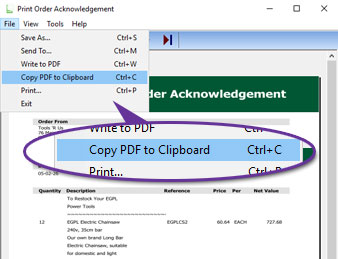
The document can be copied by using the File menu, as shown above, or the keyboard shortcut Ctrl+C.
The copied document
Printing Defaults - Multi-tray, Multi-copy Printing
Available to Software Assurance customers with axis diplomat 2024 or above
Release Date: 20/01/2025
Support for both multi-tray and multi-copy printing is standard but has previously only been configurable by the user during printing with the settings being retained by axis diplomat for later use.
The Maintain Printing Defaults Supervisor Function has now been enhanced to allow these settings to be configured at any time.
The axis diplomat Printer Selection dialog allows you to select a specific printer and output tray for each copy of the document. This is designed to help in situations where multiple paper copies of a document are required (for example, a pink copy for the customer, a yellow copy for the driver and a white copy for filing).
Different paper stock can be loaded in different printer trays (or in completely separate printers) and multiple copies of a document automatically produced each time. The number of copies, the chosen printer and the selected output tray is retained as the default for subsequent printing of that type of document. These defaults are stored separately for each workstation.
.jpg)
Where more than one copy is specified, the “Copies” button opens an additional dialogue which allows the user to specify a different printer and/or tray for each copy:
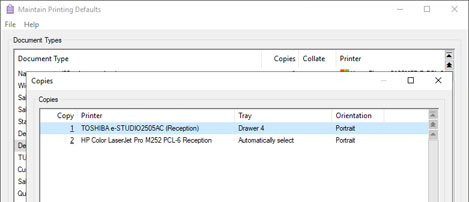
Not only do these developments make it easier to manage default printing behaviour but they also make it easier to configure background printing with multiple copies.
Business Intelligence
Additional Columns in Sales Business Intelligence Stock Tab
Available to Software Assurance customers with axis diplomat 2024 or above
Release Date: 09/01/2025
Sales Business Intelligence has been enhanced to allow more insight into your business performance by adding new columns to the Stock tab for Stock Attributes, enabling you to sort, filter, and analyse sales data in more ways.
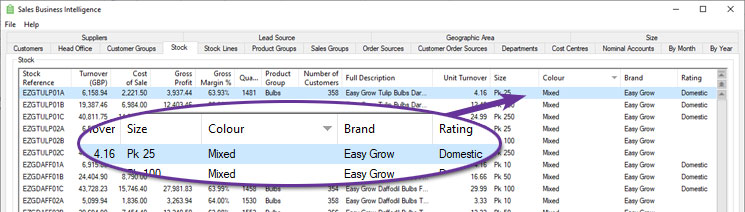
You can define up to ten custom attributes, such as size, colour, material, or any other classification relevant to your business, and now see this information against stock items listed within Sales Business Intelligence.
Sales Ledger, CRM & Sales Order Processing
Deposit Rules for Quotations and Sales Orders
Available to Software Assurance customers with axis diplomat 2024 or above
Release Date: 06/02/2026
For businesses that need to enforce or encourage deposits on certain transactions, this significant and extensive development brings control and visibility by integrating deposit settings into the sales workflow. With this functionality, there is no longer a need to rely on manual reminders or calculations. Sales and admin staff are immediately shown the appropriate deposit percentage and value as they build a quotation or sales order, ensuring consistency and removing uncertainty.
At the system level, deposit rules are configured within Supervisor Functions > Amend Company Parameters > Maintain SOP Parameters, on a dedicated Deposits tab.
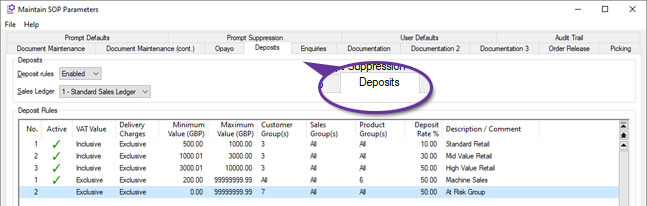
Users can define rules based on order value thresholds, customer group, sales group, and product group. The rules can be tailored to include or exclude VAT and delivery charges, making them flexible enough to match a variety of commercial models. Multiple rules can be created per sales ledger, and where more than one rule could apply to a given document, the system automatically uses the one with the highest level of deposit. This gives administrators granular control over policy without sacrificing clarity for users.
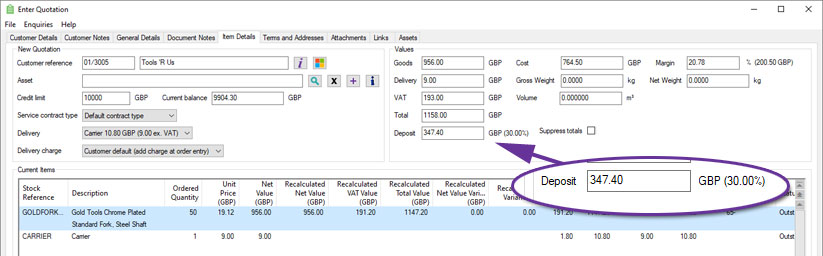
When working within a sales document, deposit information is always in view, updated as changes to the lines dictate. The deposit in shown as both percentage and currency values.
When entering or amending a sales document, on the General Details tab, the system displays the specific deposit rule that has been applied and allows users with appropriate security permissions to override the deposit percentage.
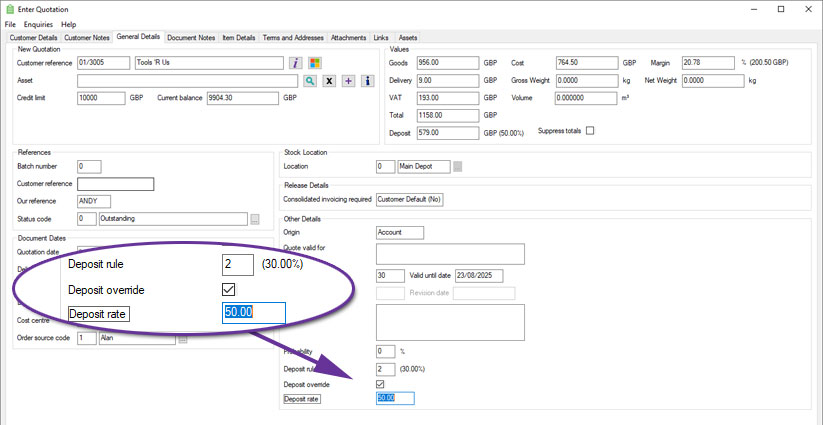
This override function is particularly useful when dealing with exceptions, such as trusted customers or promotional campaigns, and provides the necessary flexibility without compromising audit integrity. An audit trail of any deposit percentage or rule changes is recorded against the document.
Copy functions will recalculate deposit values based on current rules, whereas converting a quotation to an order will preserve the original deposit value.
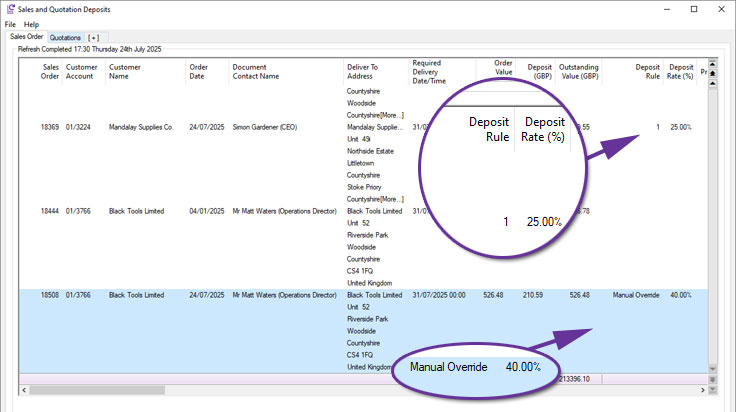
The Quotations and Sales Orders monitor now include dedicated columns showing the deposit percentage, deposit value, and the rule applied.
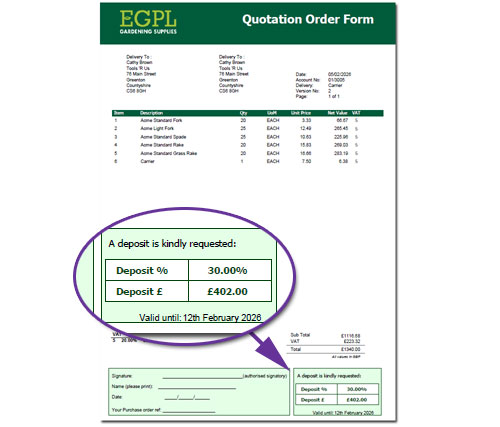
Document Designer templates, such as Quotations, Quotation Order Forms and Pro Forma Invoices, can also include information on the deposit required on a particular quotation or sales order:
Sales Order On Hold and Off Hold Email Notifications
Available to Software Assurance customers with axis diplomat 2024 or above
Release Date: 24/12/2025
Individual users and groups within axis diplomat can now be configured to receive an email whenever Sales Orders are placed on hold or released from hold.
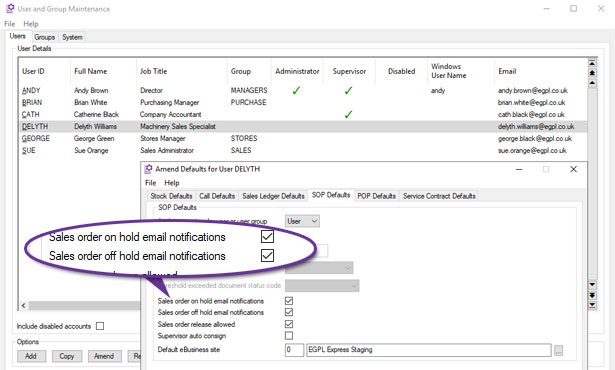
This is configured by using Kernel Supervisor Functions > User and Group Maintenance and selecting Accounts User Defaults for the user or group in question.
Orders may be placed on hold for a variety of reasons, including approval thresholds, credit control and manual intervention.
These email notifications provide clear visibility whenever an order’s hold status changes and removes the need for users to solely rely on a monitor of order lists, which may result in a quicker response. They include a link to open the order within axis diplomat direct from the email.
Sales Order Authorisations
Available to Software Assurance customers with axis diplomat 2024 or above
Release Date: 23/12/2025
Functionality has been added to axis diplomat to manage Sales Order Authorisations and to provide an approval mechanism.
Sales Order Authorisations can be used to limit financial risk by applying value limits to sales orders. Each user, or user group, can be assigned their own approval threshold.
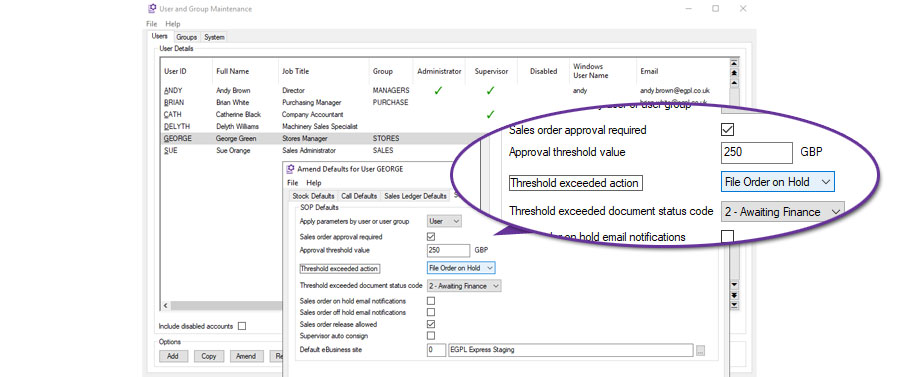
When a user attempts to file a sales order that exceeds that threshold, axis diplomat can, on a user by user basis, either:
- Block filing - this prevents the user from saving the sales order until the document value is reduced below the approval threshold.
- Warn Only - this issues a warning message to the user but does not prevent filing.
- File order on hold - this files the order but places it on hold and creates an order audit trail entry.
In addition, a specific Document Status Code may be set on orders which exceed the sales order approval threshold when filed. This could, for example, allow managers to run a monitor listing just orders that are on hold for this specific reason.
When the Sales Order On hold option is used, the order can be reviewed and released by someone with the appropriate security permission. The action that placed the order on hold, and the subsequent release, are both recorded in the Sales Order audit trail. This provides clear visibility of when the threshold was exceeded, who released the order, and when it was allowed to progress.
Sales Order Authorisations are configured using Kernel Supervisor Functions > User and Group Maintenance and selecting Accounts User Defaults, SOP Defaults for the user or group in question.
User and Group Security Permissions for Delivery Charges
Available to Software Assurance customers with axis diplomat 2024 or above and the Delivery Methods & Charges module
Release Date: 02/09/2025
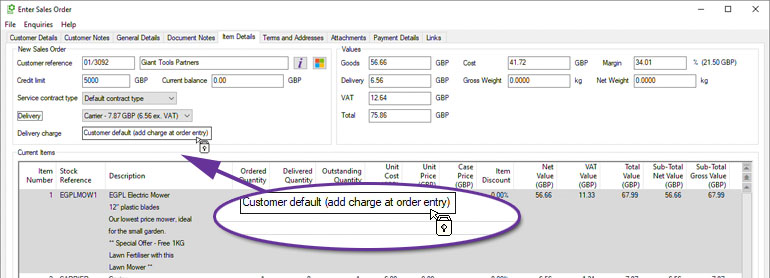
The security permissions within axis diplomat have been extended to allow permissions to be set on altering the delivery charge on a sales order. This allows you to keep delivery pricing consistent, and prevent accidental zero charges, protecting margins without slowing order entry.
A number of parameters (found on the Document Maintenance (cont.) tab of Sales Ordering Processing Parameters) control the use of Delivery Methods for Delivery Charges.
You can now allow or deny a user or user group the ability to amend the Delivery Charge on Sales Orders when “Delivery charge from delivery method” is enabled. Users without this ability may still choose the Delivery Method but cannot alter the Delivery Charge associated with that method.
For further details see Delivery Methods and Charges
Forward-Dated Case Pricing on Monitors
Available to Software Assurance customers with axis diplomat 2024 or above and the Date Specific Prices and Discounts module
Release Date: 30/07/2025
For systems using the Case Pricing option in conjunction with the Date-Specific Prices and Discounts module, the Stock Items and the Customer Price Lists monitors have been enhanced with eight new columns to support future-dated pricing analysis. These additions provide greater visibility into how case pricing, margins, and costs will look at a specified point in time. Users can configure the monitor tab using the Tab Options button, which includes a Show Prices For option which will enable the additional columns. This allows you to specify a future date and time and view pricing information as at that point in time.
These enhancements make it easier to review future pricing and protect margins.
| Column | Description |
|---|---|
| Case Price (Current) | Renamed from Case Price. Shows current case price calculated as inner price x case quantity. |
| Case Price (DD/MM/YY) | Displays case price for the selected future date and time (inner price x case quantity). |
| Case Inner Price (Current) | Renamed to show current case inner price used in the calculation of the case price. |
| Case Inner Price (DD/MM/YY) | Shows case inner price for the selected date and time. |
| Case Margin On Standard Cost (%) (Current) | Shows margin percentage between standard cost and case price (current). |
| Case Margin On Standard Cost (%) (DD/MM/YY) | Shows margin percentage between standard cost and case price for selected date. |
| Case Margin On Standard Cost (Current) | Shows margin value between standard cost and case price (current). |
| Case Margin On Standard Cost (DD/MM/YY) | Shows margin value between standard cost and case price for selected date. |
Deactivate Customer Delivery Addresses
Available to Software Assurance customers with axis diplomat 2024 or above and the Purchase Delivery Advice module
Release Date: 30/07/2025
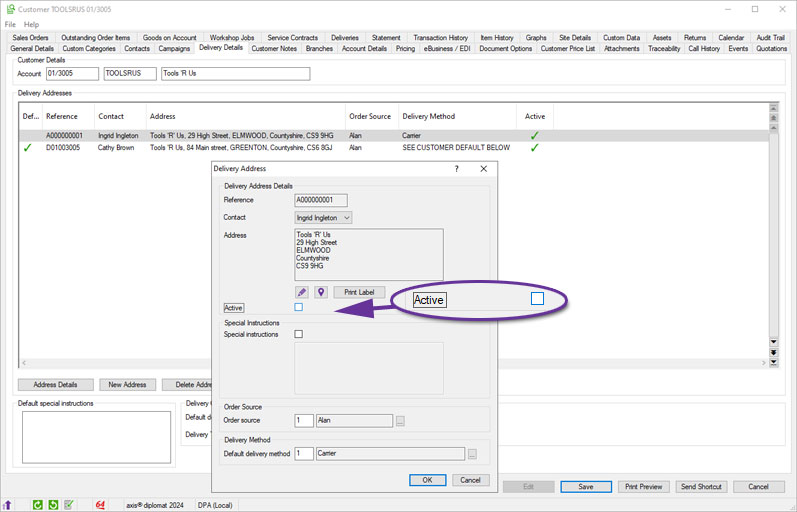
A new option allows individual Customer Delivery Addresses to be flagged as inactive, helping keep address records clean and relevant. Once an address is marked inactive, it will no longer be available for selection during order maintenance. For systems linked to axis vMerchant, deactivated delivery addresses will also no longer be published for selection at the checkout.
This change reduces the risk of selecting incorrect or obsolete addresses and helps keep address lists easier to navigate.
Copy Asset option from Asset Monitors
Available to Software Assurance customers with axis diplomat 2024 or above and the Customer Assets module
Release Date: 30/07/2025
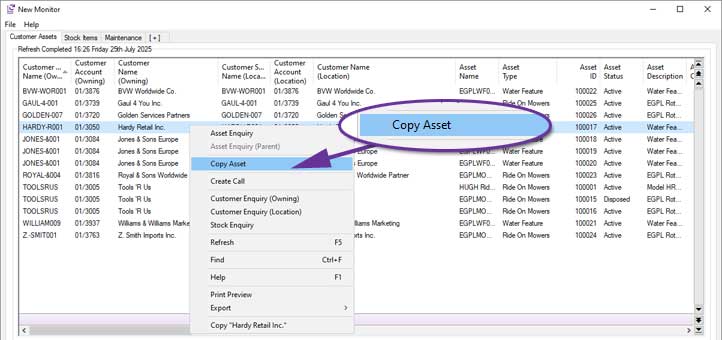
Customer Assets monitor tabs now include a context menu (right-click) option, ‘Copy Asset’, for users with appropriate security permissions.This allows users to quickly duplicate an existing asset, carrying over key details like descriptions, categories, and configurations. It is ideal for repeated installations or when onboarding similar equipment for a customer. The serial number is excluded in the copy. Custom data fields are copied based on their 'copyable' flag, which controls whether each field should be included in the copy. This is especially useful in cases where some asset details, such as access notes, are specific to the original and should not carry over. It allows faster, more accurate asset setup whilst maintaining flexibility where needed.
Automatic Attachment of Stock Data Sheets to Orders Acknowledgements
Available to Software Assurance customers with axis diplomat 2024 or above
Release Date: 19/06/2025
The system can now automatically attach Stock Data Sheets to sales order acknowlegements. When a stock item has a Data Sheet PDF on the stock record, or on its product group for shared use, the sheet is automatically appended in the preview and print produced by Document Designer. Previously available for quotations, this option has been extended to include sales orders so that customers can receive the right product information every time.
This update helps with compliance and reduces manual effort. It is ideal for a range of applications, including COSHH information, installation instructions, and licence agreements. The sheets are appended after the relevant content in the output so users do not need to attach files by hand.
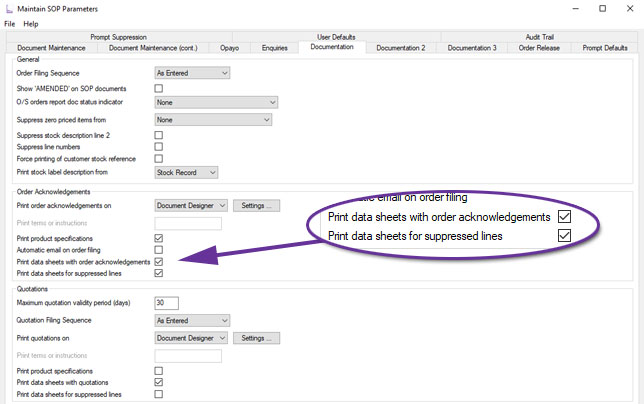
To enable this, set the parameter in Supervisor Functions > Amend Company Parameters > Maintain SOP Parameters. On the Documentation tab, tick Print data sheets with sales order to include them as part of the document.
To include Data sheets for lines that are suppressed by sub totals, tick Print Data Sheets for suppressed lines so the lines remain hidden but their data sheets are still included. This enhancement has also been added to the Quotation data sheet options.
Lifecycle Fields for ICT Asset Service Management
Available to Software Assurance customers with axis diplomat 2024 or above and the ICT Asset Service Management module
Release Date: 11/06/2025
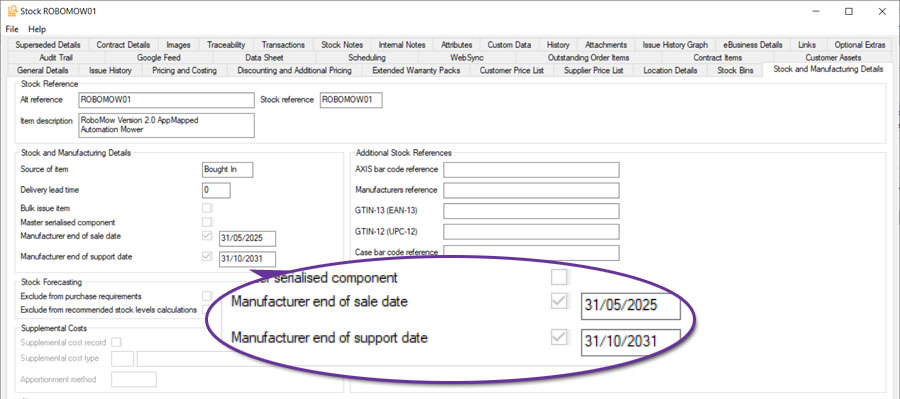
The ICT Asset Service Management module has been enhanced to add two new fields to axis diplomat stock records to help track a product's lifecycle. These fields are Manufacturer End-of-Sale Date and Manufacturer End-of-Support Date. These fields allow you to record key product lifecycle milestones directly against stock records, supporting proactive asset management and standards compliance (for example Cyber Essentials).
These new fields are fully integrated into monitors, giving users the ability to filter and report on both Stock Items and Customer Assets based on these dates. This makes it easy to identify stock linked assets that are no longer supported or are approaching end-of-sale, helping businesses plan ahead, manage risk, and meet compliance goals.
For more information:
https://documentation.axisfirst.co.uk/ict-asset-service-management/articles/21303
New Contact Columns in Customer Assets Monitor
Available to Software Assurance customers with axis diplomat 2024 or above and the Customer Assets module
Release Date: 07/05/2025
Six new columns have been added to Customer Assets monitors, giving visibility of key contact details for each asset. For both the Asset Manager and the Asset User, columns for their Email, Telephone Number, and Mobile Number are now available. Please note that these columns are not enabled by default but can be added to a Customer Assets monitor by right-clicking on the column headings and selecting "More...".
In addition to being a convenient tool when contacting specific individuals about a particular asset, augmenting the information available on Customer Assets monitors also opens up valuable opportunities for targeted marketing and customer engagement and could even be used to populate CRM Campaigns
For more details on customer asset monitors see My Monitors – Customer Assets Monitor.
Improved Sales Document Audit Trail
Available to Software Assurance customers with axis diplomat 2024 or above
Release Date: 16/04/2025
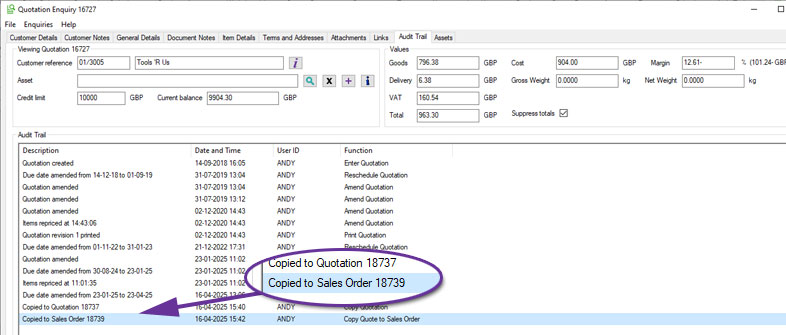
When a sales document, such as a quotation, is copied, both the new and original documents now include detailed audit trail entries.
The newly created document displays the source (for example, "Quotation copied from document 544862") and the original document now also shows that it was copied and the reference of the new document, such as "Copied to Quotation 654321".
This update makes it easier to identify related documents and track document history, particularly when reviewing or correcting issues in an original document that may be a replicated elsewhere.
Print Proforma (Quote) from Scrolling Data Lists
Available to Software Assurance customers with axis diplomat 2024 or above
Release Date: 16/04/2025
A customer quotation may be used to create a proforma invoice and this can now be accessed from the scrolling data list in either the Quotations tab of Customer Enquiry or a Quotations monitor tab.
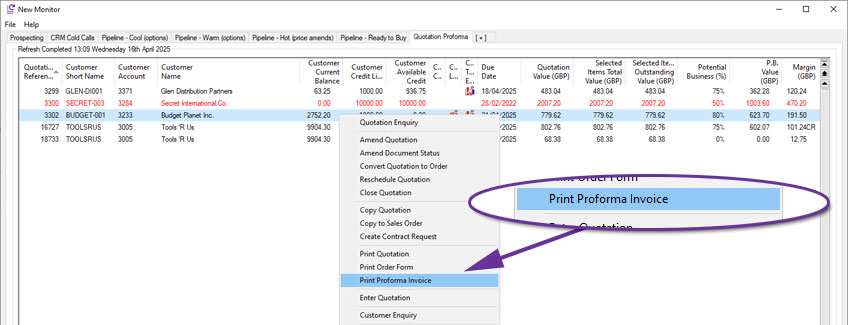
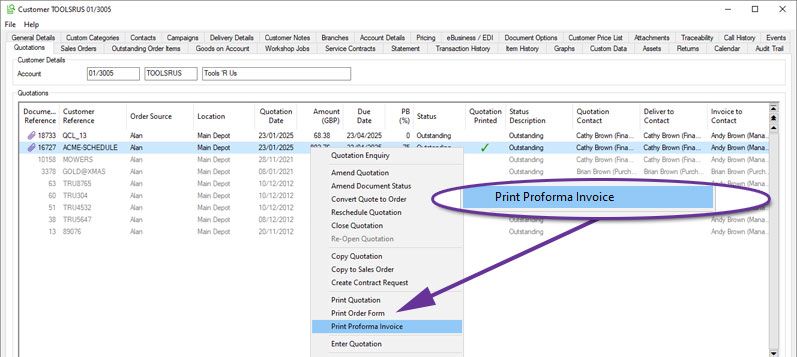
For more information:
https://documentation.axisfirst.co.uk/Proforma-Invoice/articles/21797
Urgent Notes for Assets
Available to Software Assurance customers with axis diplomat 2024 or above and the Customer Assets module
Release Date: 16/04/2025
Customer Assets may have notes, which enable you to record any information that you wish against individual assets. This has been enhanced to allow the notes against specific assets to be marked as Urgent.
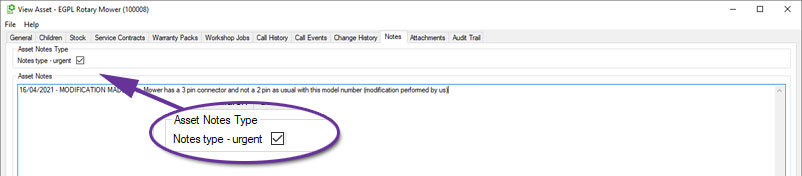
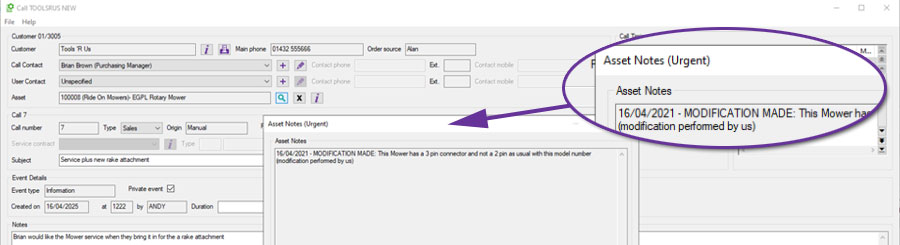
When an asset has an urgent note, the Asset Enquiry screen will now display an urgent notes dialog. Users must acknowledge this dialog before proceeding with the enquiry, ensuring that key details are not overlooked.
In addition, when linking an asset to a CRM call, Service Contract, or Workshop Job, any urgent notes associated with that asset will also appear automatically.
Outstanding Items Margins on Sales Order Monitors
Available to Software Assurance customers with axis diplomat 2024 or above
Release Date: 20/01/2025
Three new columns have been added to Sales Order monitor tab types to improve visibility of margins on unreleased items. These columns focus specifically on outstanding sales order lines.
The new columns are:
- Outstanding Items Margin (Order Currency)
- Outstanding Items Margin (Base Currency)
- Outstanding Items Margin (%)
These additions help sales, finance, and operational teams better assess the profitability of pending sales to set priorities or identify issues.
Suppress Sub-Totalled Items from selected documents
Available to Software Assurance customers with axis diplomat 2024 or above
Release Date: 18/12/2024
The Sub-Total functionality in Sales Order Processing now includes the option to suppress sub-totalled lines from selected documents.
This ability is controlled by an overall system parameter on the Documentation (cont.) tab of Maintain Sales Ledger Parameters:
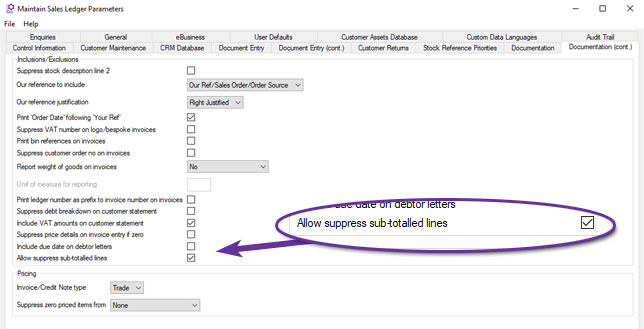
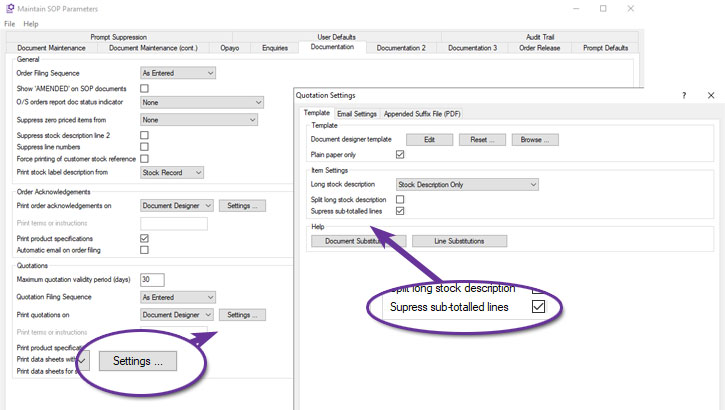
Once set, individual document types can be configured to suppress sub-totalled items. For example, to suppress sub-totalled items from Quotations, set the parameter within Quotations Settings, from the Documentation tab of Maintain SOP Parameters:
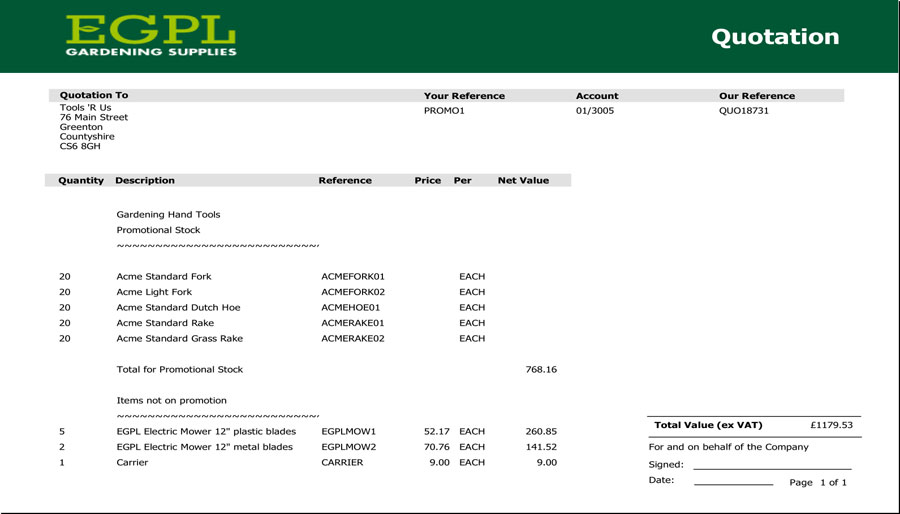
Quotation with Sub-Totalled Lines not suppressed
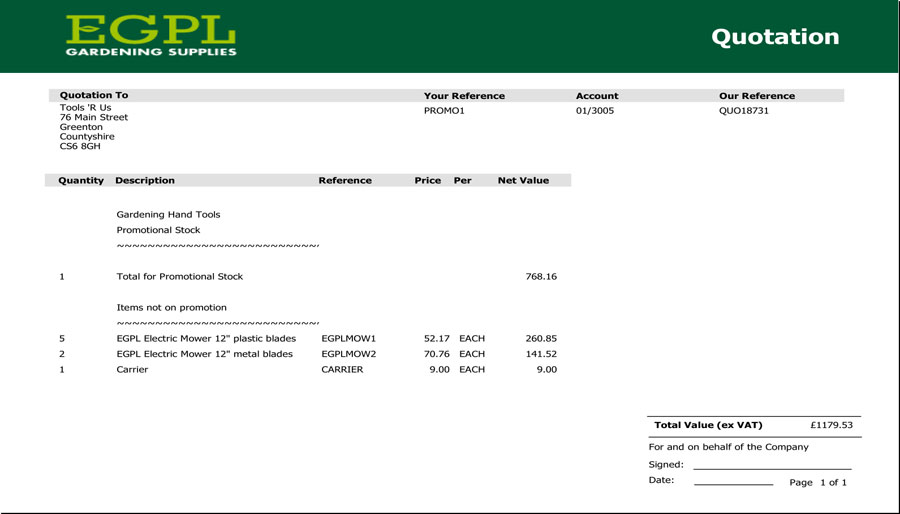
Quotation with Sub-Totalled Lines suppressed
As can be seen from the examples above, this can simplify documentation, focusing on sub-totals when the individual components are of little or no interest to the customer.
For more information:
https://documentation.axisfirst.co.uk/Sub-Totalling-in-Sales-Ledger-Document-Entry/articles/20735
CRM Call Category Element Sort Options
Available to Software Assurance customers with axis diplomat 2024 or above
Release Date: 12/12/2024
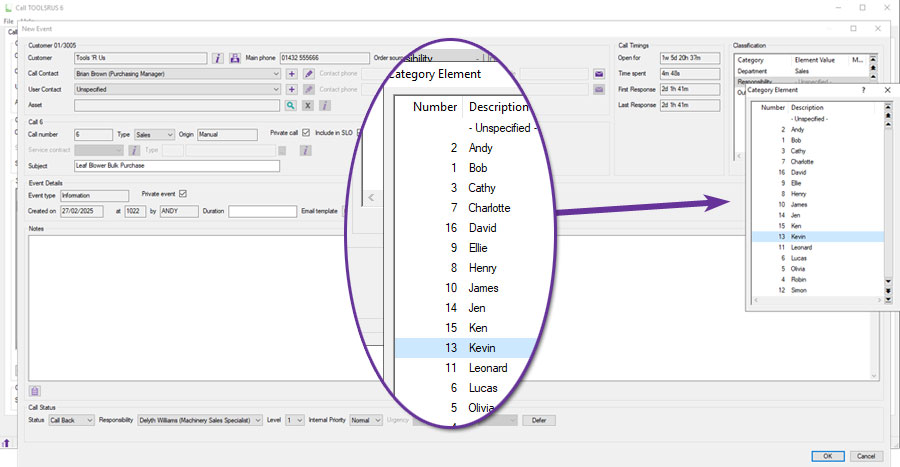
When using Call Categories to analyse CRM calls, the ‘Call Elements’ by default, can now be listed numerically, sorted by the element's code number, or alphabetically, sorted by the element's description.
This parameter can be set separately for each Call Category:
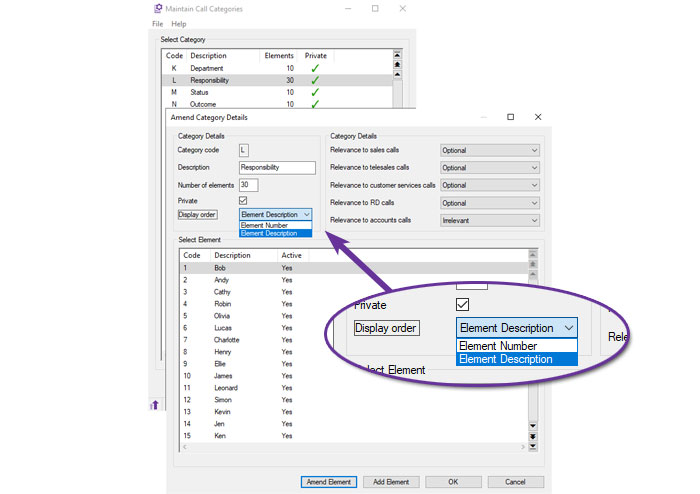
This is particularly useful for Call Categories that have long lists of elements, since it makes it easier for the operator to find the correct option:
Customer Account Charity Number
Available to Software Assurance customers with axis diplomat 2024 or above
Release Date: 22/11/2024
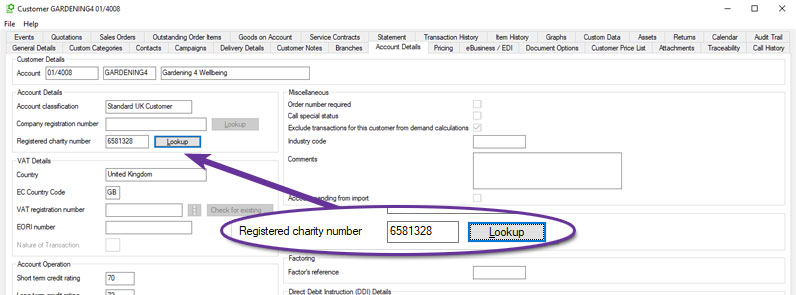
A new field has been added to Customer Accounts to record a Registered Charity Number. The new field can be found on the Account Details tab of Customer Enquiry and there is also a Lookup button to check the charity number against the Charity Commission register of charities.
Purchase Ledger & Purchase Order Processing
Document Designer Goods Received and Return Notes
Available to Software Assurance customers with axis diplomat 2024 or above
Release Date: 30/10/2025
Document Designer versions of the Goods Received Note and Goods Returned Note documents are now available. These new templates allow users to fully customise the layout, wording, and fields shown on each document, providing flexibility to match internal processes and corporate branding.
Both templates are available from:
Maintain POP Parameters > Document Parameters tab > Goods Received / Returned Print
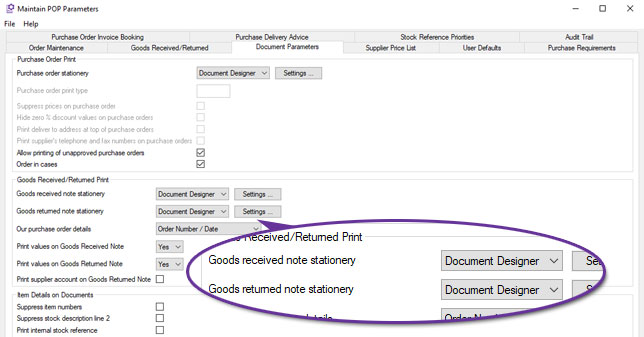
Selecting Document Designer enables the Settings button, allowing users to view available merge fields, edit the design, and control document appearance through the familiar Document Designer interface.
When printed, both documents automatically create an audit trail event, recording the user, date, and time of printing for complete traceability.
This enhancement brings Goods Received and Goods Returned documentation in line with other purchasing and stock-related stationery, allowing a consistent, familiar design across the purchasing workflow.
Bulk Close Purchase Orders from Monitors
Available to Software Assurance customers with axis diplomat 2024 or above
Release Date: 30/04/2025
Users are now able to close multiple purchase orders in one action via multi-select within Purchase Order, Purchase Order Items, or Purchase GRNI monitor tabs. Multiple entries can be selected by using Shift+Click to select a range or Ctrl+Click for individual entries. Ctrl+A selects all visible rows, which is ideal when filters have been applied to limit the selection of purchase orders shown.
Once selected, right-click to access the Close Purchase Order option. An audit trail event is created on each purchase order to provide a clear history of changes.
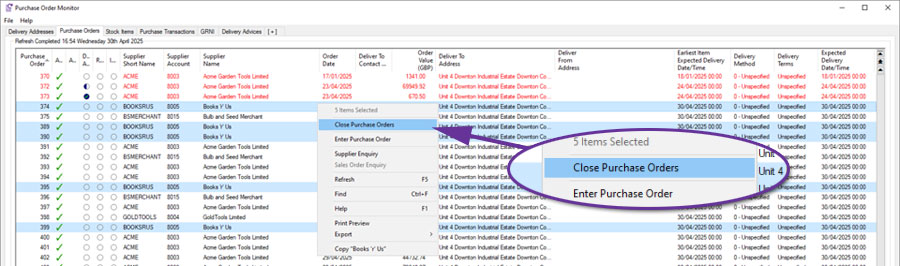
Access to this functionality is controlled by the Security Permissions of the user.
For further details, help documentation can be found here:
Purchase Orders Monitors
Purchase Order Items Monitor
Purchases GRNI Monitor
Import Supplier Status
Available to Software Assurance customers with axis diplomat 2024 or above
Release Date: 16/04/2025
The Import Supplier Records function has been extended to allow new or existing supplier accounts to be flagged as Closed or Prospect. Two new fields have been added to the Supplier Fields Page 3 tab:
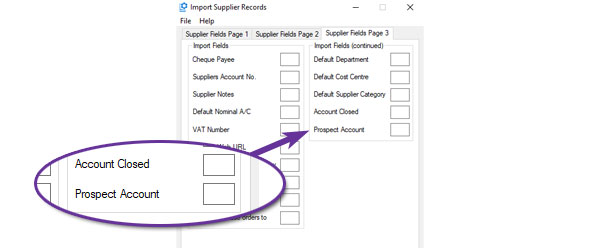
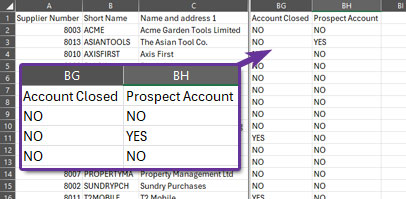
The Export Supplier Records function has also been extended to include these two settings as additional columns in the standard layout:
Stock Ledger, Bill of Materials & MRP
Discontinued Column in Where Used tab
Available to Software Assurance customers with axis diplomat 2024 or above and the Bill of Materials module
Release Date: 24/03/2026
The Stock Enquiry function has been extended to include a Discontinued column.
.jpg)
This can help identify components that may no longer required because the assemblies that they are used in are now discontinued.
Transfer All Location Stock
Available to Software Assurance customers with axis diplomat 2024 or above
Release Date: 25/07/2025
An all-new Supervisor function has been added, 'Transfer All Location Stock'. This enables the efficient and controlled movement of all stock, including traceable items, between locations whilst maintaining full transaction history.
The function automates key checks, including identifying open documents such as outstanding sales or purchase orders, that may block transfers and ensures valid bin assignments at the receiving location. It also handles locked records without interrupting the batch process, making it a true multi-user function. Furthermore, if a stock item is not active at the destination, it is automatically activated. Users can also assign adjustment reasons, enter batch references for traceability, and generate detailed reports for audit and review using the existing functionality of a stock transactions monitor.
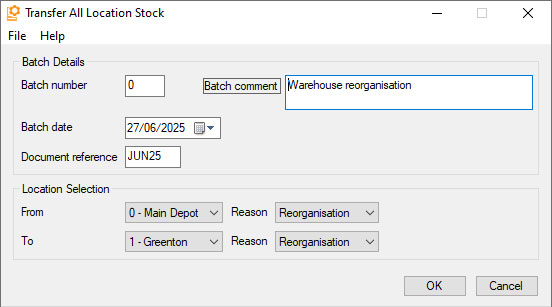
This functionality is particularly useful in operational scenarios such as full warehouse moves, site closures, or warehouse reorganisation projects where large volumes of stock need to be relocated. It ensures that transfers are processed accurately, with minimal manual intervention and a clear audit trail.
For more information, please refer to the function help Transfer All Location Stock
New Stock Record Transaction Tab Column 'Delivery Note'
Available to Software Assurance customers with axis diplomat 2024 or above
Release Date: 16/07/2025
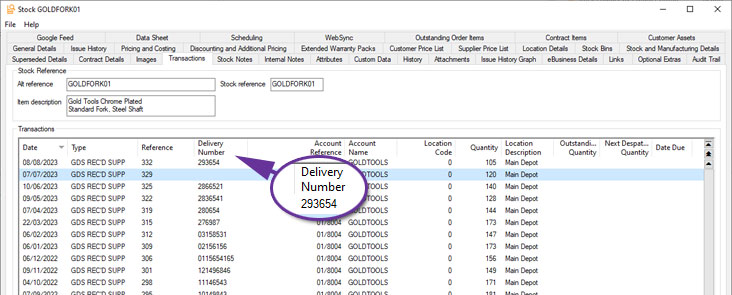
The Transactions tab within Stock Enquiry now includes a dedicated Delivery Number column specifically for GRN (Goods Received Note) transactions. This addition allows you to quickly reference the supplier’s delivery note number directly from the Stock Transactions tab without the need to open individual transaction records.
Move Whole Bin Contents within location
Available to Software Assurance customers with axis diplomat 2024 or above and the Multi Location Multi Bin Stock module
Release Date: 11/06/2025
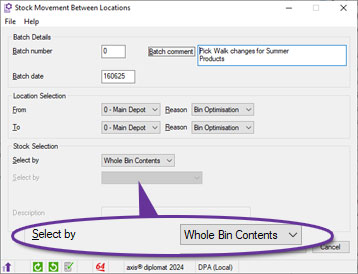
The function Stock Movement Between Locations has been extended to include a new option.
The Whole Bin Contents option supports the movement of all stock items from one bin to another within the same stock location. This option is triggered when the selected ‘From’ and ‘To’ locations match, making it ideal for internal warehouse reorganisation, such as adjusting pick paths due to seasonal changes or stock turnover patterns. The batch interface enables users to initiate a session, scan or enter the source bin, and confirm quantities for transfer in a single action, with optional document reference updates. The process validates bin-level stock availability, enforce same-location constraints, and supports barcode scanning, including composite Location/Bin labels.
Filtering Monitors by Customer or Supplier Prices
Available to Software Assurance customers with axis diplomat 2024 or above
Release Date: 08/05/2025
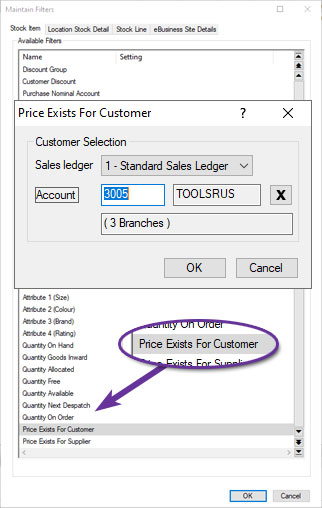
Two new filter options have been made added to all monitor tab types that can be filtered by Stock. The new filters, Price Exists For Customer and Price Exists For Supplier, allow you to enter an account number and view only stock items that have a matching price list entry. By combining this with other filters you could, for example, produce a monitor listing all of the items for which a specific customer has special pricing but which are not published to your website (and which they therefore could not purchase online).
Additional Reference Matching in Import Stock Details from CSV
Available to Software Assurance customers with axis diplomat 2024 or above
Release Date: 10/03/2025
In addition to matching items in the file to existing stock items by Stock Reference, Alternative Reference and Supplier's Reference, the Import Stock Details from CSV function also supports matching by Manufacturer's Reference and any of the Barcodes that can be held against a stock item.
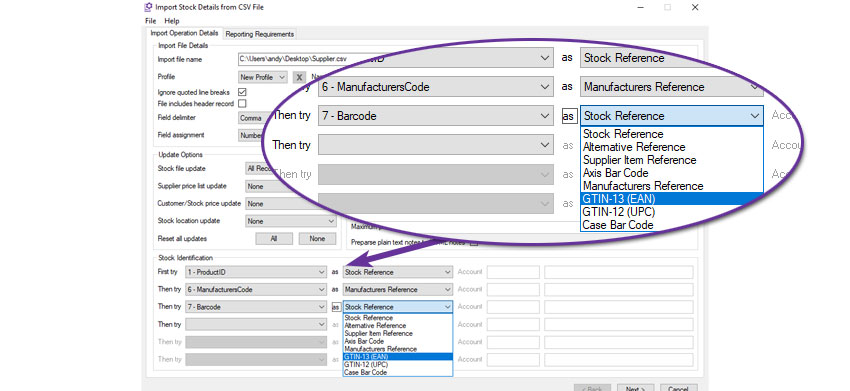
For example, this import will attempt to match column 1, the ProductID, to an existing stock record's Stock Reference. If it does not find one, it will attempt to match column 6 to a stock record's Manufacturer's Reference. If it does not match an item it will then attempt to match the barcode from column 7 of the import file. Only if it then fails to find a match will it create a new stock record.
Import Stock Details from CSV Profiles
Available to Software Assurance customers with axis diplomat 2024 or above
Release Date: 10/03/2025
The function to import stock records from CSV files has been extended to support profiles.
Profiles allow you to save all of the field matching for future use. If, for example, you regularly get an updated product file from a supplier, you can set up the criteria to map that supplier's file to the axis diplomat stock record fields once and save as a profile. That means that you never need to specify all of the selection criteria again unless the supplier changes the format of their file.
Furthermore, the profiles are shared across all users so that, once set up, the profile can be used to import that format file by anyone.
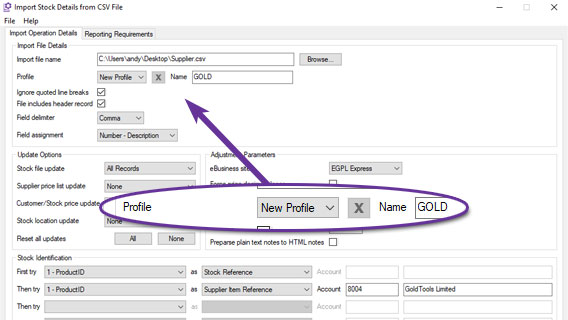
This example shows creating a new profile called "GOLD" that can be used in the future to import updated product files in the same format.
Stock Record Block Amendment
Available to Software Assurance customers with axis diplomat 2024 or above
Release Date: 15/01/2025
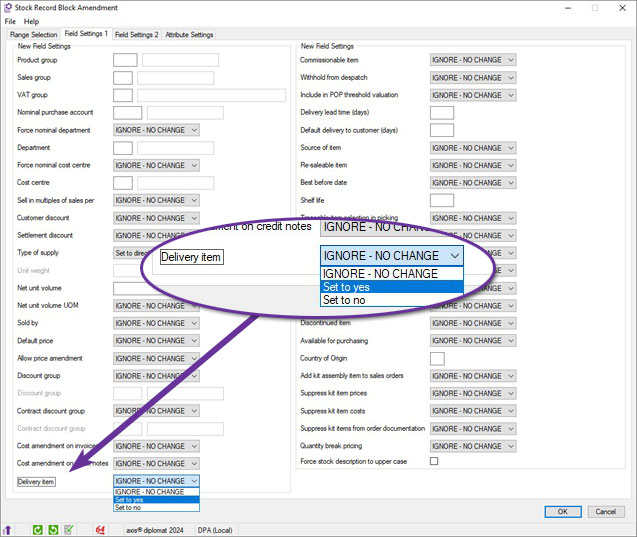
The Stock Record Block Amendment function has been modified to include an additional field for "Delivery Item".
The Delivery Item is a checkbox seen on the Pricing and Costing tab of a Stock Record and is used to indicate items used as delivery charges that can be zero VAT-rated for orders consisting entirely of zero VAT-rated items. This option is only available for items classified as either a service or a directly related service and so items classified as goods will not be updated.
Assembly Audit Trail
Available to Software Assurance customers with axis diplomat 2024 or above and the Bill of Materials module
Release Date: 13/12/2024
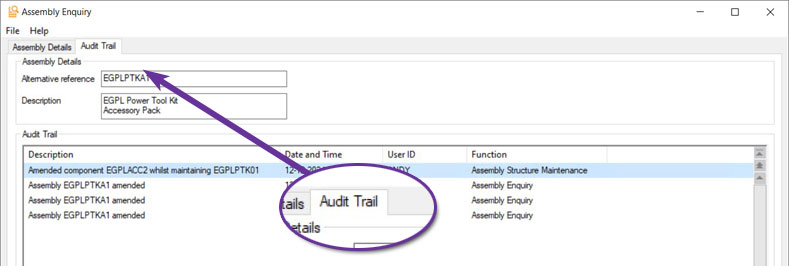
When an assembly record is edited, an Audit Trail event is now created which can be viewed on the Audit Trail tab within the Assembly Enquiry function.
You are able to edit a sub-assembly whilst working on a higher-level assembly. For example, if you modify component EGPLACC2, within the context of the assembly EGPLPTK01, the Audit Trail will record an event "Amended component EGPLACC2 whilst maintaining EGPLPTK01." This feature makes it easy to track how and when changes were made.
Warehouse Management
Auto pick sales order for faster paper-based picking
Available to Software Assurance customers with axis diplomat 2024 or above and the Warehouse Paper-based Sales Order Picking module
Release Date: 10/02/2026
A new parameter, Auto pick sales order, speeds up paper-based picking by automatically picking eligible items as soon as you enter the picking function. When this option is enabled, all non-traceable items on the selected order are automatically picked on entry, so the user can go straight to printing paperwork or reviewing exceptions instead of picking each line manually.
This is ideal where the majority of items do not require serial or batch tracking and where the picking team works from printed documents. It reduces keying effort, helps keep picking consistent and supports higher throughput in busy warehouses.
The Auto pick sales order parameter is available for locations that are not multi bin. For multi bin warehouses, standard picking controls remain in place and items continue to be picked manually through the existing process.
Pick sales orders directly from Customer Enquiry
Available to Software Assurance customers with axis diplomat 2024 or above and the Warehouse Paper-based Sales Order Picking module
Release Date: 10/02/2026
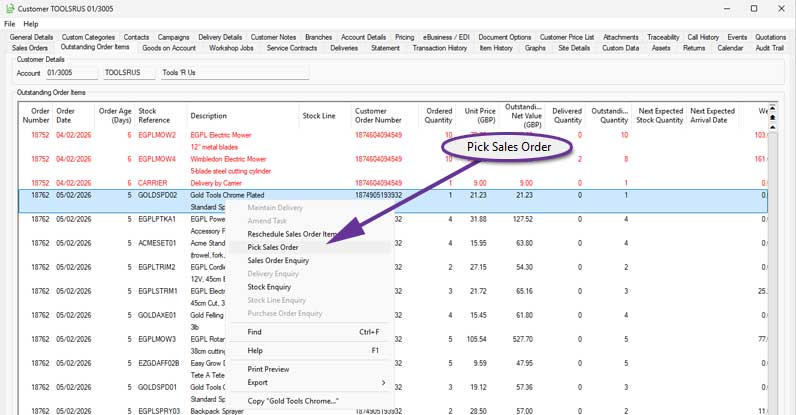
A new context menu (right-click) option has been added to make it easier to pick sales orders directly from Customer Enquiry. When you highlight an order on the Orders tab, or an individual line on the Outstanding Order Items tab, you can now use the new Pick Sales Order option.
Whether you are preparing a delivery for picking by consolidating items from multiple sales orders for the warehouse to pick using a paper Delivery Note, or mirroring annotated paperwork that has come back from a warehouse, the system can be configured to suit your requirements using SOP Parameters.
Confirm Shipping Labels and Delivery Documentation
Available to Software Assurance customers with axis diplomat 2024 or above and the Delivery Service Provider Interfaces Foundation module
Release Date: 24/01/2025
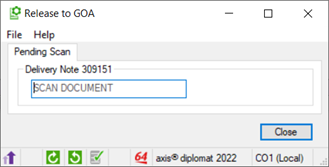
An enhancement to Delivery Service Provider (DSP) interfaces adds the option of including a prompt for users to re-scan delivery labels during the consignment process to verify that the correct labels have been used. This helps to reduce the risk of picking up incorrect labels, particularly when using shared printers.
A prompt requests that the user scans the barcode from the Delivery/Picking Note:
This then displays the expected number of labels, prompting the user to scan the shipping label barcodes:
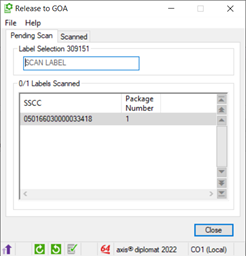
Verification against the shipping details occurs in real-time, providing auditory feedback for mismatched or confirmed labels. This process is specifically designed for multi-package consignments involving shipping containers.
The setting, Enforce scan of package/pallet label, can be set for specific Delivery Methods using the function Maintain Delivery Methods.
Net Value now in Delivery Enquiry Container Tab
Available to Software Assurance customers with axis diplomat 2024 or above and the Shipping Containers module
Release Date: 24/12/2024
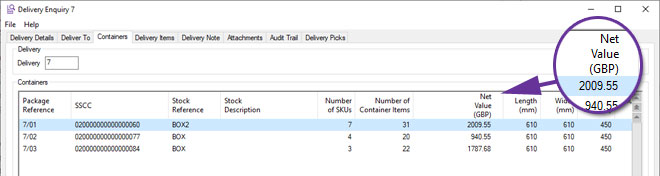
A new column for Net Value has been added to the scroling data list within the containers tab of a delivery enquiry.
New Shipping Containers Monitor
Available to Software Assurance customers with axis diplomat 2024 or above and the Shipping Containers module
Release Date: 24/12/2024
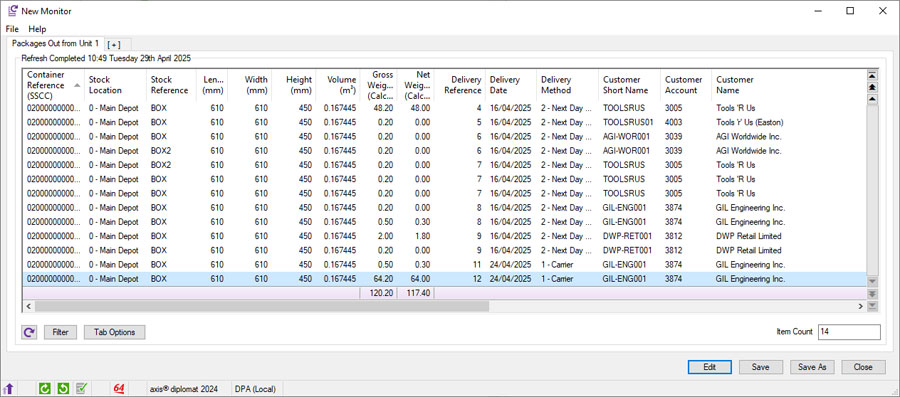
The Shipping Containers option extends the information recorded for each delivery that you send to a customer by capturing detail on each individual container (package) within the delivery. Typically, containers are added during the picking and/or packing process - either automatically, based on the Delivery Service, or through scanning, allowing items to be picked and scanned directly into their respective containers.
A new monitor tab, 'Shipping Containers', enables you to view, manage, and organise container-related information, including Delivery Methods and Delivery Addresses, within a single list. The right-click context menu provides quick access to further details, such as Delivery Enquiries, Container specifics, Stock levels, or Customer Enquiries. Additionally, it allows you to modify settings or input any missing information highlighted by the monitor.
eBusiness
Statement Delivery Link to Web
Available to Software Assurance customers with axis diplomat 2024 or above and the module
Release Date: 22/12/2025
This feature is intended for systems using axis vMerchant Express, where customers are encouraged to view their statements online.
Sales Ledger Statement emails can now include a link to a website (URL) that allows eligible recipients to access their statement online. When a statement is sent to a contact who is enabled for eBusiness and authorised to access accounts information, the system can insert a link into the email text that will take them directly to their statement page whilst ensuring that they are logged in.
Where Trading Identities are in use, these are taken into account when determining the appropriate site for the link.
Statement PDFs continue to be generated and stored via Document Delivery, ensuring statements remain available for audit purposes and attached to the email for recipients who prefer to receive statements in PDF format.
This enhancement provides a simple way to encourage customers to access their online account facilities while preserving the existing statement delivery process.
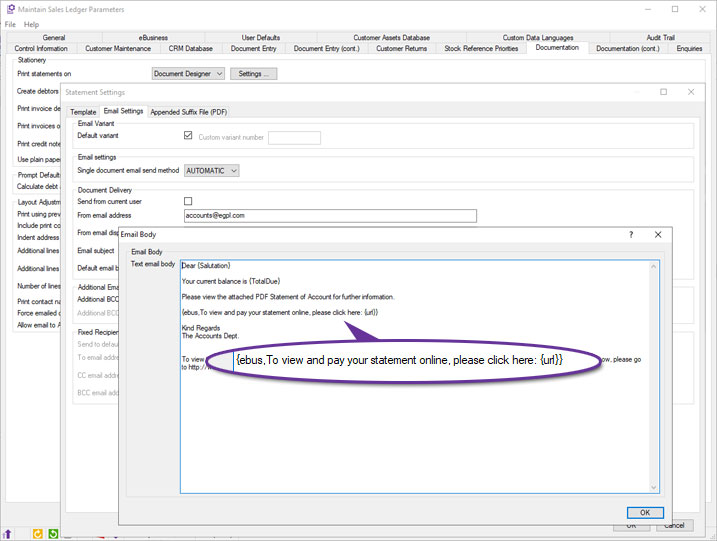
The email text may include the placeholder {url}, which is replaced at runtime with the statement link. This can be used in conjunction with a further substitution that can be included in the emails, {ebus, ...}. Anything between "{ebus," and "}" is only added to a particular email if the recipient is eBusiness-enabled - this means that you will not send links to people that cannot access them.
For example:
{ebus,To view and pay your statement online, please click here: {url}}
To make adjustments to your Sales Ledger Statement emails, use Maintain Sales Ledger Parameters tab 'Documentation' and ensure that the Statements template choice is document Designer, then click ‘Settings’.
Service Contract Management
Projected Revenue for Service Contracts and Service Contract Requests
Available to Software Assurance customers with axis diplomat 2024 or above and the Service Contract Management module
Release Date: 16/01/2025
Whenever a Service Contract or Service Contract Request is created or modified, the system will now automatically calculate and record two years' of projected (future) revenue (one projected transaction for each billing period e.g. monthly, quarterly etc.). The projections will take account of the start and end dates on individual contract lines and so illustrate how a contract's revenue is expected to change over time.
These projections can be shown on the Transactions tab of a Service Contract (or Service Contract Request) Enquiry by ticking the option "Include Projected Invoicing."
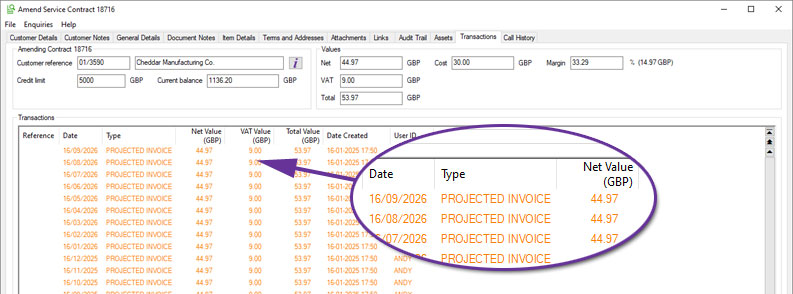
Projected Invoices will also take account of future price changes when Date Specific Service Contract Pricing is in use.
New Filters Available in Service Contract and Service Contract Items Monitors
Available to Software Assurance customers with axis diplomat 2024 or above and the Service Contract Management module
Release Date: 01/01/2025
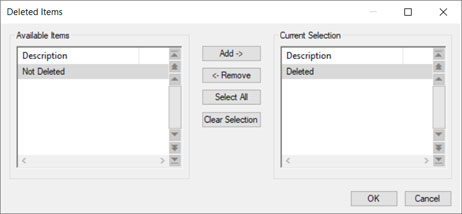
The monitors tabs for 'Service Contracts' and 'Service Contract Items' now have an additional filter to allow the analysis of Deleted Contract Lines and Deleted Contracts. This is particularly useful in conjunction with two other new axis diplomat 2024 Service Contract Monitor features:
Create Deleted Contract Items - Used to analyse archived transactions from the past 25 periods and recreate critical historical data related to deleted contract lines and service contracts.
Calculate Projected Revenue - The projected revenue takes into account both existing and planned future invoicing to give a complete picture of the expected income from service contracts.
Workshop Job Management
Auto-pick product items at Create Invoice for Job
Available to Software Assurance customers with axis diplomat 2024 or above and the Workshop Job Picking module
Release Date: 11/12/2025
A new parameter helps streamline the point at which a Workshop Job is invoiced. When enabled, any product (non-stocked) items that have been added to the job but not yet picked will be automatically picked at the moment you raise the invoice.
This allows the workflow to keep moving without forcing the user to stop, open extra screens or reconcile missing picks at the end of the process. It is especially helpful in busy workshops where physical parts are added and picked for the job and then labour and subcontract work are added in stages while the job progresses.
In many workshops, staff add the physical parts first, then add labour using product codes for analysis. With the new auto-pick option, admin time is reduced and the need for subsequent invoices for missed items is also reduced.
New Notes Column in Workshop Job Monitor
Available to Software Assurance customers with axis diplomat 2024 or above and the Workshop Job Management Module module
Release Date: 29/04/2025
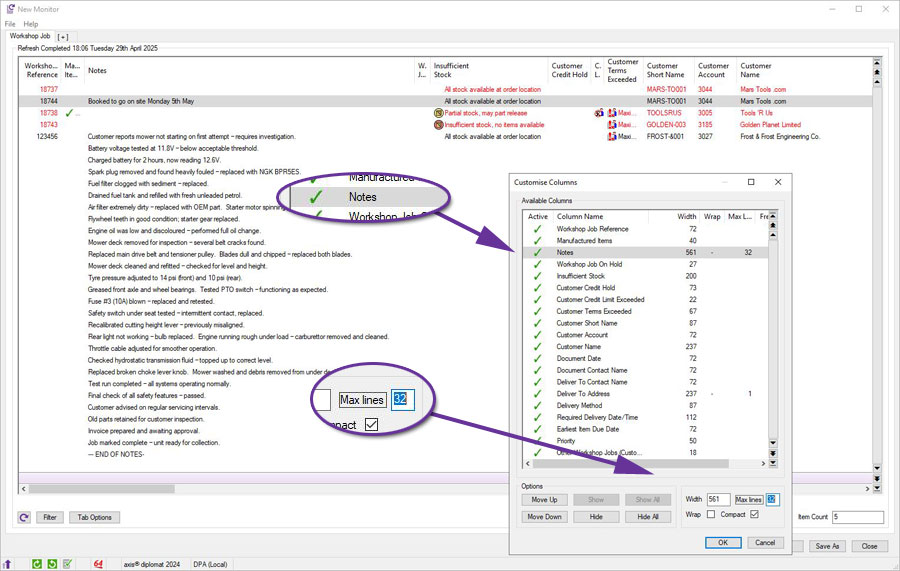
A new column has been added to Workshop Job monitor tabs to display the content of each Workshop Job's Notes.
To view the full content, simply hover over the entry. Alternatively, use the ‘More’ option from the context menu (by right-clicking on the header) to expand the display and reveal additional lines of text and save your view settings:
axis payroll
Amend Driving Licence Details
Available to Software Assurance customers with axis payroll 2024 or above
Release Date: 11/12/2024
To assist with the HR task of maintaining records of employee’s driving licences, a new maintenance function is now available to allow the details to be updated without using the general Amend Employee Details function:
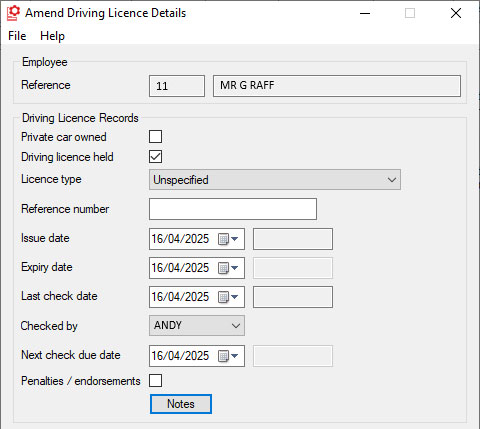
This allows you to take advantage of function-level privacy and security settings to restrict access to the more powerful functions so that the job of updating driving licence records can be delegated to more junior members of staff.
For more information:
https://documentation.axisfirst.co.uk/Amend-Driving-licence-details/article/146568