Recent Software Developments
Listed below are a number of the key enhancements that have been added to axis diplomat and axis payroll.
Sales Ledger, CRM & Sales Order Processing
Audit Trail for Delete Sales Order Line
Available to Software Assurance customers with axis diplomat 2024 or above
Release Date: 19/05/2026
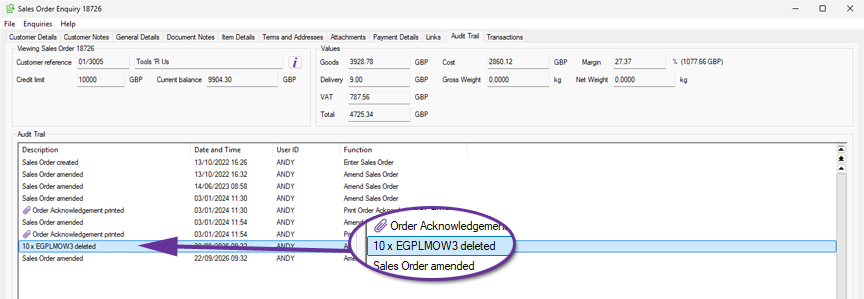
When a line is deleted from a Sales Order, the system will now automatically generate an audit trail event recording the stock reference and quantity removed, along with the time, date and operator.
This provides a clearer operational history of changes made to Sales Orders.
Pricing information has intentionally not been included within the audit trail event due to privacy considerations. The function Audit Trail Search can be used to review these events, or a User Activity monitor can be created.
Stock Ledger, Bill of Materials & MRP
Discontinued Column in Where Used tab
Available to Software Assurance customers with axis diplomat 2024 or above and the Bill of Materials module
Release Date: 24/03/2026
The Stock Enquiry function has been extended to include a Discontinued column.
.jpg)
This can help identify components that may no longer required because the assemblies that they are used in are now discontinued.
Warehouse Management
Age Restricted Products
Available to Software Assurance customers with axis diplomat 2024 or above and the Despatch & Delivery Management module
Release Date: 15/07/2026
For systems with Despatch & Delivery Management, the ability to flag a stock item for 'Age restricted sales' has been added.
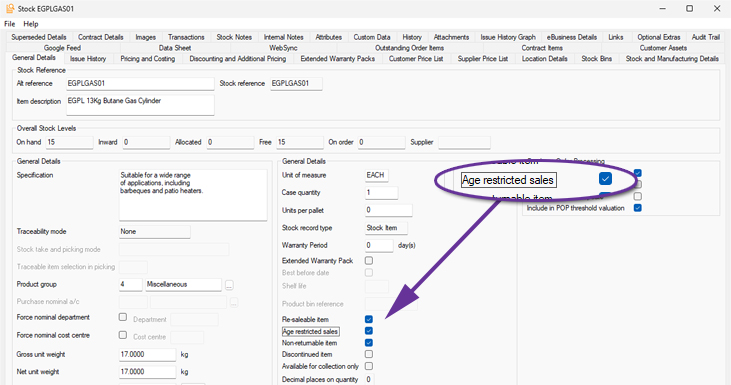
This ensures that deliveries containing these items can only be consigned using services that provide age verification at the point of delivery.
Functions which provide delivery method selection (such as Import eBusiness Orders, Sales document maintenance functions, Delivery creation, Picking/Pack & Despatch and Consignment, including ‘best’ calculations), filter Delivery Methods according to age verification requirement. If any stock item on the order or delivery is flagged as requiring age verification then only Delivery Methods mapped to services which support verification will be available.
Additional Information in Delivery Enquiry
Available to Software Assurance customers with axis diplomat 2024 or above and the Delivery Service Provider Interfaces Foundation module
Release Date: 19/05/2026
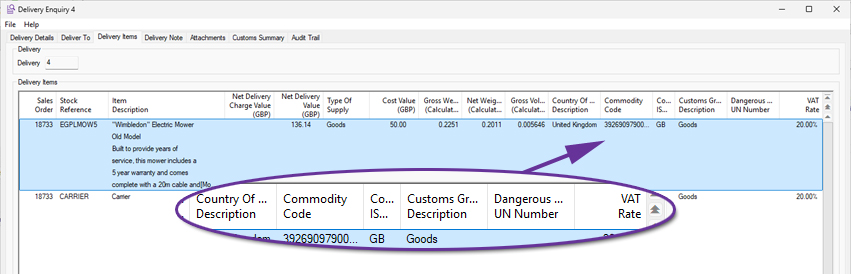
A number of additional columns have been made available within the Delivery Items tab of Delivery Enquiry. This improves the visibility of customs, dangerous goods, and VAT-related information.
The following columns have been added:
- Country of Origin Code ISO 3166-1
Displays the two-character Country of Origin ISO code alongside the existing Country of Origin description. - Customs Group Description
Displays the description from the Customs Group file where available. - Customs Group Code
Added as a separate column and hidden by default. - UN Number
Displays the UN Number (on systems that also have the Dangerous Goods module). - VAT %
Displays the VAT percentage based on the stock item's VAT group.
This enhancement gives users faster access to key delivery item information without needing to move between multiple functions and is especially useful for businesses handling export, customs, dangerous goods, or VAT-sensitive goods.
eBusiness
Import Google Feed Details
Available to all customers with axis diplomat 2024 or above with eBusiness
Release Date: 22/05/2026
The function Import Price Feed Details has been renamed to Import Google Feed Details for better clarity.