New Features in axis diplomat 2026
Listed below are a number of the key enhancements that have been added in axis diplomat 2026, including those released under Software Assurance to subscribers with axis diplomat 2024
Showing 116 enhancements covering:
- Kernel (Core) Software
- Nominal Ledger & General Accounts
- Sales Ledger, CRM & Sales Order Processing
- Purchase Ledger & Purchase Order Processing
- Stock Ledger, Bill of Materials & MRP
- Warehouse Management
- Service Contract Management
- Workshop Job Management
- axis payroll
Kernel (Core) Software
AES-256 Encryption
Available to all customers with axis diplomat 2026 or above
Release Date: 15/10/2026 Call Reference: 823531
As part of the release of axis diplomat 2026, we are pleased to announce a significant upgrade to axis diplomat's security architecture: all system data encryption is being transitioned to industry‑standard AES-256 encryption.
This change is a part of our commitment to protecting your data using proven, widely trusted security technologies, aligning with modern compliance and best practice expectations.
What’s Changing?
The axis diplomat database, it's associated SQL database and file attachments will all be encrypted using AES-256 (Advanced Encryption Standard, 256‑bit key length).
This includes information such as customer and supplier records, financial transactions, employee and payroll data, as well as documents and attachments stored within the system.
The encryption and decryption processes are performed transparently by the axis diplomat software and the Microsoft SQL Server database platform, so day-to-day users can continue working without changing the way they use the system.
(Excludes Microsoft SQL Express edition which does not support Transparent data encryption (TDE) functionality. We recommend that any customer currently running with SQL Express edition upgrade to SQL Server Standard or higher in order to fully implement data encryption.)
Why We’re Making This Change
1. Increased threat
We see cyber-crime as one of the biggest existential threats to business today.
2. Industry Standardisation
AES-256 is a globally recognised encryption standard used by governments, financial institutions, and major cloud providers worldwide. It is the de facto standard for high-security encryption. Moving to a widely adopted standard ensures compatibility with modern security frameworks and best practices.
3. Improved Transparency and Trust
Standardised cryptography: Has been extensively analysed and tested by the global security community.
Avoids reliance on “security through obscurity”.
Provides greater assurance to customers, auditors, and regulators.
4.Compliance Alignment
AES-256 supports compliance with common regulatory and security frameworks, including:
- GDPR (data protection expectations)
- ISO 27001
- Cyber Essentials / NCSC guidance
- Industry-specific standards (finance, healthcare, defence, etc.)
5. Futureproofing
AES-256 is widely considered robust even in the face of emerging technologies, including potential future quantum computing developments.
What This Means for You
✅ No Change to User Experience
No changes to how you use the system.
No new processes or workflows to learn.
✅ Automatic Upgrade
AES-256 Encryption will be updated automatically as part of the upgrade to axis diplomat 2026.
✅ Stronger Security Posture
Improved protection of sensitive data.
Alignment with modern security expectations.
Frequently Asked Questions (FAQs)
1. What is AES-256?
AES-256 is an encryption standard that uses a 256‑bit key to protect data. It is widely regarded as one of the most secure encryption methods available and is used globally for sensitive data protection.
2. Will I need to do anything to enable this?
No. The transition is handled as part of the upgrade.
3. Will this impact system performance?
Whilst the encryption and decryption process does impose additional processor load, AES-256 is highly efficient and supported by modern processors (including hardware acceleration). In practice, we do not expect there to be a noticeable impact on performance for typical workloads.
4. Does this affect data at rest, in transit, or both?
The upgrade applies to Data at rest (stored data such as database files and backups)
5. Is AES-256 secure against future threats like quantum computing?
AES-256 is widely considered resilient against foreseeable quantum threats. While quantum computing may reduce its theoretical strength, it remains highly secure in practical terms.
Importantly, AES-256 ensures that your data remains protected both now and for the long term.
6. Will this effect integrations or APIs?
No. Encryption changes are internal to axis diplomat. Where axis diplomat interfaces with third party systems (for example EDI or Delivery Service Providers), data is first decrypted and then passed to the third party using whatever encryption or secure protocols are dictated by that interface.
7. Will this affect me accessing the axis diplomat SQL database via the Windows ODBC driver interface?
No. The Microsoft SQL ODBC driver handles encryption/decryption transparently to the user.
8. Does this change impact backups or disaster recovery?
Backups will also benefit from AES-256 encryption. Existing backup processes remain unchanged, but stored data will now be protected to a higher standard.
9. When will this change take effect?
The rollout will occur as part of upgrading an axis diplomat system to axis diplomat 2026.
10. Can I opt-out of using encryption?
No. axis diplomat 2026 will only be supported with AES-256 encryption enabled. Given the increasing level of threat of data loss from cyber-attack and requirements from legislation, government and industry guidance, the cyber security insurance industry, and requirements from supply chains, we do not consider it viable to run ERP systems in the years ahead without this level of encryption. If you have a concern over how this might affect your operation, please discuss this with your account manager or the software services team.
Scheduled Reporting - Automated Monitor Reports
Available to all customers with axis diplomat 2026 or above
Release Date: 15/10/2026 Call Reference: 861618
Have you ever wanted to send information from your axis diplomat system to someone, whether a colleague, a customer, an accountant or someone else entirely, on a regular basis? Scheduled Reporting aims to answer this need.
Some example applications for this functionality could include:
- Email a list of customers on manual credit hold as a PDF to your sales team every Sunday evening. This means that they have access to the list, even if they are travelling and seeing customers, without needing remote access to the axis diplomat system.
- Send a weekly list of items on back order to a key customer account.
With this new facility, the contents of any monitor tab can be sent to an email recipient, or simply saved in your axis diplomat documents folder for you, as either:
- an axis diplomat format report (.AXR)
- a CSV File
- an Excel Workbook
- a PDF
The report can be generated on varying frequencies (daily, weekly, monthly or yearly) and at specified times and days. This means, for example, that you can send a report daily at 6am, Monday through Friday.
In simple terms, if the information required can be represented on a monitor tab, it can be generated and sent automatically on a regular basis.
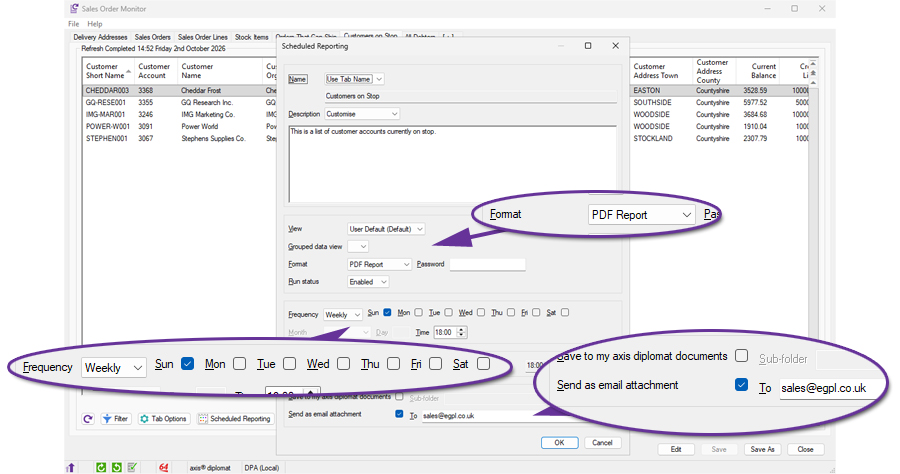
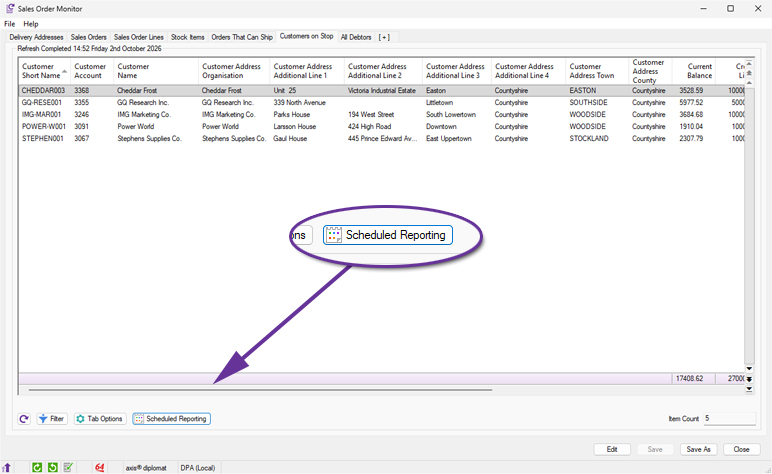
Configuring a Scheduled Report is simple with a new Scheduled Reporting button at the bottom of every monitor tab:
The presence of this button is controlled via a new specific permission on the user's account which is off by default:
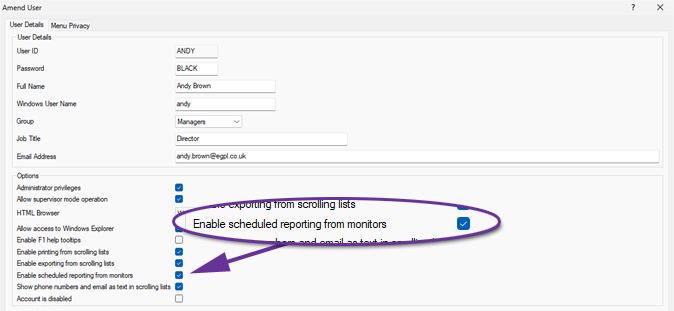
Scheduled Reporting is an extremely powerful tool and this means that only the users who should be allowed to have access can see the button on their monitors.
Grouped Data Views in Data Lists
Available to all customers with axis diplomat 2026 or above
Release Date: 15/10/2026 Call Reference: 746799
Grouped Data Views are a new concept in axis diplomat 2026 that allow you to create your own sub-totalled views of any scrolling data list and save them for future use.
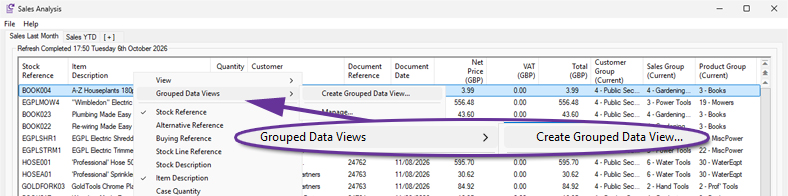
For example, in this Sales Transactions monitor tab, you could choose to create a Grouped Data View showing the total net turnover for each Customer Group.
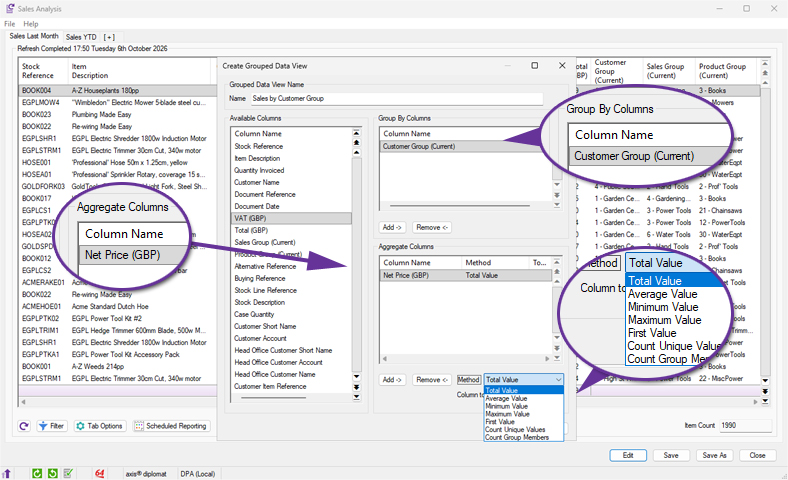
Having selected Create Grouped Data View, you provide a name for the view, specify the column that you want to group by (Customer Groups in this case) and the column to use for the aggregate (the total value of the Net Price column in this case):
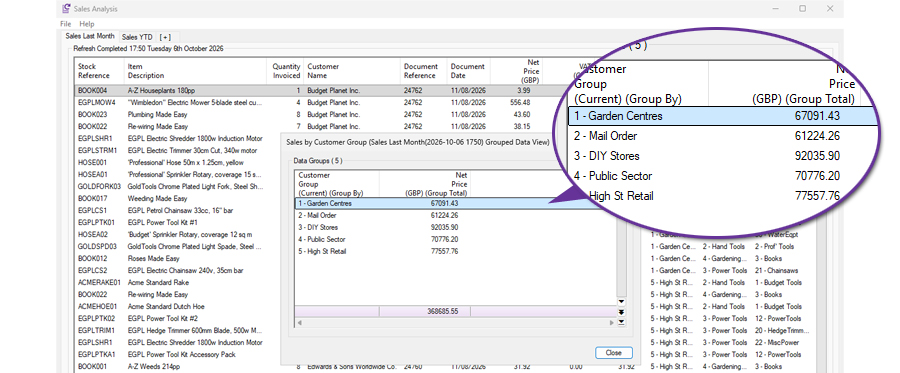
You then see a summary of the items in that monitor tab, sub-totalled by each Customer Group:
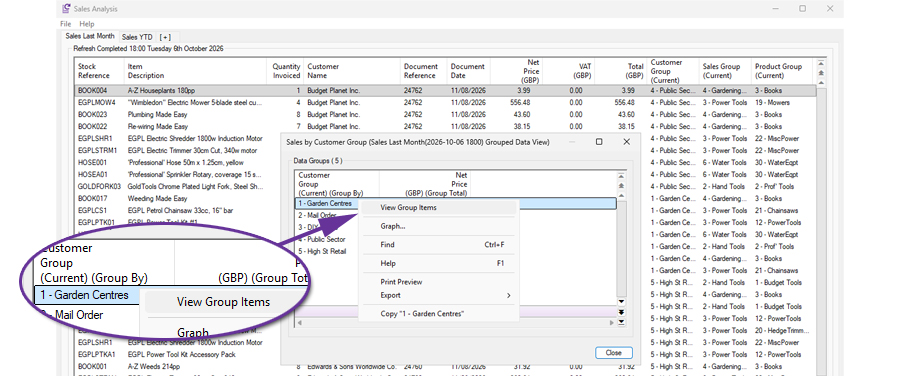
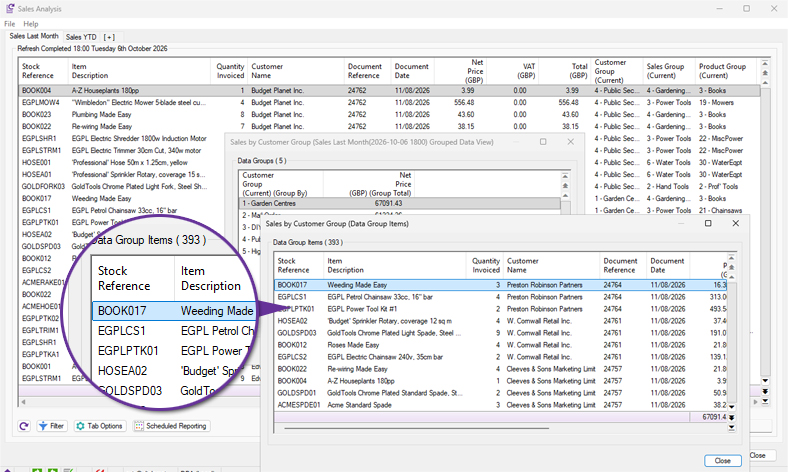
You can drill down into any of the rows, if you want to gain a better understanding of what individual items make up a particular row:
This is easier and quicker than going back to the original monitor tab and filtering to the specific Customer Group.
A Grouped Data View can have multiple 'Group By' columns and/or multiple Aggregate Columns. Here, for example, is a view grouped by both Customer Group and Sales Group:
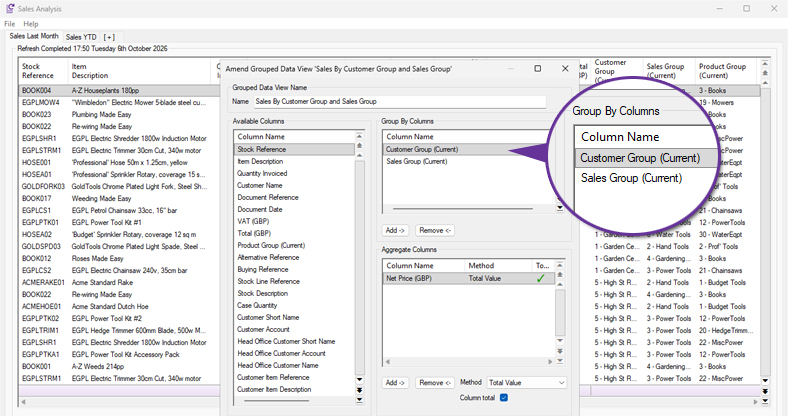
This then shows, for each Customer Group, the breakdown for each Sales Group:
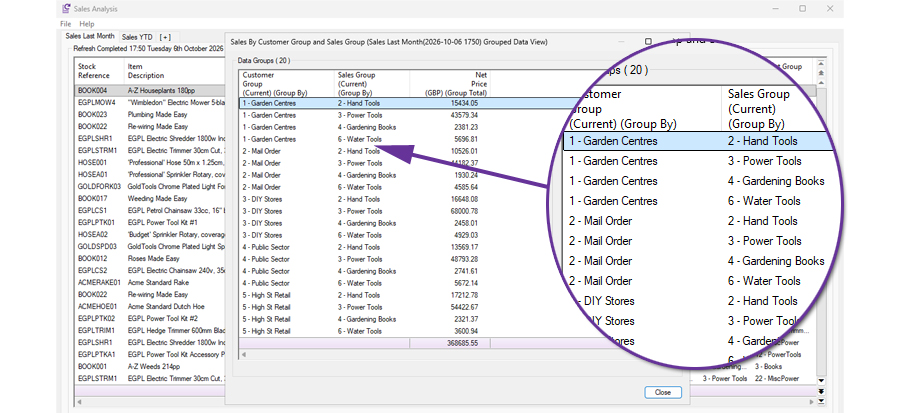
Although the example above uses a monitor tab, the facility is available wherever data lists appear in the system.
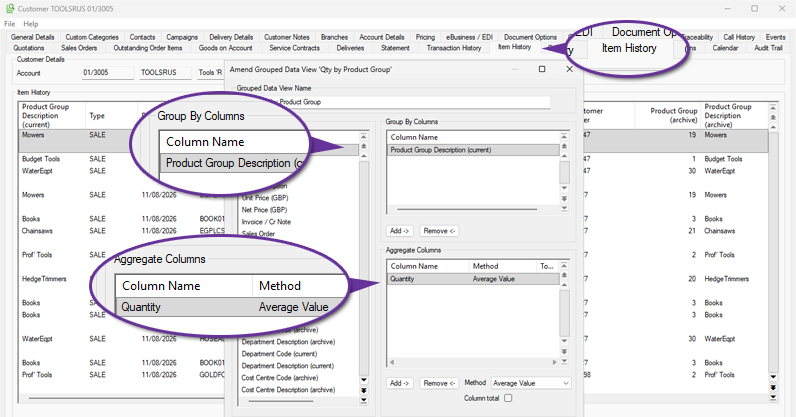
For example, it would be possible to use a Grouped Data View on the Item History tab of a Customer Enquiry to see the Average Ordered Quantity across different Product Groups for that customer.
Grouped Data Views allow you to perform detailed analysis within the system that would previously have meant exporting the data to a spreadsheet.
Full Support for International Names and Addresses
Available to all customers with axis diplomat 2026 or above
Release Date: 15/10/2026 Call Reference: 519777
Коректне відображення імен і адрес (‘Correct display of names and addresses’)
It’s important to be able to represent your customer’s name and address correctly wherever they are, or whatever their heritage, whether your customers hail from Ukraine, Poland, Hungary or other countries across Central and Eastern Europe and the wider world.
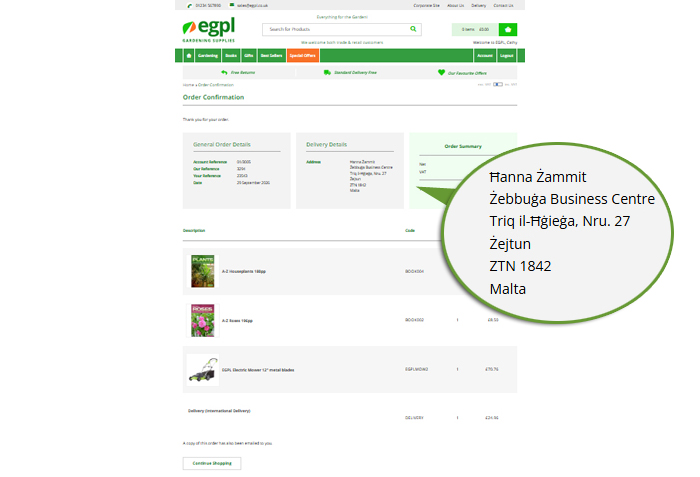
Previous versions of axis diplomat stored contact and address information using character sets designed primarily for Western European languages and could not accurately store many characters used in elsewhere, such as Ł, Č, Ř, Ș, Ű and entire Cyrillic alphabets. We’ve extensively re-engineered the way axis diplomat 2026 stores and processes customer and supplier names and addresses to use the ‘Unicode’ standard.
Unicode support ensures that customer and supplier names and addresses are stored and displayed exactly as intended, including accented characters and non-English alphabets. This improves data accuracy, enhances the customer experience, and helps ensure documents, labels and communications are produced correctly regardless of language.
Of course, this does rely on name and address information being received by axis diplomat from other systems using this standard (for example your eCommerce web site1) and any systems to which axis diplomat needs to send name and address data2 also supporting the standard (for example delivery service providers or fulfilment service providers).
1 axis vMerchant Express eCommerce web sites already support this standard.
2 We integrate with a long list of third-party systems including carriers, postal services, and fulfilment service providers whose capabilities vary. Please contact us if you have a query regarding support for this functionality with a specific provider.
Copy to clipboard (as PDF)
Available to Software Assurance customers with axis diplomat 2024 or above
Release Date: 24/07/2025 Call Reference: 709767
The ability to copy a whole document to the clipboard as a PDF is now available within the document preview window.
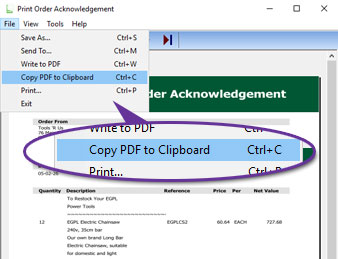
The document can be copied by using the File menu, as shown above, or the keyboard shortcut Ctrl+C.
The copied document
Audit Trail for Attachment Deletions
Available to Software Assurance customers with axis diplomat 2024 or above
Release Date: 24/03/2025 Call Reference: 830322
Audit trail events are now recorded for the deletion of attachments across a wide range of objects.
Previously, audit entries were only created when attachments were added or updated. With deletions now also being logged, administrators and auditors have a complete record of attachment activity.
Whenever an attachment is deleted, an entry is created in the audit trail showing the user, date, time, and name of the deleted file. This applies to:
- Suppliers
- Customers
- Stock Items
- Sales Orders
- Purchase Orders
- Sales Invoices and Credit Notes
- Purchase Invoices and Credit Notes
Support for 64-bit Microsoft Office
Available to Software Assurance customers with axis diplomat 2024 or above
Release Date: 12/06/2026 Call Reference: 749251
axis diplomat 2026 can now integrate with the 64-bit version (or the previously supported 32-bit version) of Microsoft Office when Office is installed on either a Windows Server or Windows PC.
The version of Microsoft Office installed is detected automatically and axis diplomat will adjust to integrate with the installed version without any manual configuration being required.
Running the 64-bit version of Microsoft Office allows Office applications to address more memory, allowing more complex spreadsheets in Excel and helping in environments with very large Outlook mailboxes.
Not all 3rd party applications support 64-bit Microsoft Office - check that any other applications you are using are also compatible before considering the switch.
Note that axis diplomat can also now integrate directly to Microsoft Office 365 Outlook web when sending emails. In some cases, this may obviate the need for you to have Outlook installed as a Windows application at all in your environment.
Outlook 365 Web
Available to all customers with axis diplomat 2026 or above
Release Date: 15/10/2026 Call Reference: 852770
If you are looking for the convenience of sending emails directly from axis diplomat but without the need to have the Outlook Windows application installed, then axis diplomat 2026 has the answer.
axis diplomat can now send emails utilising Outlook 365 web. Users continue to click on ‘send email’ icons and menu options as they always have, but with axis diplomat 2026, this opens a window to the Outlook 365 web email dialogue rather than the Outlook Windows application.
If your organisation primarily uses Outlook 365 web, this may remove the need for you to install Outlook as a Windows application reducing complexity as well as storage and processor overheads.
axis diplomat 2026 continues to support integration with locally installed Outlook Windows application so your organisation can choose between the Windows or web versions of Outlook depending on the best solution for you.
The techie bits: axis diplomat 2026 switches from sending emails using locally installed MAPI to using the Microsoft Graph API and a WebView2 window of Outlook 365 web. A system-wide configuration option allows selection between these methods.
Support for WIA (Windows Image Acquisition) Scanners
Available to Software Assurance customers with axis diplomat 2024 or above
Release Date: 30/07/2025 Call Reference: 607709
Support has been added to axis diplomat for WIA (Windows Image Acquisition) scanners in addition to existing TWAIN scanner support. This makes it easier to connect a wider range of scanning devices to the software, especially entry-level and consumer-grade scanners that do not include a TWAIN driver.
The WIA interface is built into Windows and is ideal for straightforward scanning tasks. It offers a simplified interface with fewer configuration steps, making it sutable for quick one-off scans or environments where users do not need to adjust detailed scanner settings. Adding support for WIA expands hardware compatibility, reduces setup time, and gives users more flexibility when choosing scanning equipment.
TWAIN is still the better choice for advanced scanning requirements such as multi-page document handling, duplex scanning and integration with auto-feeders. If your business regularly scans invoices, purchase orders, or uses batch scanning features, a TWAIN-compatible scanner is recommended. For quick tasks like scanning a single signed document or a proof of delivery, WIA may offer a solution where no TWAIN driver is available.
Please note that some axis diplomat features, such as Delivery Note Scanning and Sales Order Release, are designed specifically with TWAIN scanners in mind. These functions often require more control over scan behaviour, such as prompting for scans at specific workflow stages or saving directly to linked transactions. In those cases, a TWAIN-compatible device will still be necessary to use the functionality.
Printing Defaults - Multi-tray, Multi-copy Printing
Available to Software Assurance customers with axis diplomat 2024 or above
Release Date: 20/01/2025 Call Reference: 832102
Support for both multi-tray and multi-copy printing is standard but has previously only been configurable by the user during printing with the settings being retained by axis diplomat for later use.
The Maintain Printing Defaults and Maintain Background Printing Defaults Supervisor Functions have now been enhanced to allow these settings to be configured at any time.
The axis diplomat Printer Selection dialog allows you to select a specific printer and output tray for each copy of the document. This is designed to help in situations where multiple paper copies of a document are required (for example, a pink copy for the customer, a yellow copy for the driver and a white copy for filing).
Different paper stock can be loaded in different printer trays (or in completely separate printers) and multiple copies of a document automatically produced each time. The number of copies, the chosen printer and the selected output tray is retained as the default for subsequent printing of that type of document. These defaults are stored separately for each workstation.
.jpg)
Where more than one copy is specified, the “Copies” button opens an additional dialogue which allows the user to specify a different printer and/or tray for each copy:
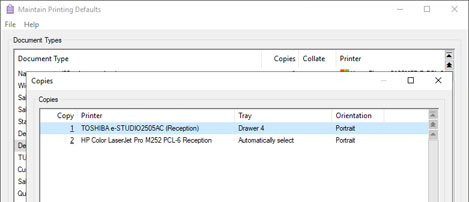
These developments make it easier to manage default printing behaviour and background printing with multiple copies.
Show Phone Numbers and Email as Text in Data Lists
Available to Software Assurance customers with axis diplomat 2024 or above
Release Date: 09/05/2025 Call Reference: 849975
A new parameter has been added to User Details to control whether phone numbers and email addresses are hidden or displayed as plain text in scrolling lists.
By default, these fields are shown as icons with hover-to-view to reduce the risk of data being screen-scraped. However, some job roles may benefit from being able to see the details directly. We recommend that administrators review job roles and only enable this option where direct visibility of phone numbers and email addresses is justified.
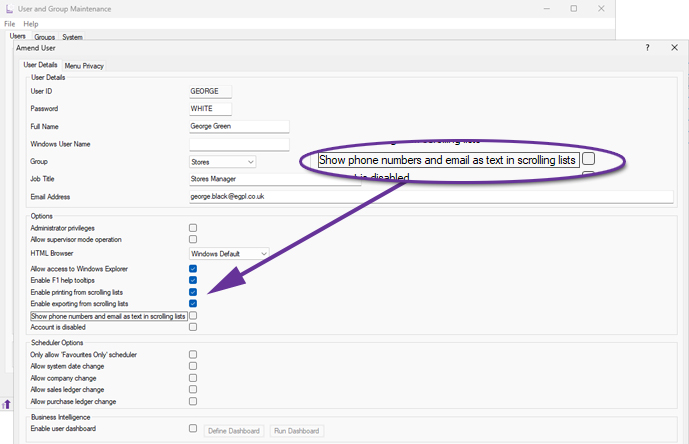
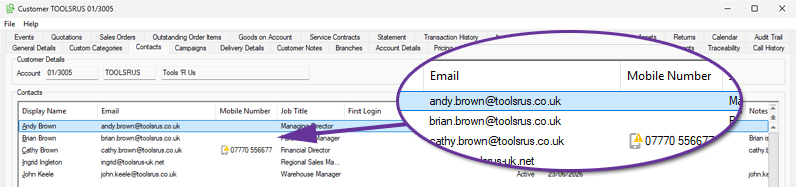
In the default state, with the permission not set, contact details are shown as icons with hover-to-view:
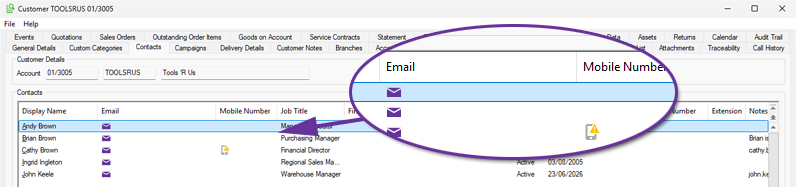
Once permission for this user has been granted, contact details appear as plain text:
Make Phone Calls from Telephony Monitor
Available to Software Assurance customers with axis diplomat 2024 or above and the Telephony Interface module
Release Date: 19/05/2026 Call Reference: 846687
A new context menu (right-click) option has been added to the Telephony Monitor to call numbers directly from the monitor.
The option is context-sensitive so, when right-clicking on a column in a row that does not contain a telephone number, the option is disabled. If the user selects a column in the row that does contain a telephone number, the option to directly call the number becomes available.
Nominal Ledger & General Accounts
Enhanced Nominal Account Types
Available to all customers with axis diplomat 2026 or above
Release Date: 15/10/2026 Call Reference: 83300
New and standard at axis diplomat 2026, Enhanced Nominal Account Types extends the existing Nominal Account Types to allow Draft Accounts and Budgetary Analysis reports, together with the Profit & Loss and Balance Sheet Monitors, to present financial information grouped in a format which is aligned with standard UK accounting categories.
The Account Type is assigned to the Nominal Account using the Amend Nominal Account Details function as shown below:
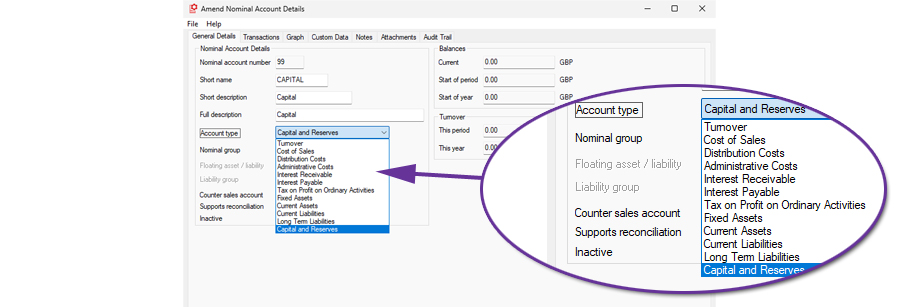
Existing nominal accounts are automatically converted from the old types to the following new types:
- 'Sales Trading' become 'Turnover'
- 'Purchase Trading' become 'Cost of Sales'
- 'Profit & Loss' become 'Administrative Costs'
- 'Asset' become 'Current Asset'
- 'Liability' become 'Current Liability'
Accounts may then be manually amended to make use of the other new types.
Draft Accounts style reports and monitors have additional totalling by the new account types with new sub-totals for:
- Total Turnover
- Total Cost of Sales
- Gross Profit
- Total Distribution Costs
- Total Administrative Costs
- Operating Profit (before interest payable and receivable)
- Profit Before Taxation (after interest payable and receivable)
- Profit After Taxation
- Fixed Assets
- Current Assets
- Current Liabilities
- Net Current Assets
- Net Assets
- Net Current Assets
- Capital and Reserves
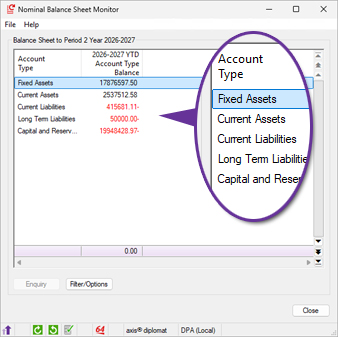
Nominal Balance Sheet Monitor showing Sub-Totals by Account Type
For more information:
https://documentation.axisfirst.co.uk/enhanced-nominal-account-types/articles/29819
Nominal Journal Templates
Available to all customers with axis diplomat 2026 or above
Release Date: 15/10/2026 Call Reference: 854614
A new Nominal Ledger function has been added to create and maintain Nominal Ledger Journal Templates. This allows users to define journal templates where the default coding for regular journals can be recorded. These journal templates can then be used in the Nominal Ledger Journals function to manually enter values without needing to key the nominal account codes. Typical examples for journal templates are entry of fixed asset depreciation journals and entry of payroll journals.
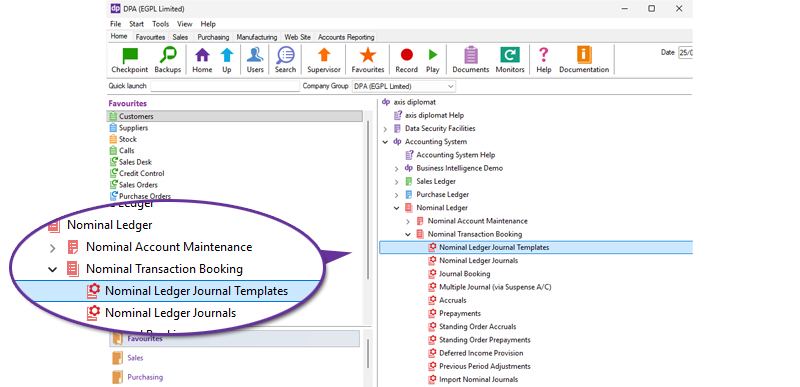
A number of different templates can be defined, for different requirements:
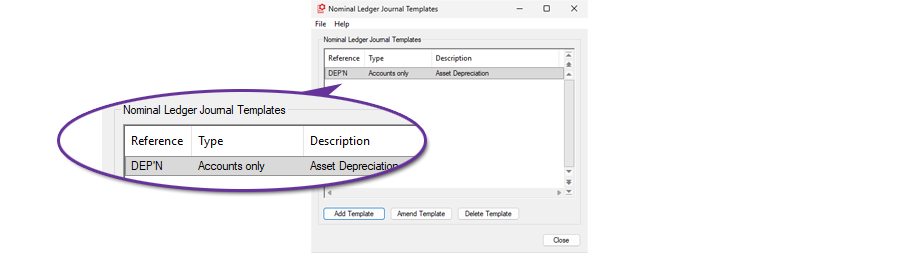
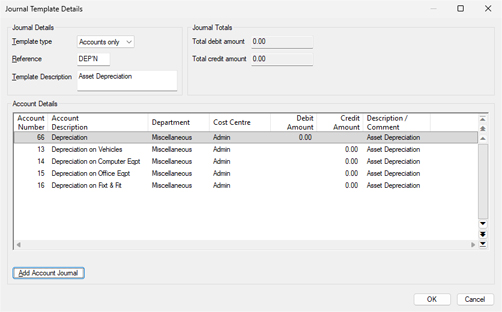
An additional entry type has been added into Nominal Ledger Journals to allow entry using a template:

The use of Nominal Ledger journal templates for the entry of regular, variable value, journals assists accounts users by removing the need to remember or search for Nominal Ledger codes. This reduces the risk of mis-entry, whilst also speeding up processing of regular journals.
For more information:
https://documentation.axisfirst.co.uk/nominal-ledger-journal-templates/article/148025
Bank Account Reconciliation Enhancements
Available to all customers with axis diplomat 2026 or above
Release Date: 15/10/2026 Call Reference: 638987
The Bank Account Reconciliation function within the Cash Book now supports attachments, with an optional viewing pane to see PDF format attachment files whilst reconciling items. This allows the user to attach copies of bank statements and work through the reconciliation on a single screen.
The attachments are stored as Nominal Account attachments and can also be viewed from both Nominal Account Enquiry and Cash Account Enquiry.
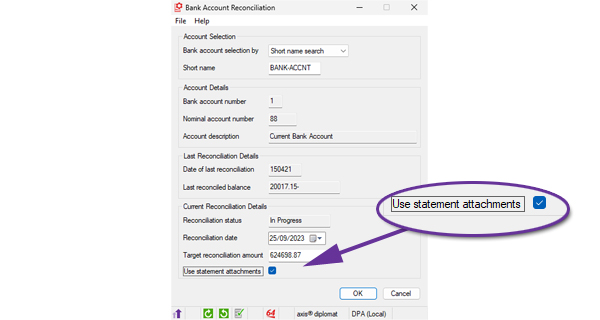
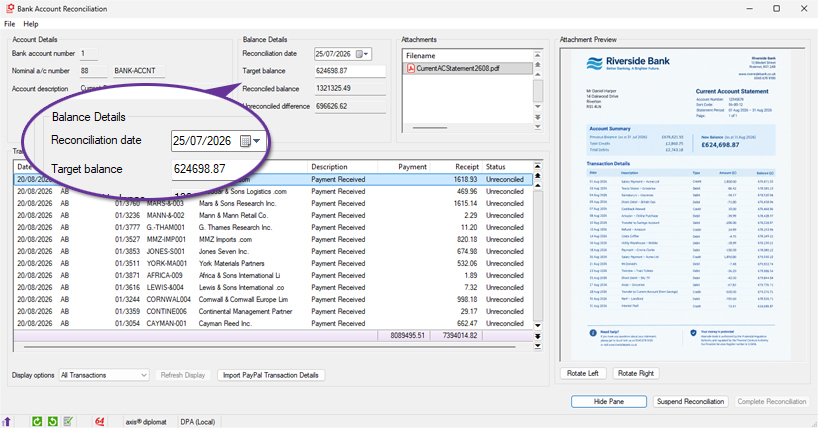
The target reconciliation balance and reconciliation date are also now editable from the reconciliation screen above.
The function has also been extended to allow cash book transactions to be booked from within the function, removing the need to suspend the reconciliation to correct transactions or to enter missing ones.
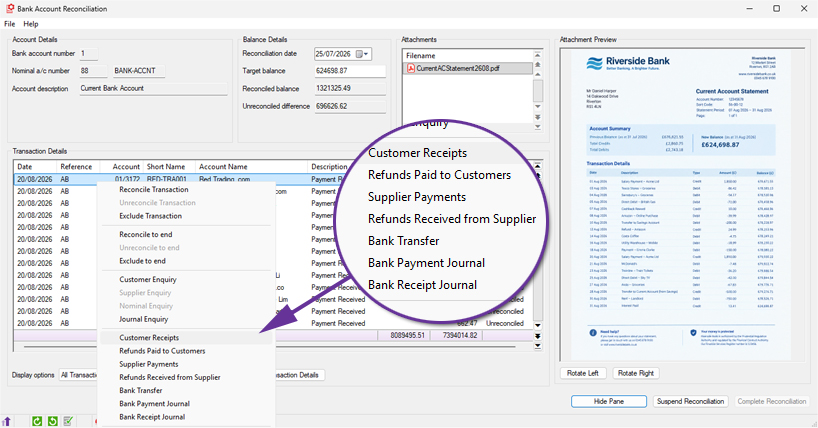
As new transactions are entered from within Bank Account Reconciliation, they are automatically flagged as reconciled.
Deferred Income Provision
Available to Software Assurance customers with axis diplomat 2024 or above
Release Date: 03/09/2025 Call Reference: 856394
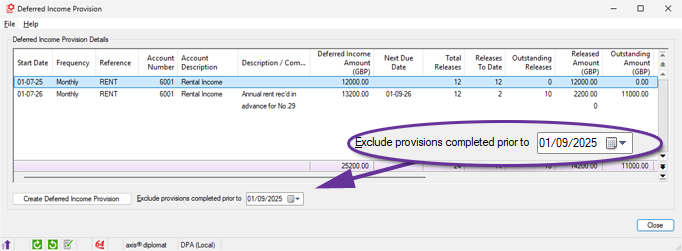
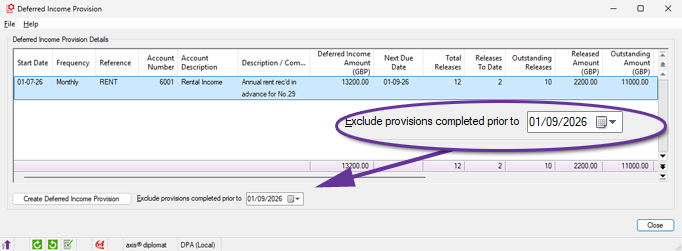
The Deferred Income Provision has been modified to add an option to exclude provisions completed prior to a specified date from the displayed list. This allows the list of deferred income provisions to be filtered as required, to show only outstanding provisions or outstanding plus those completed in the current financial year.
All deferred income:
Outstanding deferred income only:
For more information:
https://documentation.axisfirst.co.uk/deferred-income-provision/article/159903
Enter Postponed VAT - Attach C79
Available to all customers with axis diplomat 2026 or above
Release Date: 15/10/2026 Call Reference: 871739
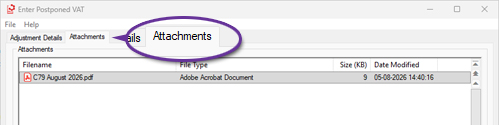
When entering Postponed VAT, there is now an attachments tab, allowing the addition of any relevant files. Once the transaction has been filed, the attachment(s) will be added to the attachments tab of the supplier invoice for the transaction.
Import Nominal Journals
Available to all customers with axis diplomat 2026 or above
Release Date: 15/10/2026 Call Reference: 854614
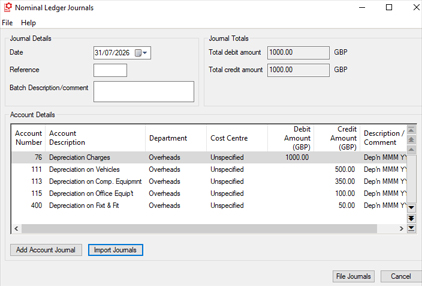
The Nominal Ledger Journals function has been extended to include a facility to import journals from a spreadsheet. In addition to normal day-to-day requirements, this can also assist with loading journals generated by non-users of axis diplomat such as external accountants or payroll systems.
The import supports a number of file formats, including Microsoft Excel®, CSV (comma separated variable) and TSV (tab separated variable).
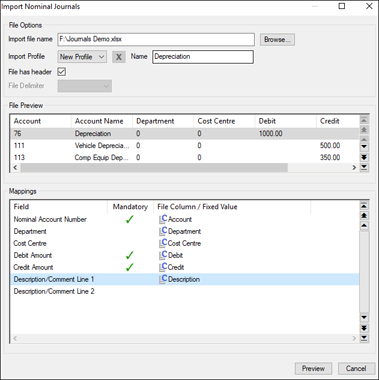
The file to be imported must include columns for Nominal Account Number, Debit Amount and Credit Amount. Additional columns may also be mapped for:
- Department
- Cost centre
- Description/Comment Line 1
- Description/Comment Line 2
As with a variety of other imports on the system, you have the option of setting these to fixed values so they do not need to exist in the import file.
Once you have specified the mapping between the file's columns and the journal fields, you can save the details in a profile. This means that you do not need to go through this process every time if you regularly get files to import in the same format.
A typical spreadsheet might look like this:
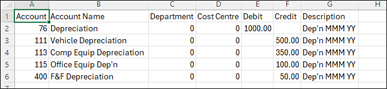
The import function would then allow you to match the columns in the spreadsheet with the required data field:
Once imported, the journals appear within the function, ready for filing in the usual way:
Amend Nominal Account Numbers
Available to Software Assurance customers with axis diplomat 2024 or above
Release Date: 25/09/2025 Call Reference: 844742
A new Nominal Ledger Utility function, 'Amend Nominal Account Numbers', has been added within Supervisor Functions.
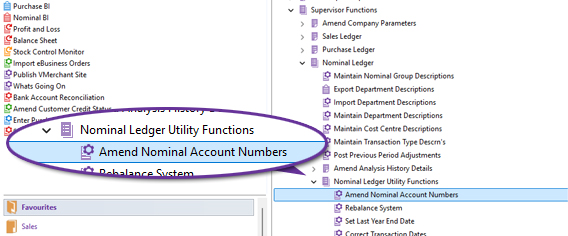
This function allows an existing Nominal Ledger Account to be re-numbered to a new account number.
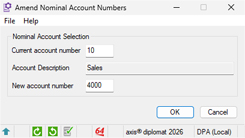
This is a single user function and it is highly recommended that a backup is taken when prompted and, for performance reasons, data protection should be suspended. The function will also update any associated transaction history with the new account number.
Sales Ledger, CRM & Sales Order Processing
AI Assisted Import in Sales Order Maintenance
Available to all customers with axis diplomat 2026 or above
Release Date: 15/10/2026 Call Reference: 873771
axis diplomat 2026 now includes optional AI assistance when using the Import facility within Sales Order Maintenance.
The Import option has been included within Sales Order Maintenance for some time, to allow order lines, typically provided as a spreadsheet, to be imported:
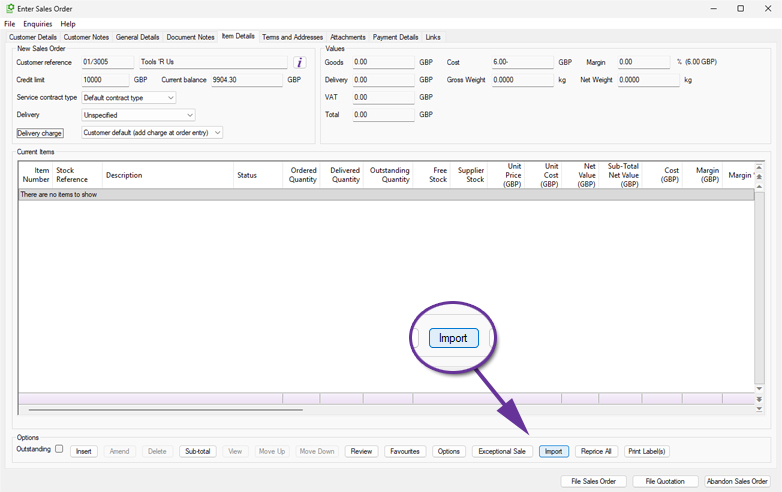
By utilising Microsoft's Azure AI Document Intelligence, this option has now been extended to analyse your customer's purchase orders supplied in PDF format. It will try and identify the part codes and quantities from the document:
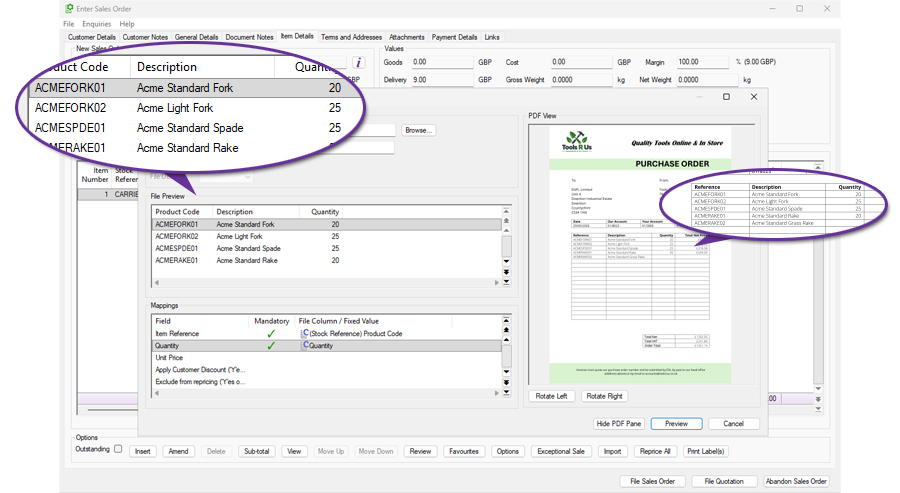
Any items that cannot be matched are shown in a preview pane but the matched ones can still be imported.
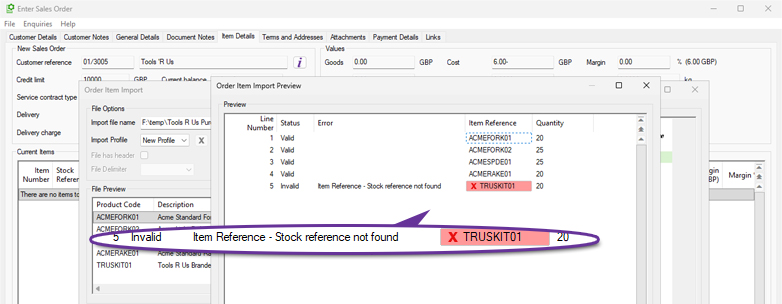
Your data remains secure during processing and is not retained or used by the AI system for training.
For those who receive a large percentage of their customer's orders as PDFs via email, this can represent a significant time-saving, particularly on orders that contain a large number of items.
Improved Load Speed for Customer Enquiry
Available to all customers with axis diplomat 2026 or above
Release Date: 15/10/2026 Call Reference: 862181
The Customer Enquiry function has been enhanced to improve performance when viewing customer accounts holding large volumes of historical data. Several data-intensive tabs now retrieve information in the background, allowing users to begin working with an account whilst additional information continues to load behind the scenes.
This applies to the following tabs within Customer Enquiry:
- Branches
- Transaction History
- Item History
- Goods on Account
The development is particularly beneficial where customer accounts contain a lot of transactions, providing a more responsive experience when reviewing account information. This is especially helpful when accounts are loaded whilst the customer is on the phone, such as when axis diplomat is linked to a phone system that automatically loads the customer enquiry from the incoming call.
Configurable Debt Analysis Period for Debtors Letters
Available to Software Assurance customers with axis diplomat 2024 or above
Release Date: 13/05/2026 Call Reference: 861082
Previously, the Print Debtors Letters function used the overall customer debt analysis period defined in Maintain Sales Ledger Parameters but a separate Debtors Letters debt analysis period has now been added.
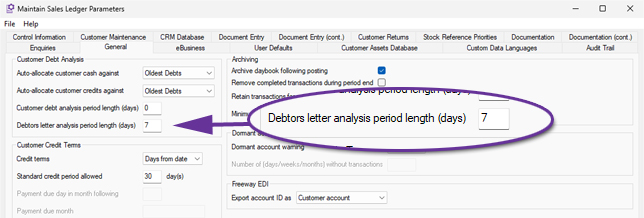
This allows, for example, Statements to use the standard monthly debt aging periods as defined in the customer debt analysis period length parameter and for Debtors Letter variants to be sent at 7, 14 and 21 days past their due date.
Apply User Defaults by User or Group
Available to Software Assurance customers with axis diplomat 2024 or above
Release Date: 29/12/2025 Call Reference: 860673
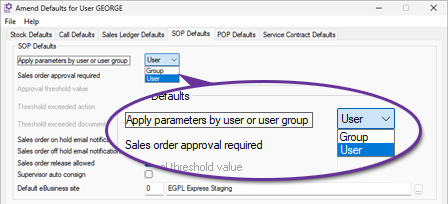
User and Group Maintenance has been modified to improve the administration of both SOP Defaults and Call Defaults configured at User and Group level.
The revised screens provide a clearer view of configured values and inheritance behaviour, making it easier to identify whether a setting originates from a Group configuration or has been overridden at User level.
These improvements provide administrators with clearer visibility of how values are inherited and applied whilst reducing the complexity of maintaining user-specific and group-based configurations.
Customer Account Charity Number
Available to Software Assurance customers with axis diplomat 2024 or above
Release Date: 22/11/2024 Call Reference: 830358
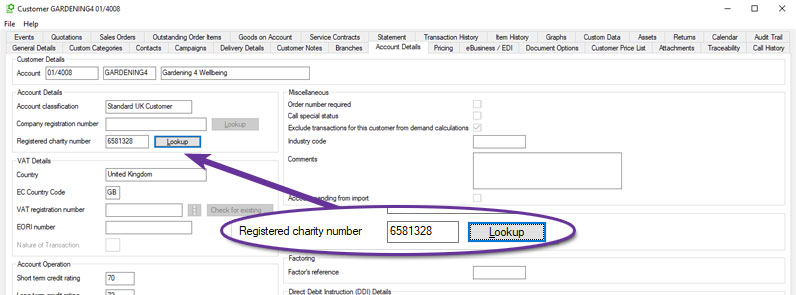
A new field has been added to Customer Accounts to record a Registered Charity Number. The new field can be found on the Account Details tab of Customer Enquiry and there is also a Lookup button to check the charity number against the Charity Commission register of charities.
Improved Sales Document Audit Trail
Available to Software Assurance customers with axis diplomat 2024 or above
Release Date: 16/04/2025 Call Reference: 839651
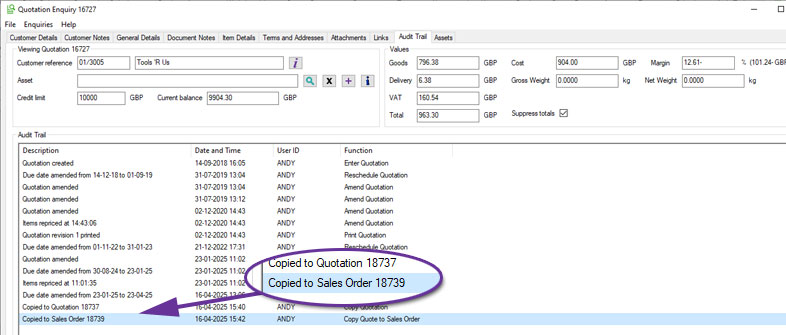
When a sales document, such as a quotation, is copied, both the new and original documents now include detailed audit trail entries.
The newly created document displays the source (for example, "Quotation copied from document 544862") and the original document now also shows that it was copied and the reference of the new document, such as "Copied to Quotation 654321".
This update makes it easier to identify related documents and track document history, particularly when reviewing or correcting issues in an original document that may be a replicated elsewhere.
Exclude Zero Value Invoices from Background Printing
Available to Software Assurance customers with axis diplomat 2024 or above
Release Date: 23/06/2026 Call Reference: 859406
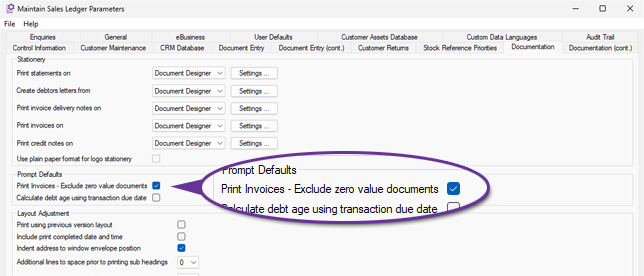
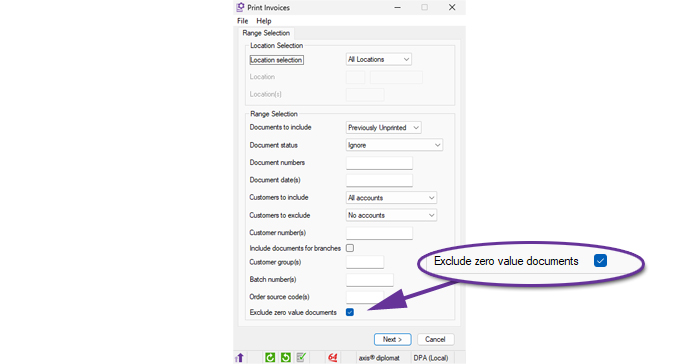
The Print Invoices function now provides the ability to exclude zero value invoices from invoice print runs, helping to minimise waste and reduce processing time.
This setting can be configured as a default within Sales Ledger Parameters, allowing organisations to embed the behaviour into their standard processes:
Users can also select the option manually when running individual invoice print runs, providing flexibility where business requirements vary:
Automatic Invoice Delivery
Available to Software Assurance customers with axis diplomat 2024 or above
Release Date: 10/10/2025 Call Reference: 857963
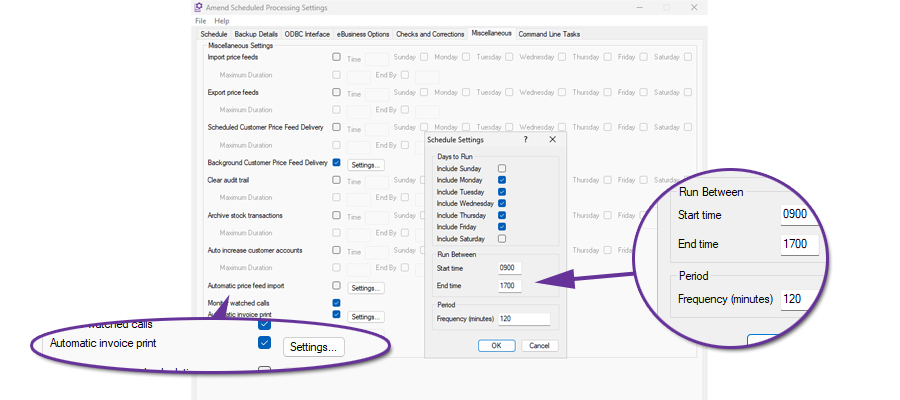
Invoices raised during the day can now be delivered automatically in the background at scheduled intervals. The Kernel Function Amend Scheduled Processing Settings can be used to enable automatic invoice printing to run at set intervals throughout the day. Customers set to receive their invoices by email will be included as well whilst those set for post will have their invoices printed on the nominated default printer.
Exceptional Sales
Available to all customers with axis diplomat 2026 or above
Release Date: 15/10/2026 Call Reference: 643995
Previously only available as an additional option, Exceptional Sales is now standard.
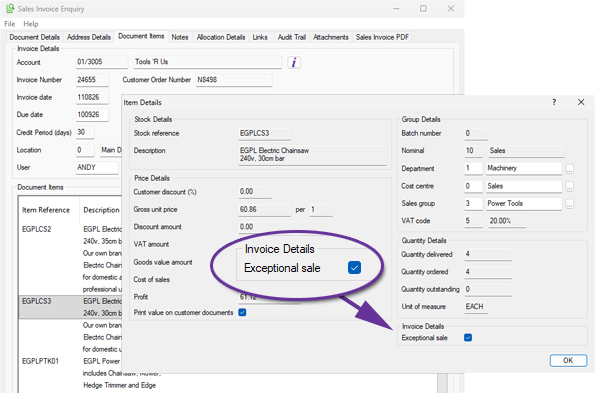
The Exceptional Sale flag is used to exclude specific transactions for the calculation of average demand in the standard Stock Forecasting functionality and for historical demand by the optional Demand Forecasting module.
Sales Business Intelligence selectors can also be written to include/exclude exceptional sales from the reported sales as required.
Flagging a sales transaction line as an exceptional sale prevents unusual one-off transactions from skewing stock demand history when planning future required stock levels.
The 'Exceptional Sale' flag may be set on sales order lines and carried through to the invoice transaction or may be set retrospectively on the invoice. Lines on credit notes may also be marked as exceptional.
A customer may also be flagged as Exceptional sales (via the Account Details tab): if set, all orders for the customer will default to being an exceptional sale.
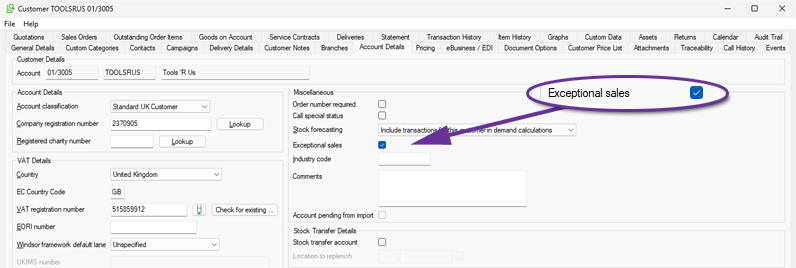
For more information:
https://documentation.axisfirst.co.uk/exceptional-sale/articles/30124
Exclude Accounts with Balances from Automatic Cash Allocation
Available to Software Assurance customers with axis diplomat 2024 or above
Release Date: 04/12/2025 Call Reference: 844758
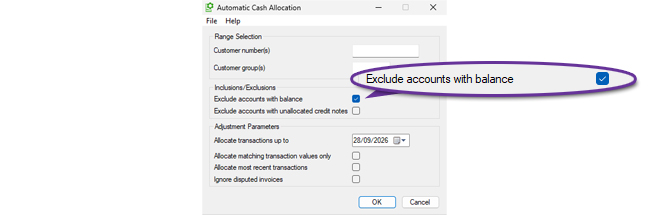
The Automatic Cash Allocation function has been extended to provide an option to 'Exclude accounts with balance'. This allows the function to be run so that it only deals with allocations on accounts that have a zero value outstanding balance. Those with non-zero balances can then be reviewed manually afterwards to assess what allocations need to be made.
Deactivate Customer Delivery Addresses
Available to Software Assurance customers with axis diplomat 2024 or above
Release Date: 30/07/2025 Call Reference: 851038
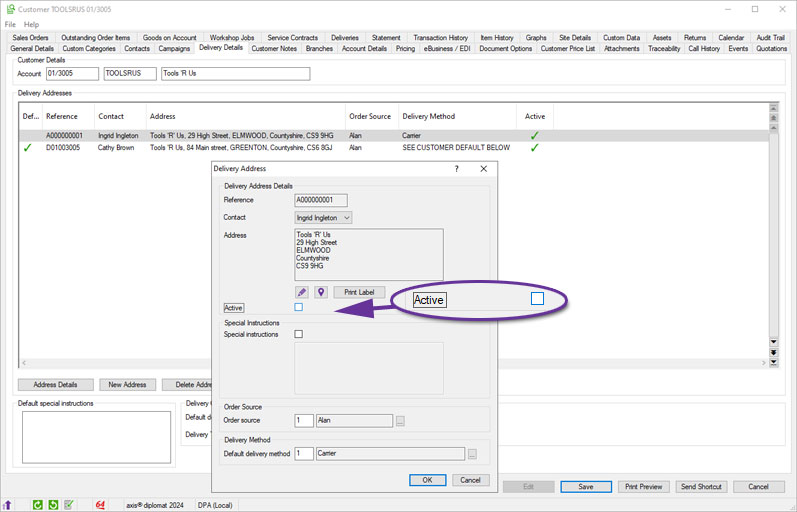
A new option allows individual Customer Delivery Addresses to be flagged as inactive, helping keep address records clean and relevant. Once an address is marked inactive, it will no longer be available for selection during order maintenance. For systems linked to axis vMerchant, deactivated delivery addresses will also no longer be published for selection at the checkout.
This change reduces the risk of selecting incorrect or obsolete addresses and helps keep address lists easier to navigate.
Additional Columns in Sales Business Intelligence Stock Tab
Available to Software Assurance customers with axis diplomat 2024 or above
Release Date: 09/01/2025 Call Reference: 837483
Sales Business Intelligence has been enhanced to allow more insight into your business performance by adding new columns to the Stock tab for Stock Attributes, enabling you to sort, filter, and analyse sales data in more ways.
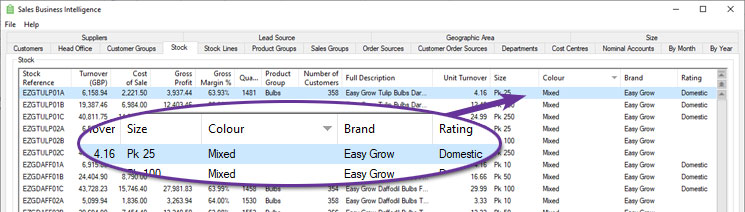
You can define up to ten custom attributes, such as size, colour, material, or any other classification relevant to your business, and now see this information against stock items listed within Sales Business Intelligence.
Refresh on Customer Price List Maintenance
Available to all customers with axis diplomat 2026 or above
Release Date: 15/10/2026 Call Reference: 860527
The Customer Price List tab within Customer Enquiry has been enhanced with a new Refresh button, allowing users to immediately reload customer pricing information without having to close and reopen the customer record.
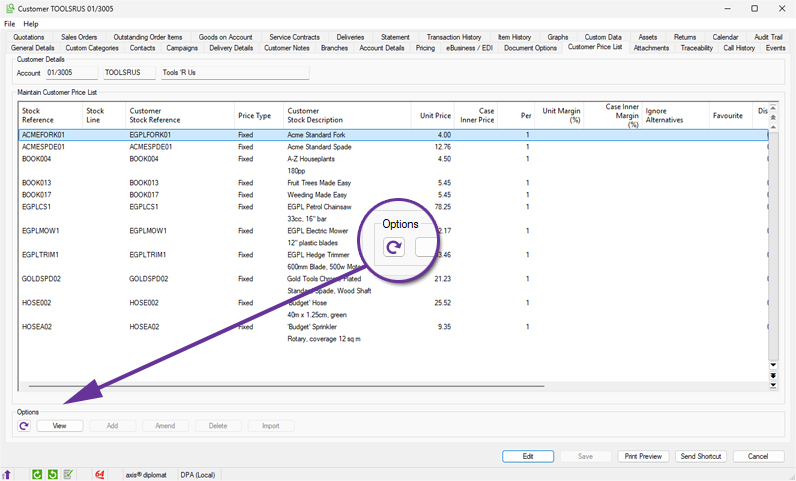
Previously, Price List updates from other areas of axis diplomat, such as Sales Order or Quotation maintenance, meant that users would need to reopen the Customer Enquiry function before seeing the price changes.
Sales Order Authorisations
Available to Software Assurance customers with axis diplomat 2024 or above
Release Date: 23/12/2025 Call Reference: 858131
Functionality has been added to axis diplomat to manage Sales Order Authorisations and to provide an approval mechanism.
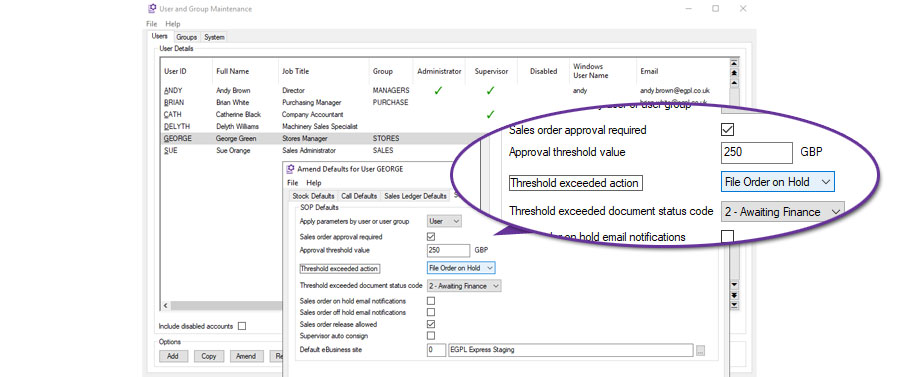
Sales Order Authorisations can be used to limit financial risk by applying value limits to sales orders. Each user, or user group, can be assigned their own approval threshold.
When a user attempts to file a sales order that exceeds that threshold, axis diplomat can, on a user by user basis, either:
- Block filing - this prevents the user from saving the sales order until the document value is reduced below the approval threshold.
- Warn Only - this issues a warning message to the user but does not prevent filing.
- File order on hold - this files the order but places it on hold and creates an order audit trail entry.
In addition, a specific Document Status Code may be set on orders which exceed the sales order approval threshold when filed. This could, for example, allow managers to run a monitor listing just orders that are on hold for this specific reason.
When the Sales Order On hold option is used, the order can be reviewed and released by someone with the appropriate security permission. The action that placed the order on hold, and the subsequent release, are both recorded in the Sales Order audit trail. This provides clear visibility of when the threshold was exceeded, who released the order, and when it was allowed to progress.
Sales Order Authorisations are configured using Kernel Supervisor Functions > User and Group Maintenance and selecting Accounts User Defaults, SOP Defaults for the user or group in question.
Deposit Rules for Quotations and Sales Orders
Available to Software Assurance customers with axis diplomat 2024 or above
Release Date: 06/02/2026 Call Reference: 849833
For businesses that need to enforce or encourage deposits on certain transactions, this significant and extensive development brings control and visibility by integrating deposit settings into the sales workflow. With this functionality, there is no longer a need to rely on manual reminders or calculations. Sales and admin staff are immediately shown the appropriate deposit percentage and value as they build a quotation or sales order, ensuring consistency and removing uncertainty.
At the system level, deposit rules are configured within Supervisor Functions > Amend Company Parameters > Maintain SOP Parameters, on a dedicated Deposits tab.
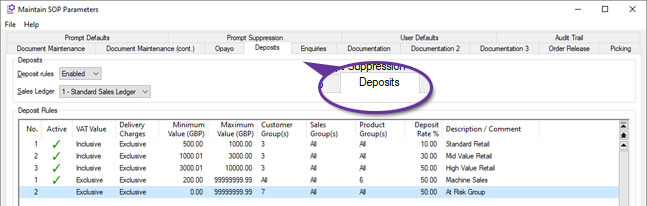
Users can define rules based on order value thresholds, customer group, sales group, and product group. The rules can be tailored to include or exclude VAT and delivery charges, making them flexible enough to match a variety of commercial models. Multiple rules can be created per sales ledger, and where more than one rule could apply to a given document, the system automatically uses the one with the highest level of deposit. This gives administrators granular control over policy without sacrificing clarity for users.
When working within a sales document, deposit information is always in view, updated as changes to the lines dictate. The deposit is shown as both percentage and currency values.
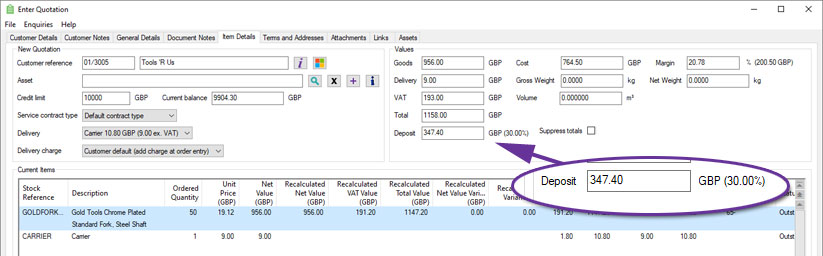
When entering or amending a sales document, on the General Details tab, the system displays the specific deposit rule that has been applied and allows users with appropriate security permissions to override the deposit percentage.
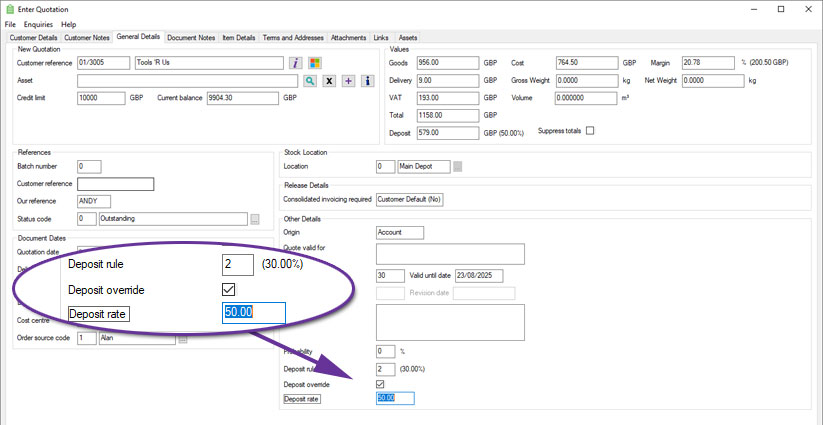
This override function is particularly useful when dealing with exceptions, such as trusted customers or promotional campaigns, and provides the necessary flexibility without compromising audit integrity. An audit trail of any deposit percentage or rule changes is recorded against the document.
Copy functions will recalculate deposit values based on current rules, whereas converting a quotation to an order will preserve the original deposit value.
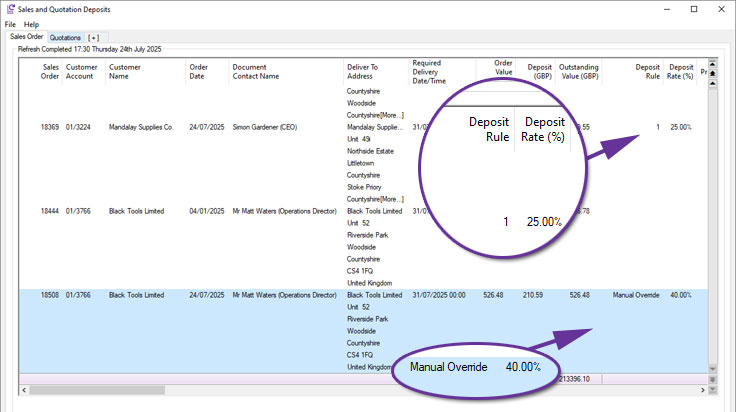
The Quotations and Sales Orders monitor now include dedicated columns showing the deposit percentage, deposit value, and the rule applied.
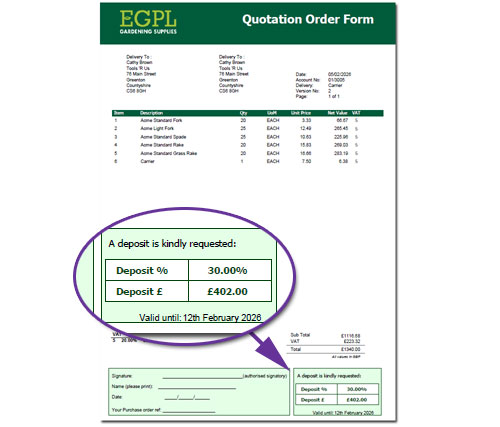
Document Designer templates, such as Quotations, Quotation Order Forms and Pro Forma Invoices, can also include information on the deposit required on a particular quotation or sales order:
Use Customer Stock Description for Quotations and Sales Orders
Available to all customers with axis diplomat 2026 or above
Release Date: 15/10/2026 Call Reference: 859476
Customer Price Lists have been extended to provide customer-specific item descriptions that can then be used for Sales Orders and Quotations and shown on customer-facing documentation.
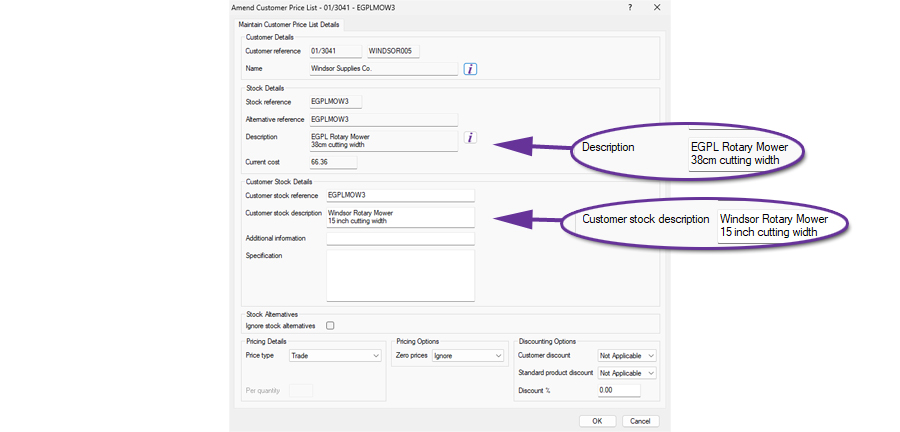
The functionality is enabled via a parameter on the Prompt Defaults tab of the function Maintain SOP Parameters:
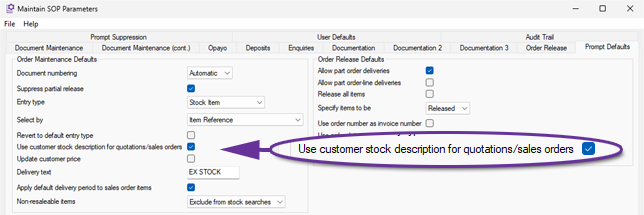
Enabling this option will replace the standard stock description with the customer's own stock description (if defined) when adding items to Quotation and Sales Order documents. This means that you are now able to provide customers with documents that show their unique descriptions for products.
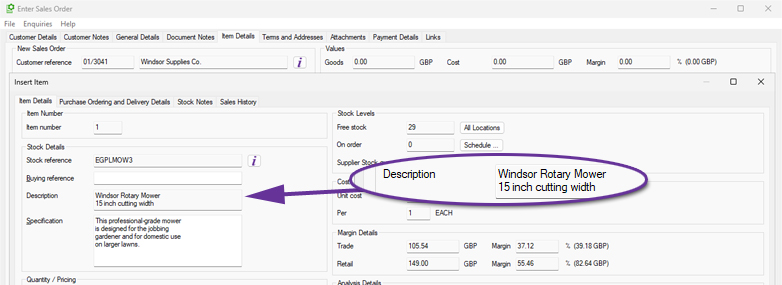
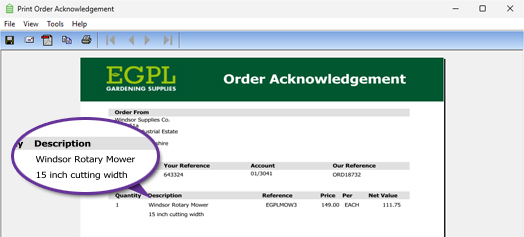
A new Document Designer field also has been added for "Item Internal Description", which is always the item's description from the stock ledger, regardless of whether there is a customer-specific description for this item on a given document. This means that documents that are used internally (such as a pick note) can still show your description whilst those documents that go to a customer (such as an invoice or delivery note) can show their description.
Additional Barcode Columns in Sales Order Maintenance
Available to Software Assurance customers with axis diplomat 2024 or above
Release Date: 07/11/2024 Call Reference: 836737
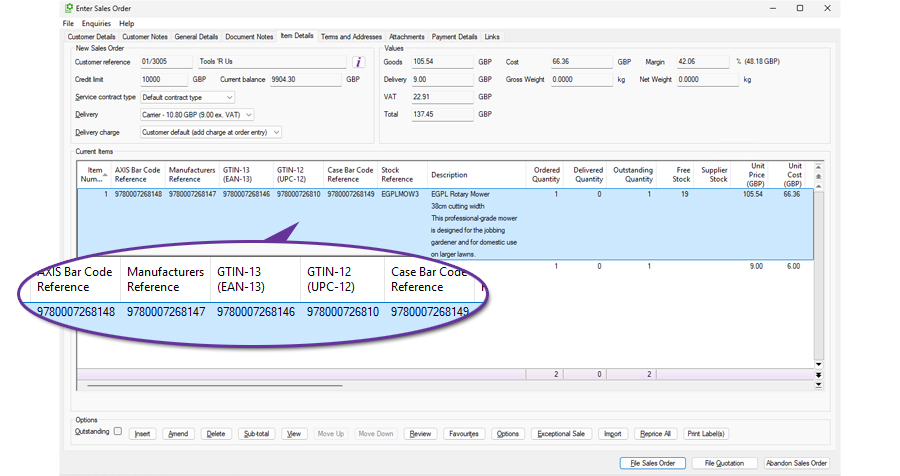
The Sales Order Maintenance function has been enhanced to include additional columns on the Item Details tab for additional references and barcodes:
- AXIS Bar Code Reference
- Manufacturers Reference
- GTIN-13 (EAN-13)
- GTIN-12 (UPC-12)
- Case Bar Code Reference
These additional columns make it easier to review, check and analyse product information relating to customer orders. The fields, alongside existing sales order information, can then be exported using the standard export facilities, providing a simple method of supplying order-related barcode and reference information to customers, third-party systems or internal departments.
Outstanding Items Margins on Sales Order Monitors
Available to Software Assurance customers with axis diplomat 2024 or above
Release Date: 20/01/2025 Call Reference: 836505
Three new columns have been added to Sales Order monitor tab types to improve visibility of margins on unreleased items. These columns focus specifically on outstanding sales order lines.
The new columns are:
- Outstanding Items Margin (Order Currency)
- Outstanding Items Margin (Base Currency)
- Outstanding Items Margin (%)
These additions help sales, finance, and operational teams better assess the profitability of pending sales to set priorities or identify issues.
Print Proforma (Quote) from Data Lists
Available to Software Assurance customers with axis diplomat 2024 or above
Release Date: 16/04/2025 Call Reference: 839911
A customer quotation may be used to create a proforma invoice and this can now be accessed from the scrolling data list in either the Quotations tab of Customer Enquiry or a Quotations monitor tab.
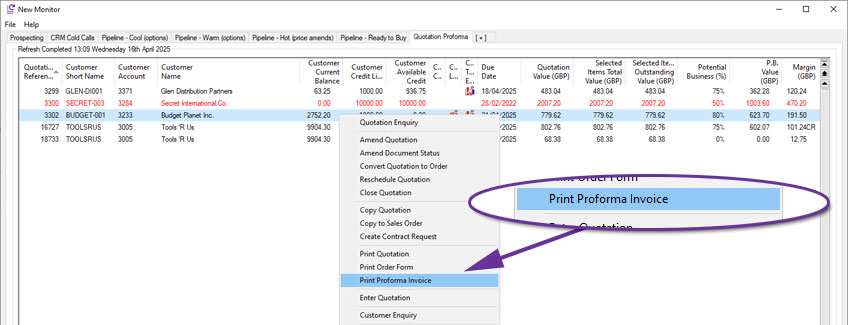
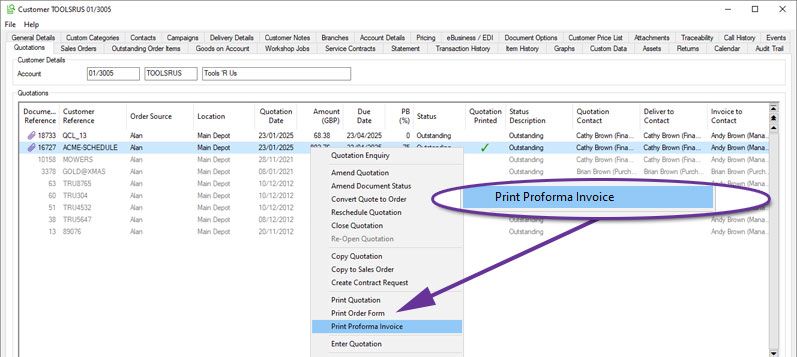
For more information:
https://documentation.axisfirst.co.uk/Proforma-Invoice/articles/21797
Sales Order Release Mode for Quotations
Available to all customers with axis diplomat 2026 or above
Release Date: 15/10/2026 Call Reference: 874145
Sales Order Release Mode is now supported on quotations in addition to sales orders. This is useful if, for example, a special agreed price is conditional on everything being sent in a single delivery.
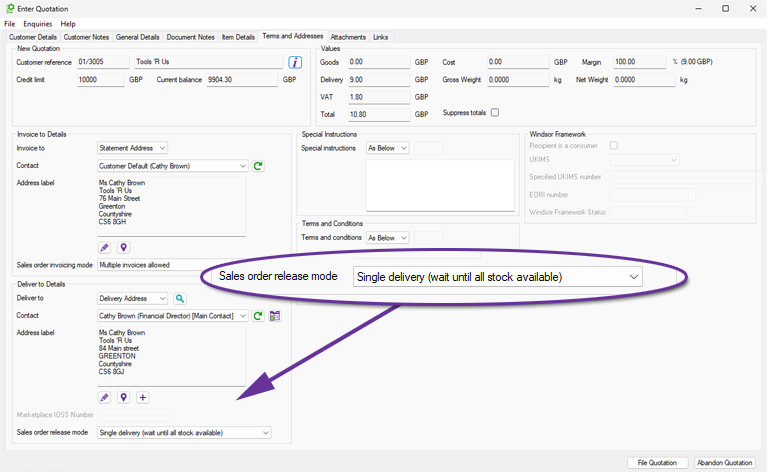
When entering a quotation, the default release mode from the customer account will be used but may be changed.
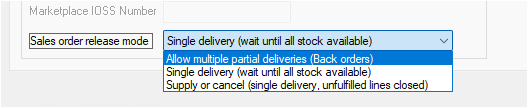
When the quotation is subsequently converted to an order, the setting will be retained. Upon upgrading to axis diplomat 2026, any existing open quotations will be set with the default release mode from the customer account.
Automatic Stock Data Sheets For Sales Orders Acknowledgements
Available to Software Assurance customers with axis diplomat 2024 or above
Release Date: 19/06/2025 Call Reference: 849694
Stock Data Sheets may now be incorporated into sales order acknowledgements.
When a Stock Item has a Data Sheet PDF, or on its Product Group for shared use, it may be automatically appended to the document. This was previously available for quotations but has now been extended to sales orders.
This can help with compliance and reduce the need for manual intervention and is ideal for COSHH information, installation instructions, and general product specifications.
This functionality is controlled by a parameter in Maintain SOP Parameters:
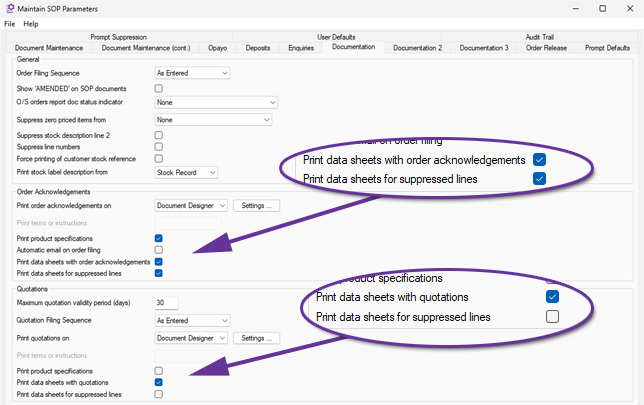
If you want data sheets to be included for lines that are suppressed by sub totals, also tick Print Data Sheets for suppressed lines. This enhancement has also been added to the Quotation data sheet options.
Suppress Sub-Totalled Items from selected documents
Available to Software Assurance customers with axis diplomat 2024 or above
Release Date: 18/12/2024 Call Reference: 830861
The Sub-Total functionality in Sales Order Processing now includes the option to suppress sub-totalled lines from selected documents.
This ability is controlled by an overall system parameter on the Documentation (cont.) tab of Maintain Sales Ledger Parameters:
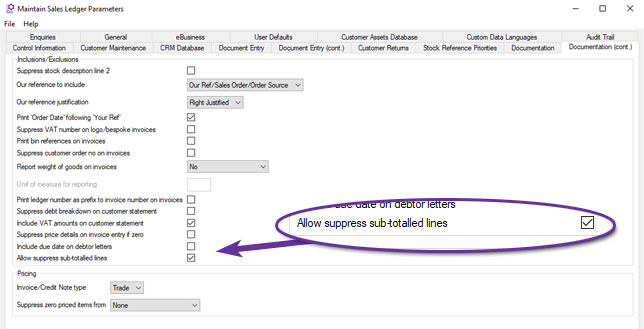
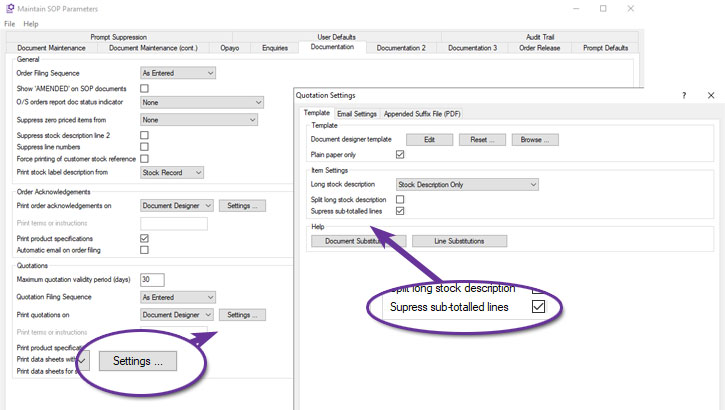
Once set, individual document types can be configured to suppress sub-totalled items. For example, to suppress sub-totalled items from Quotations, set the parameter within Quotations Settings, from the Documentation tab of Maintain SOP Parameters:
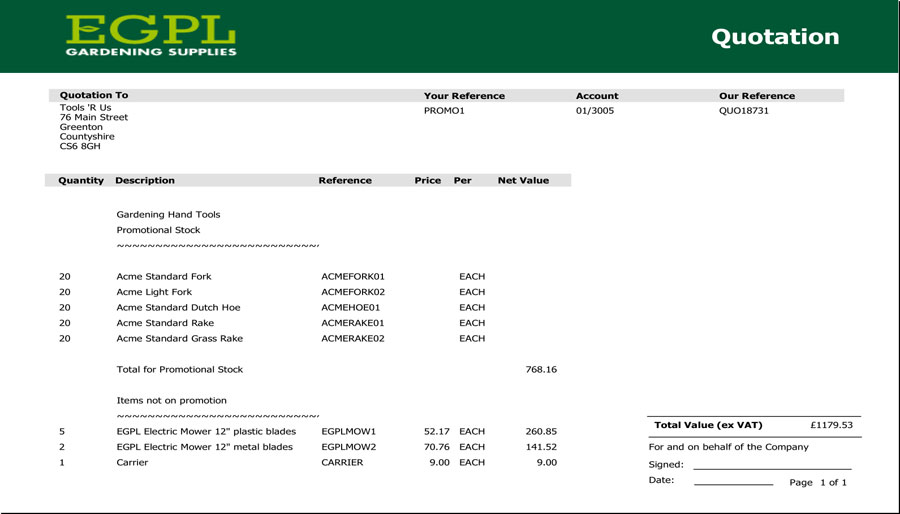
Quotation with Sub-Totalled Lines not suppressed
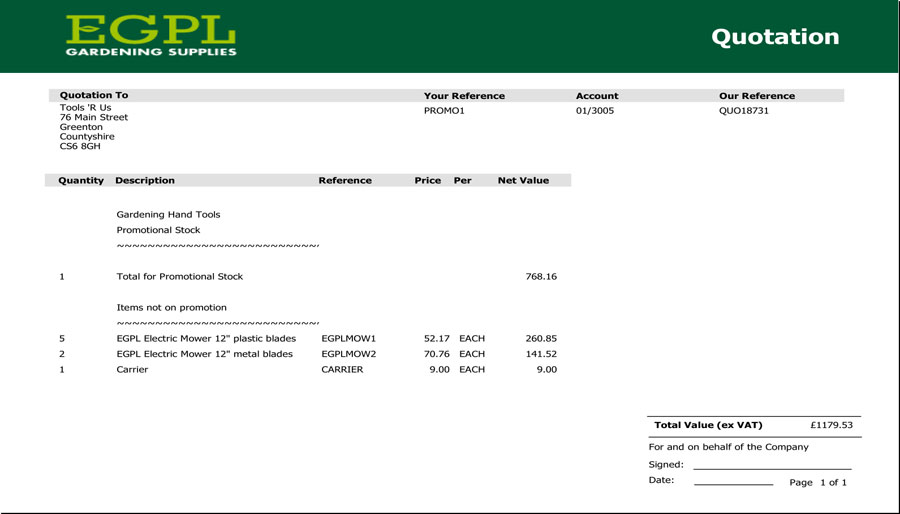
Quotation with Sub-Totalled Lines suppressed
As can be seen from the examples above, this can simplify documentation, focusing on sub-totals when the individual components are of little or no interest to the customer.
For more information:
https://documentation.axisfirst.co.uk/Sub-Totalling-in-Sales-Ledger-Document-Entry/articles/20735
Import List of Sales Orders to Close
Available to Software Assurance customers with axis diplomat 2024 or above
Release Date: 03/12/2025 Call Reference: 860987
The Close Sales Orders function now supports importing a list of orders for closure from a CSV file.
Closing large numbers of old or redundant sales orders has, in the past, been a time-consuming process but this enhancement can reduce both the time spent and the potential for keying errors when dealing with a large number of sales orders. This is especially the case if the list of orders to be closed already exists in an external data source or can be exported (for example, from a sales order monitor).
The CSV file does not need to have a specific layout as long as there is a particular column that contains the sales order numbers.
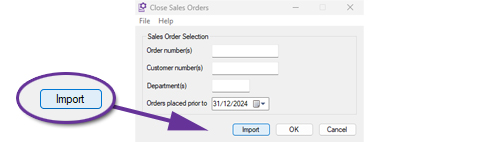
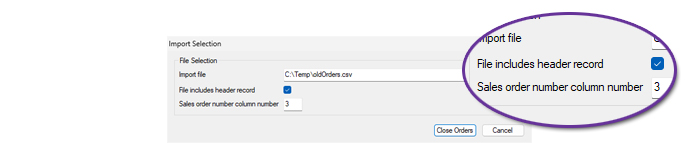
Sales Order On Hold and Off Hold Email Notifications
Available to Software Assurance customers with axis diplomat 2024 or above
Release Date: 24/12/2025 Call Reference: 861335
Individual users and groups within axis diplomat can now be configured to receive an email whenever Sales Orders are placed on hold or released from hold.
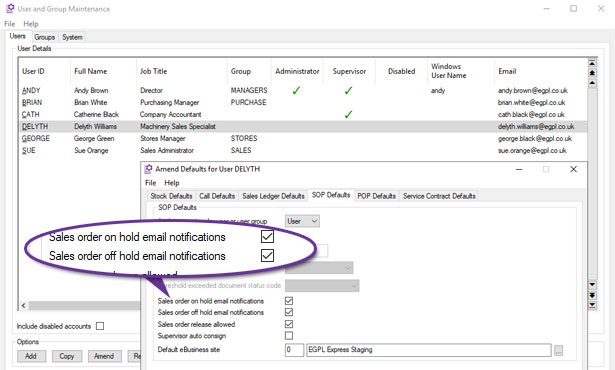
This is configured by using Kernel Supervisor Functions > User and Group Maintenance and selecting Accounts User Defaults for the user or group in question.
Orders may be placed on hold for a variety of reasons, including approval thresholds, credit control and manual intervention.
These email notifications provide clear visibility whenever an order’s hold status changes and removes the need for users to solely rely on a monitor of order lists, which may result in a quicker response. They include a link to open the order within axis diplomat direct from the email.
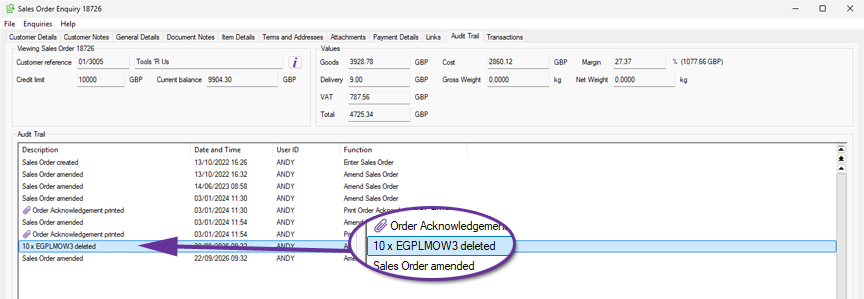
Audit Trail for Delete Sales Order Line
Available to Software Assurance customers with axis diplomat 2024 or above
Release Date: 19/05/2026 Call Reference: 858675
When a line is deleted from a Sales Order, the system will now automatically generate an audit trail event recording the stock reference and quantity removed, along with the time, date and operator.
This provides a clearer operational history of changes made to Sales Orders.
Pricing information has intentionally not been included within the audit trail event due to privacy considerations. The function Audit Trail Search can be used to review these events, or a User Activity monitor can be created.
Improved Margin Visibility within Sales Order Enquiry
Available to Software Assurance customers with axis diplomat 2024 or above
Release Date: 19/05/2026 Call Reference: 857541
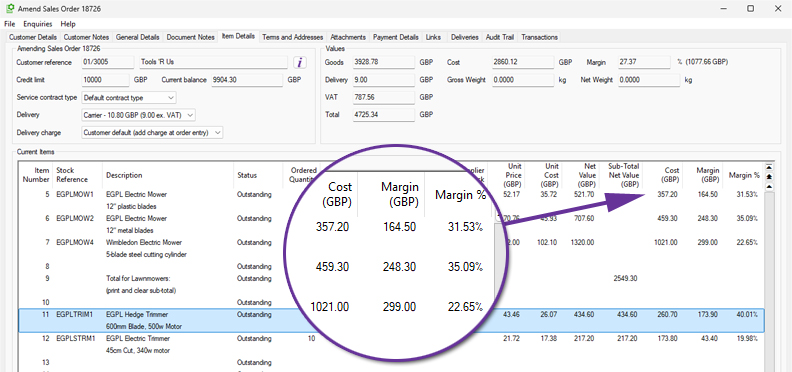
Sales Order maintenance and enquiry functions have been enhanced to show more margin information at a line level.
Columns are now included for:
- Cost
- Margin
- Margin Percentage
The cost and margin columns are monetary amounts for the total line so are particularly useful when dealing with larger quantities.
This gives users better visibility of detailed margin information, helping to ensure that profitability is not affected, for example when applying discounts.
Additional Colour Coding in Sales Order Maintenance
Available to Software Assurance customers with axis diplomat 2024 or above
Release Date: 13/10/2025 Call Reference: 832958
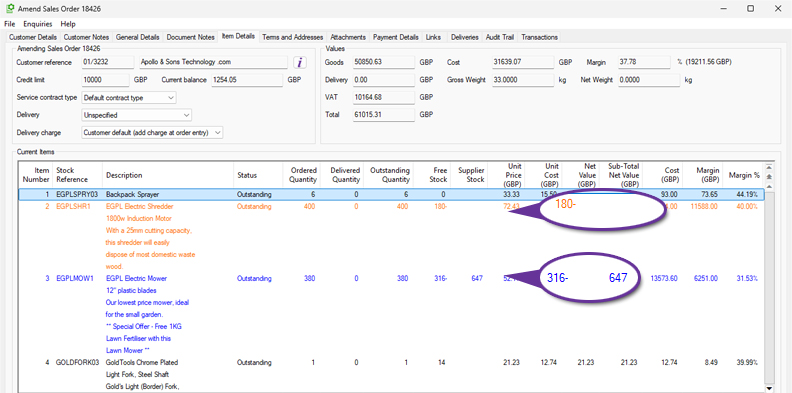
Further colour coding is now used on the Item Details list in Sales Order Maintenance functions with the addition of orange.
Items with insufficient stock are still shown as blue if there is sufficient supplier stock. If there is insufficient stock and there is also insufficient supplier stock available then these are now shown in orange.
CRM Call Category Element Sort Options
Available to Software Assurance customers with axis diplomat 2024 or above
Release Date: 12/12/2024 Call Reference: 788970
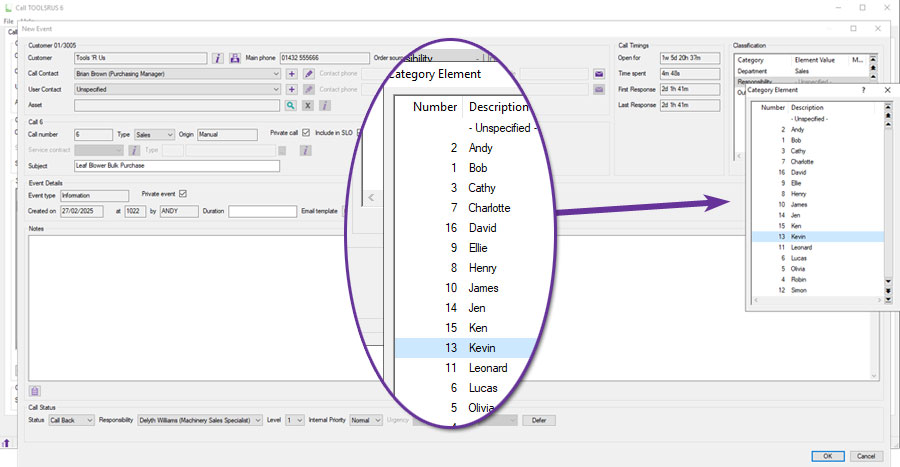
When using Call Categories to analyse CRM calls, the ‘Call Elements’ by default, can now be listed numerically, sorted by the element's code number, or alphabetically, sorted by the element's description.
This parameter can be set separately for each Call Category:
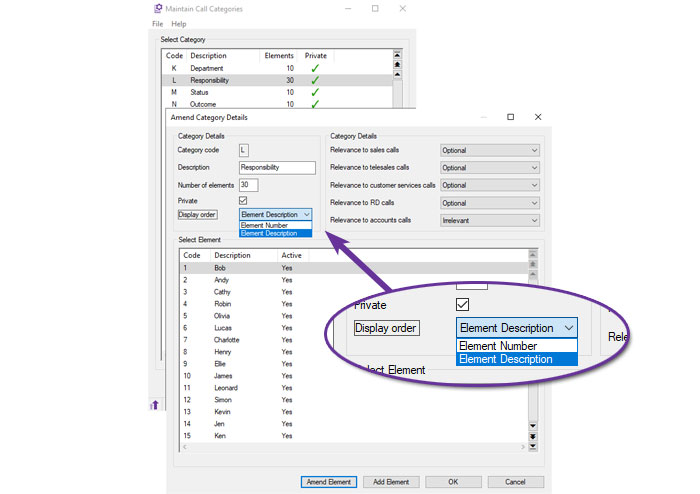
This is particularly useful for Call Categories that have long lists of elements, since it makes it easier for the operator to find the correct option:
Branded HTML Call Email Templates
Available to all customers with axis diplomat 2026 or above
Release Date: 15/10/2026 Call Reference: 856680
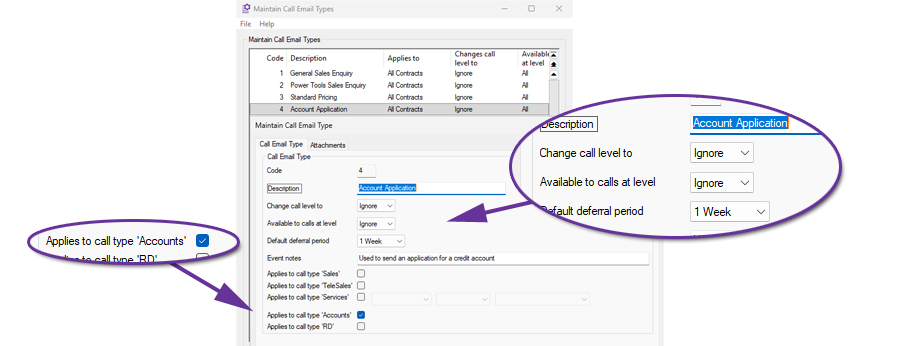
Call Email Types provides new functionality for anyone using the built-in CRM capabilities of axis diplomat.
This allows you to define a number of email templates for various standard communications with your customers and prospects, ranging from responding to sales enquiries to warranty claims - in fact, any situation for which you normally raise a CRM Call.
Each Call Email Type has an HTML Email template attached and this is used to send an email to the call contact when a call has its Call Email Type set.
Setting a new Call Email Type can also force other updates to the call, such as deferring the call for a set period of time.
To send an email, it is then just a case of selecting the email template from within the call event dialog:
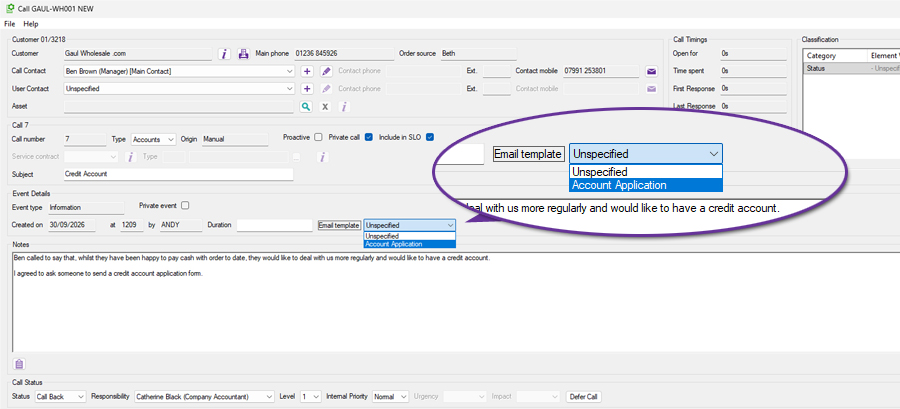
Note that the list of Email Templates is limited to those associated with the call type. The example above shows an Accounts call and so the Email Templates list only includes templates available for Accounts calls.
The template is used to pre-populate the email content but the operator has the opportunity to amend the email before sending, if they wish to personalise it in some way. For example, they would be able to edit the email to add a line such as "Thank you for your call this morning, it was good to catch up." before sending.
Defer Call Button in CRM Events
Available to Software Assurance customers with axis diplomat 2024 or above
Release Date: 19/02/2025 Call Reference: 844540
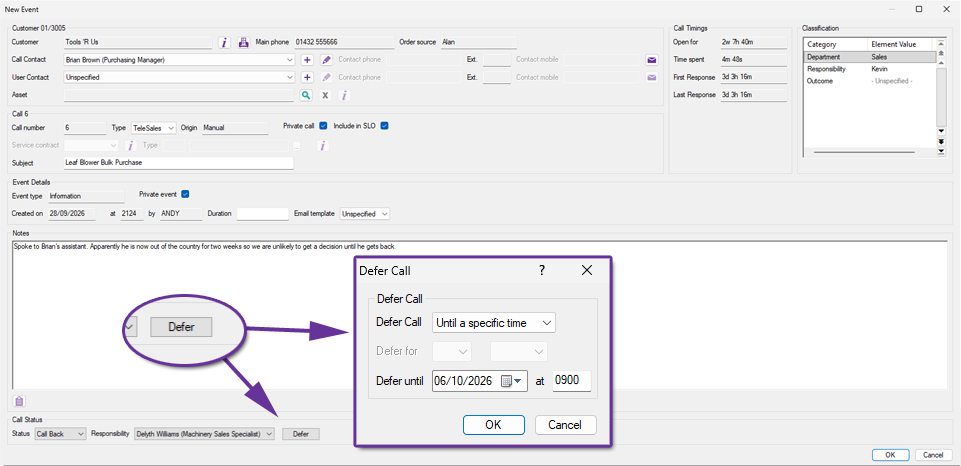
A new Defer button has been added to the Call Event window when updating CRM Telesales Calls. This allows a user to postpone a call until a later time without closing the event.
Users often need to record an interaction and then defer the follow-up until a more appropriate time. This can now be done in one operation.
Multi-Select in Calls Monitor
Available to Software Assurance customers with axis diplomat 2024 or above
Release Date: 11/12/2024 Call Reference: 661293
Managing Call lists can now be done more easily from within a Calls Monitor tab with the new ability to multi-select calls for block amendment.
You can select a contiguous range of entries by clicking on the first row and then clicking on the last row whilst holding down the Shift key. Alternatively, you can select non-contiguous rows by clicking on each individual entry whilst holding down the Ctrl key. You can also select all of the entries displayed by using Ctrl A.
In each case, a right-click will open the context menu offering the option to ‘Block Amend Calls’.
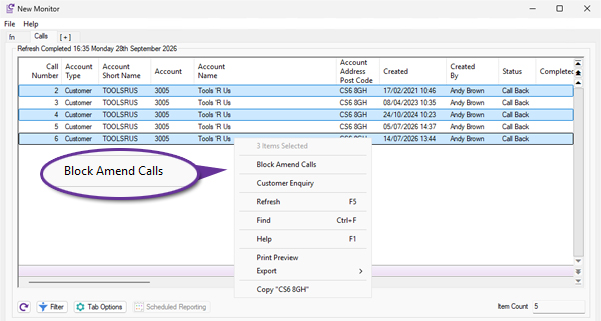
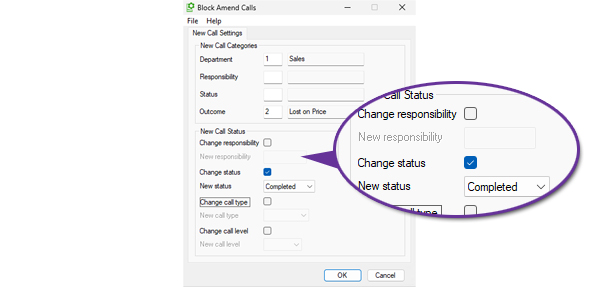
The block amendment function allows modification of the call classifications, responsibility, status, type and level.
Option to Exclude Credits from Goods on Account Invoicing
Available to Software Assurance customers with axis diplomat 2024 or above and the Goods on Account module
Release Date: 18/06/2026 Call Reference: 872727
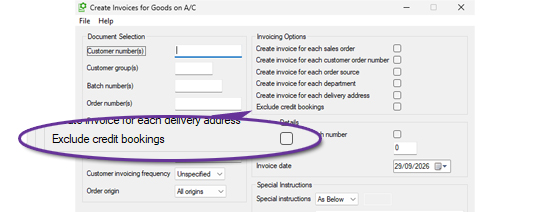
The Create Invoices for Goods on A/C function has been enhanced to provide greater control over the generation of invoices and credit notes from Goods on Account bookings. A new option, 'Exclude credit bookings', has been added to the Invoicing Options within the selection criteria screen.
Goods on Account processing is commonly used to automatically generate sales invoices from outstanding bookings. In some business environments, however, users may wish to prevent credit bookings from being converted into credit notes during the same run.
When the new 'Exclude credit bookings' option is selected, the function will ignore any Goods on Account bookings that have a negative value and would otherwise result in the creation of a credit note. Positive value bookings continue to be processed normally.
User and Group Security Permissions for Delivery Charges
Available to Software Assurance customers with axis diplomat 2024 or above and the Delivery Methods & Charges module
Release Date: 02/09/2025 Call Reference: 838195
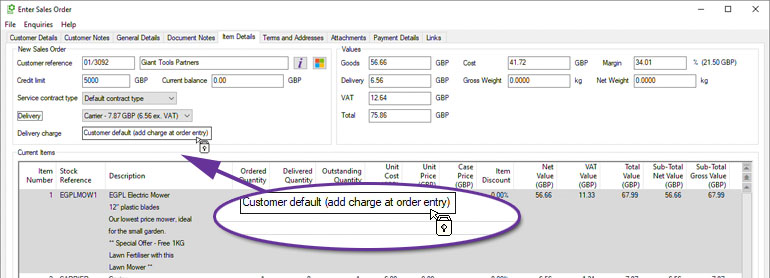
The security permissions within axis diplomat have been extended to allow permissions to be set on altering the delivery charge on a sales order. This allows you to keep delivery pricing consistent, and prevent accidental zero charges, protecting margins without slowing order entry.
A number of parameters (found on the Document Maintenance (cont.) tab of Sales Ordering Processing Parameters) control the use of Delivery Methods for Delivery Charges.
You can now allow or deny a user or user group the ability to amend the Delivery Charge on Sales Orders when “Delivery charge from delivery method” is enabled. Users without this ability may still choose the Delivery Method but cannot alter the Delivery Charge associated with that method.
For further details see Delivery Methods and Charges
Additional Options in Customer Price Feed Delivery
Available to Software Assurance customers with axis diplomat 2024 or above and the Customer Price Feed Delivery module
Release Date: 11/12/2024 Call Reference: 837114
A number of additional options have been added to the specification of customer price feed files:
Exclude Items With Zero or Negative Stock
It is now possible to create customer price feed files that only include items that you currently have available.
Supplier Stock Level by Individual Supplier(s)
You can now specify a list of suppliers to include in stock availability figures. Any available stock with other suppliers will be ignored.
‘Has Stock’ Indicator
If you wish to provide a customer with an indication of whether a particular item has stock available without actually specifying a stock on hand figure, you can now include a simple Yes/No column. The column can contain whatever text you wish, for example "Y" and "N", 0 or 1, "Available to Order", "Currently Out of Stock", etc.
Fixed Text
You can now specify a column that contains fixed text which will be used for every stock item (i.e. the same text will appear in that column on every row).
Custom Row Sorting
You can now define the order in which items appear in the customer price feed file.
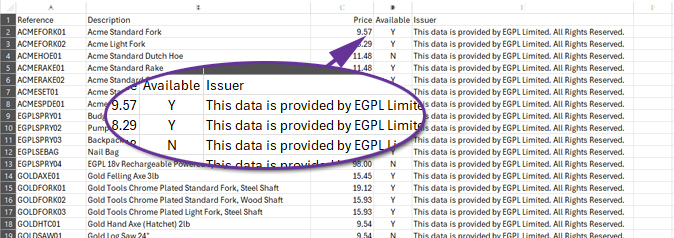
For more information:
https://documentation.axisfirst.co.uk/customer-price-feed-delivery/articles/29587
Allow Customer Price Feeds for Prospect Accounts
Available to Software Assurance customers with axis diplomat 2024 or above and the Customer Price Feed Delivery module
Release Date: 06/08/2026 Call Reference: 872528
Configuration of Customer Price Feeds was previously restricted to live account customers. This has now been extended to also include prospect accounts.
This is because it may be desirable, for commercial reasons, to provide a prospective customer with regular price updates before they become a live customer account. For example, the receipt of automated daily price and stock updates may be a pre-requisite that they have before agreeing to buy from you.
Furthermore, for those using the Sales Ledger Buying Groups module, the Buying Group accounts are themselves set as prospect accounts to ensure that they are not inadvertently used for sales transactions. This new development means that a customer price feed can now be configured for a buying group.
For more information:
https://documentation.axisfirst.co.uk/sales-ledger-buying-groups/articles/29625
Forward-Dated Case Pricing on Monitors
Available to Software Assurance customers with axis diplomat 2024 or above and the Case Pricing module
Release Date: 30/07/2025 Call Reference: 848241
For systems using the Case Pricing module in conjunction with Date-Specific Prices and Discounts, both the Stock Items and the Customer Price Lists monitor tabs have been enhanced with eight new columns to support future-dated pricing analysis.
These additions provide greater visibility into how case pricing, margins, and costs will look at a specified point in time. Users can configure the monitor tab using the Tab Options button, which includes a Show Prices For option to enable the additional columns. This allows you to specify a future date and time and view pricing information as at that point in time.
These enhancements make it easier to review future pricing and protect margins.
| Column | Description |
|---|---|
| Case Price (Current) | Renamed from Case Price. Shows current case price calculated as inner price x case quantity. |
| Case Price (DD/MM/YY) | Displays case price for the selected future date and time (inner price x case quantity). |
| Case Inner Price (Current) | Renamed to show current case inner price used in the calculation of the case price. |
| Case Inner Price (DD/MM/YY) | Shows case inner price for the selected date and time. |
| Case Margin On Standard Cost (%) (Current) | Shows margin percentage between standard cost and case price (current). |
| Case Margin On Standard Cost (%) (DD/MM/YY) | Shows margin percentage between standard cost and case price for selected date. |
| Case Margin On Standard Cost (Current) | Shows margin value between standard cost and case price (current). |
| Case Margin On Standard Cost (DD/MM/YY) | Shows margin value between standard cost and case price for selected date. |
More Stock Availability Information in Sales Order Maintenance
Available to Software Assurance customers with axis diplomat 2024 or above and the Despatch Quantity Recording module
Release Date: 08/05/2025 Call Reference: 843600
Sales Order Maintenance has been enhanced to provide greater visibility of stock availability when entering or amending sales orders and quotations. Additional columns can now be displayed on the Item Details tab, helping users to make better informed decisions more easily when processing customer orders.
The function now includes the following additional columns:
- Available Stock
- Available O/S Quantity
- Available O/S Net Value
- Available O/S VAT Value
- Available O/S Total Value
For businesses using despatch quantities, the Available Stock figure provides a more accurate indication of stock that is genuinely available to fulfil customer demand, taking existing allocations into account.
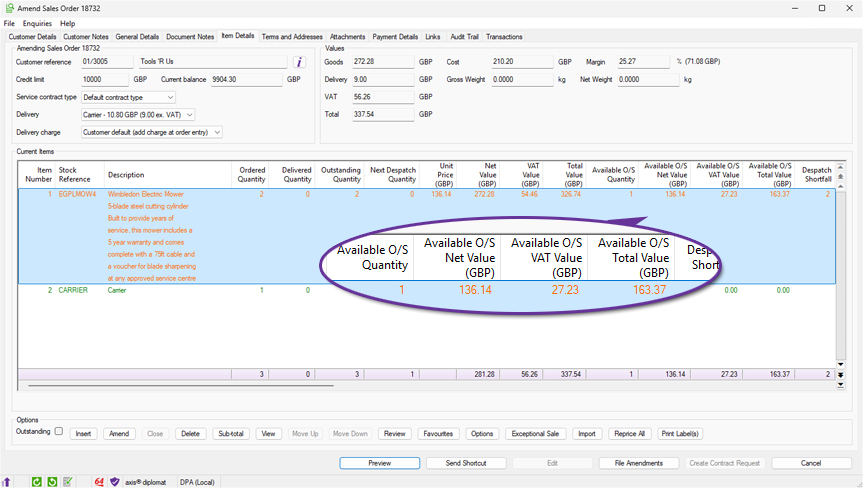
Improved Validation of Scanned Documents
Available to Software Assurance customers with axis diplomat 2024 or above and the Despatch & Delivery Management module
Release Date: 13/04/2026 Call Reference: 852810
The Attach Documents function has been enhanced to provide improved validation of scanned delivery documents, helping to prevent processing errors caused by incorrect Optical Character Recognition (OCR) results.
Documents can now be validated using a checksum contained within the scanned filename. During processing, axis diplomat verifies that the document reference and checksum contained within the filename match the expected values generated by the system. Documents that fail validation are prevented from being processed and are clearly identified for user review.
Where a document cannot be validated, the function displays the reason why the document is not suitable for processing, such as an invalid filename format or a checksum mismatch caused by an OCR recognition error. This improves the reliability of automated document processing by ensuring that scanned documents are validated before any attachment or post-processing activity takes place.
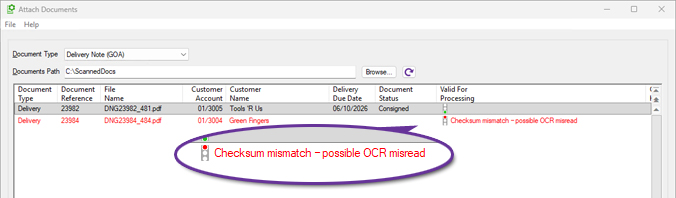
Statement Delivery Link to Web
Available to Software Assurance customers with axis diplomat 2024 or above and the axis vMerchant module
Release Date: 22/12/2025 Call Reference: 512189
This feature is intended for systems using axis vMerchant Express, where customers are encouraged to view their statements online.
Sales Ledger Statement emails can now include a link to a website (URL) that allows eligible recipients to access their statement online. When a statement is sent to a contact who is enabled for eBusiness and authorised to access accounts information, the system can insert a link into the email text that will take them directly to their statement page whilst ensuring that they are logged in.
Where Trading Identities are in use, these are taken into account when determining the appropriate site for the link.
Statement PDFs continue to be generated and stored via Document Delivery, ensuring statements remain available for audit purposes and attached to the email for recipients who prefer to receive statements in PDF format.
This enhancement provides a simple way to encourage customers to access their online account facilities while preserving the existing statement delivery process.
The email text may include the placeholder {url}, which is replaced at runtime with the statement link. This can be used in conjunction with a further substitution that can be included in the emails, {ebus, ...}. Anything between "{ebus," and "}" is only added to a particular email if the recipient is eBusiness-enabled - this means that you will not send links to people that cannot access them.
For example:
{ebus,To view and pay your statement online, please click here: {url}}
To make adjustments to your Sales Ledger Statement emails, use Maintain Sales Ledger Parameters tab 'Documentation' and ensure that the Statements template choice is document Designer, then click ‘Settings’.
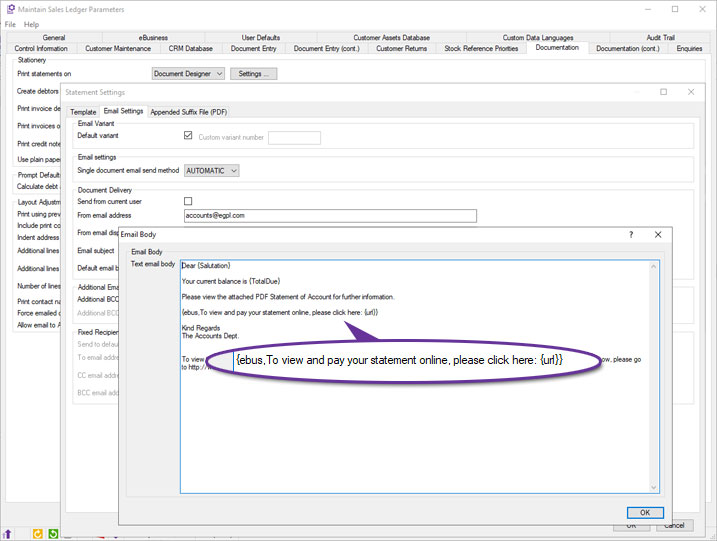
Customer Asset links
Available to Software Assurance customers with axis diplomat 2024 or above and the Customer Assets module
Release Date: 29/04/2026 Call Reference: 802398
axis diplomat has long supported the ability to link a CRM call to one specific asset (in this way, the CRM calls can be linked to the specific piece of customer equipment that the enquiry relates), link service contract line items to customer assets (to indicate which specific assets the service contract relates to), link assets to warranty packs (to apply an extended warranty to the asset) or link assets with other assets on a parent/child basis (to show individual components which make up an asset).
Now you can also:
(a) add links between assets (without creating a parent/child relationship) and
(b) add links from a CRM call to as many assets as you wish using the Call Maintenance 'Links' tab.
The Asset Enquiry/Maintenance function has been enhanced to:
(i) Add a 'Links' tab (familiar to users from other axis diplomat functions).
(ii) Provide a tick box on the asset enquiry/maintenance "Call History" and "Call Events" tabs giving users the option to include calls and call events relating to linked assets in addition to the asset in context.
Additional Domains in Customer Search
Available to Software Assurance customers with axis diplomat 2024 or above and the GFI Archiver Interface module
Release Date: 29/05/2026 Call Reference: 863968
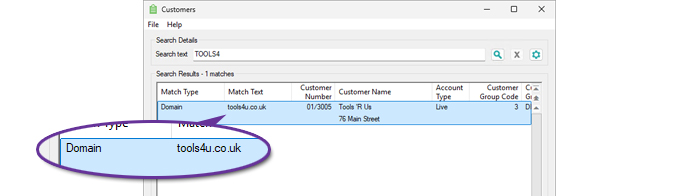
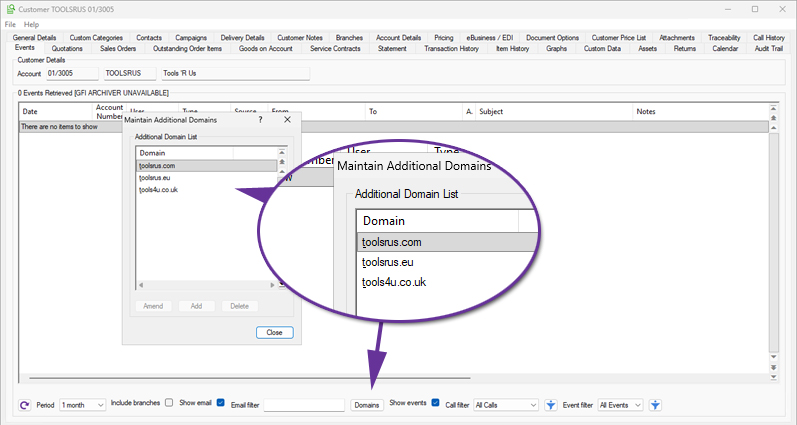
The Customer Search function has been enhanced to support searching by additional domains names associated with customers. This allows users to locate customers using a website or email domain, in addition to the existing search criteria.
This is particularly useful when dealing with organisations that are more commonly recognised by their trading website or email domain rather than their company name. For example, users receiving communications from a particular website domain can now quickly identify the corresponding customer account.
When a customer account is found through an additional domain, the search results now indicate this by displaying a Match Type of Domain.
New Contact Columns in Customer Assets Monitor
Available to Software Assurance customers with axis diplomat 2024 or above and the Customer Assets module
Release Date: 07/05/2025 Call Reference: 848524
Six new columns have been added to Customer Assets monitors, giving visibility of key contact details for each asset. For both the Asset Manager and the Asset User, columns for their Email, Telephone Number, and Mobile Number are now available. Please note that these columns are not enabled by default but can be added to a Customer Assets monitor by right-clicking on the column headings and selecting "More...".
In addition to being a convenient tool when contacting specific individuals about a particular asset, augmenting the information available on Customer Assets monitors also opens up valuable opportunities for targeted marketing and customer engagement and could even be used to populate CRM Campaigns
For more details on customer asset monitors see My Monitors – Customer Assets Monitor.
Urgent Notes for Assets
Available to Software Assurance customers with axis diplomat 2024 or above and the Customer Assets module
Release Date: 16/04/2025 Call Reference: 843469
Customer Assets may have notes, which enable you to record any information that you wish against individual assets. This has been enhanced to allow the notes against specific assets to be marked as Urgent.
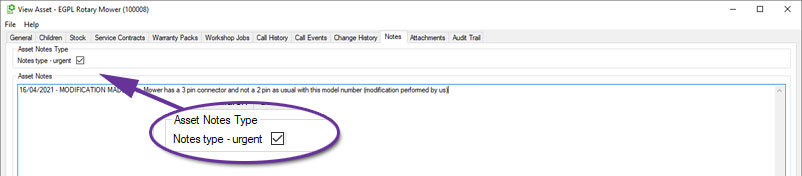
When an asset has an urgent note, the Asset Enquiry screen will now display an urgent notes dialog. Users must acknowledge this dialog before proceeding with the enquiry, ensuring that key details are not overlooked.
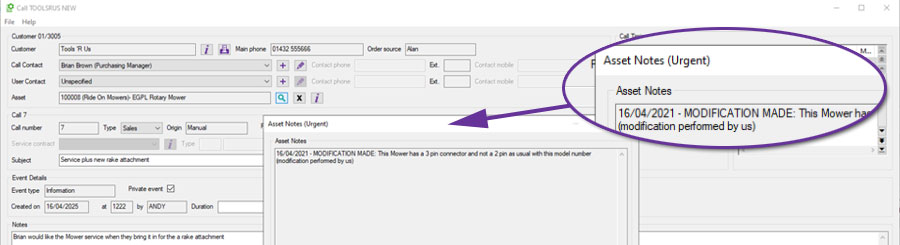
In addition, when linking an asset to a CRM call, Service Contract, or Workshop Job, any urgent notes associated with that asset will also appear automatically.
Copy Asset option from Asset Monitors
Available to Software Assurance customers with axis diplomat 2024 or above and the Customer Assets module
Release Date: 30/07/2025 Call Reference: 852632
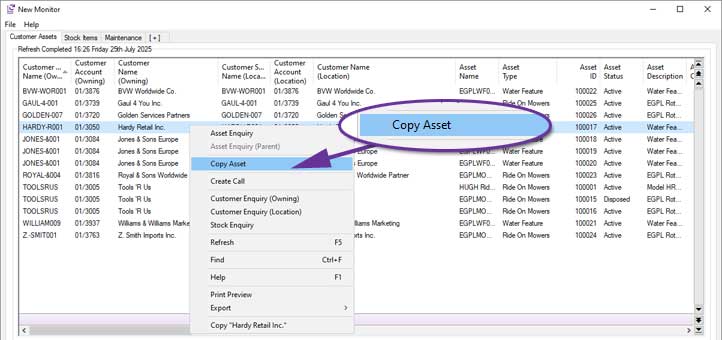
Customer Assets monitor tabs now include a context menu (right-click) option, ‘Copy Asset’, for users with appropriate security permissions. This allows users to quickly duplicate an existing asset, carrying over key details like descriptions, categories, and configurations. It is ideal for repeated installations or when onboarding similar equipment for a customer. The serial number is excluded in the copy. Custom data fields are copied based on their 'copyable' flag, which controls whether each field should be included in the copy. This is especially useful in cases where some asset details, such as access notes, are specific to the original and should not carry over. It allows faster, more accurate asset setup whilst maintaining flexibility where needed.
Asset Status Block Amendment
Available to Software Assurance customers with axis diplomat 2024 or above and the Customer Assets module
Release Date: 29/09/2025 Call Reference: 802733
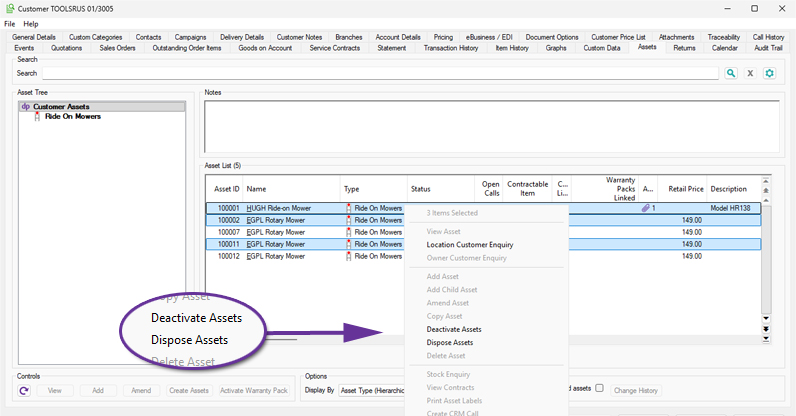
The status of multiple assets for a single customer can now be amended from Active to either Inactive or Disposed using multi-select from the Assets tab of a customer account.
A contiguous range of entries can be selected by clicking on the first relevant row and then clicking on the last row required whilst holding down the Shift key. Alternatively, select non-contiguous rows by clicking on each individual entry whilst holding down the Ctrl key. You can also select all of the entries displayed by using Ctrl A.
Lifecycle Fields for ICT Asset Service Management
Available to Software Assurance customers with axis diplomat 2024 or above and the ICT Asset Service Management module
Release Date: 11/06/2025 Call Reference: 822710
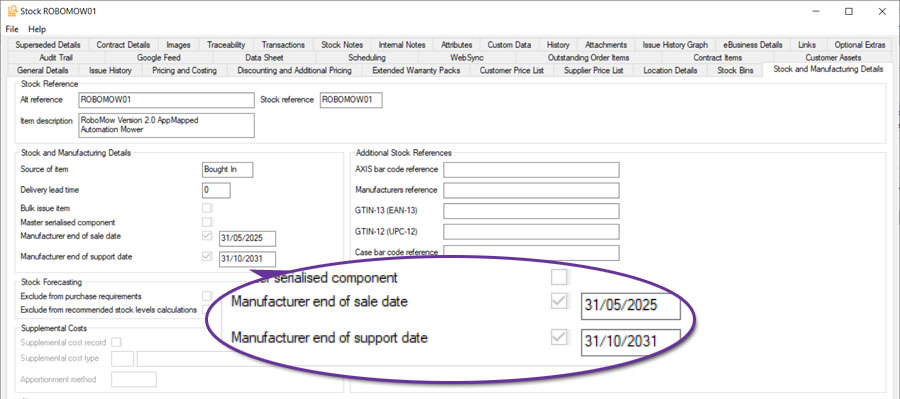
The ICT Asset Service Management module has been enhanced to add two new fields to axis diplomat stock records to help track a product's lifecycle. These fields are Manufacturer End-of-Sale Date and Manufacturer End-of-Support Date. These fields allow you to record key product lifecycle milestones directly against stock records, supporting proactive asset management and standards compliance (for example Cyber Essentials).
These new fields are fully integrated into monitors, giving users the ability to filter and report on both Stock Items and Customer Assets based on these dates. This makes it easy to identify stock linked assets that are no longer supported or are approaching end-of-sale, helping businesses plan ahead, manage risk, and meet compliance goals.
For more information:
https://documentation.axisfirst.co.uk/ict-asset-service-management/articles/21303
Purchase Ledger & Purchase Order Processing
AI Processing in Purchase Invoice Booking
Available to all customers with axis diplomat 2026 or above
Release Date: 15/10/2026 Call Reference: 829629
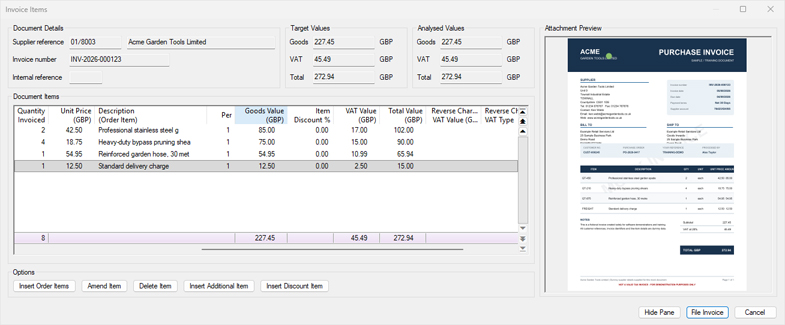
axis diplomat 2026 includes optional AI functionality to assist in processing purchase invoices and credit notes.
Utilising Microsoft's Azure AI Document Intelligence, your data remains secure during processing and is not retained or used for training purposes.
The AI functionality builds upon the Purchase Invoice Attachment Preview pane released with axis diplomat 2024 and analyses the attached document to try and identify the supplier and populate fields within Purchase Invoice Booking.
Supplier identification is done by way of trying to identify an exact Purchase Order reference. If that fails, it will look for a VAT registration number on a supplier account or a supplier Account Number. In the event of partial matches, a list of possible suppliers is shown. Ensuring your supplier data in axis diplomat is populated with the supplier's account number for you and their VAT number will greatly increase the success rate of this stage. If no supplier is found, the supplier may still be manually selected.
Once a supplier has been selected, the invoice header details are populated for review and amendment.
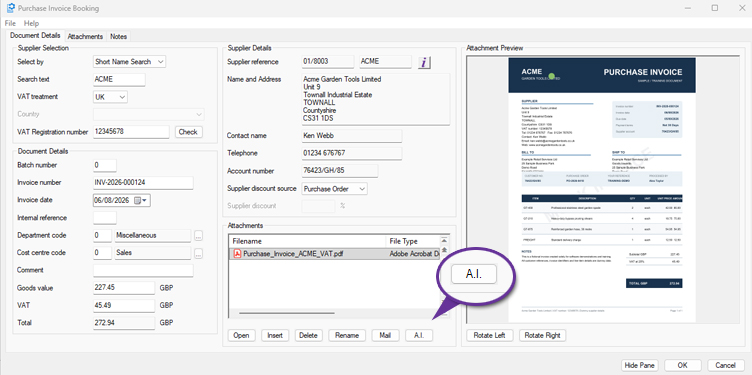
The AI functionality also populates the invoice analysis details.
If an outstanding purchase order has been identified, any matching order line items will be added. If no purchase order line items have been matched, the lines will be inserted as Additional Items using the supplier default nominal analysis code, if set. If no default nominal code is set on the supplier the additional item lines will be populated without a nominal code and will require manual amendment. Setting default nominal expense codes on your supplier accounts further increases the efficiency when entering additional items both manually and using AI.
A separate line is entered per line on the supplier invoice, together with the line description and price.
For more information:
https://documentation.axisfirst.co.uk/purchase-invoice-booking/article/160799
Bulk Close Purchase Orders from Monitors
Available to Software Assurance customers with axis diplomat 2024 or above
Release Date: 30/04/2025 Call Reference: 841600
Users are now able to close multiple purchase orders in one action via multi-select within Purchase Order, Purchase Order Items, or Purchase GRNI monitor tabs. Multiple entries can be selected by using Shift+Click to select a range or Ctrl+Click for individual entries. Ctrl+A selects all visible rows, which is ideal when filters have been applied to limit the selection of purchase orders shown.
Once selected, right-click to access the Close Purchase Order option. An audit trail event is created on each purchase order to provide a clear history of changes.
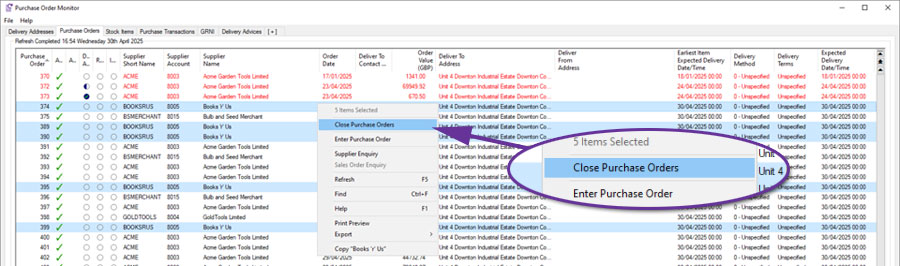
Access to this functionality is controlled by the Security Permissions of the user.
Exclude Accounts with Balances from Automatic Payment Allocation
Available to Software Assurance customers with axis diplomat 2024 or above
Release Date: 04/12/2025 Call Reference: 844758
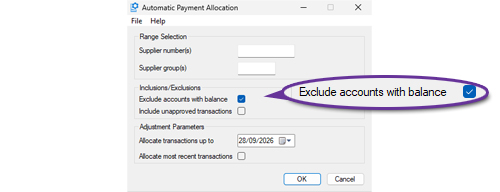
The Automatic Payment Allocation function has been extended to provide an option to 'Exclude accounts with balance'. This allows the function to be run so that it only deals with allocations on accounts that have a zero value outstanding balance. Those with non-zero balances can then be reviewed manually afterwards to assess what allocations need to be made.
Import Supplier Status
Available to Software Assurance customers with axis diplomat 2024 or above
Release Date: 16/04/2025 Call Reference: 847283
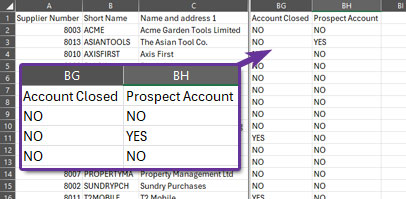
The Import Supplier Records function has been extended to allow new or existing supplier accounts to be flagged as Closed or Prospect. Two new fields have been added to the Supplier Fields Page 3 tab:
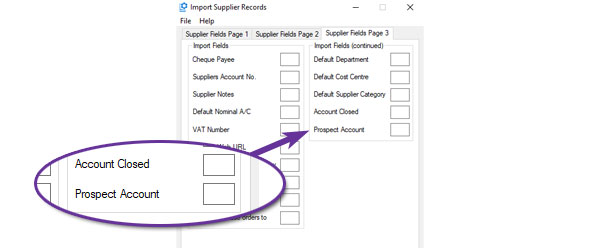
The Export Supplier Records function has also been extended to include these two settings as additional columns in the standard layout:
Additional Column in Stock Transaction Monitor
Available to Software Assurance customers with axis diplomat 2024 or above and the Purchase Delivery Advice module
Release Date: 30/07/2025 Call Reference: 832585
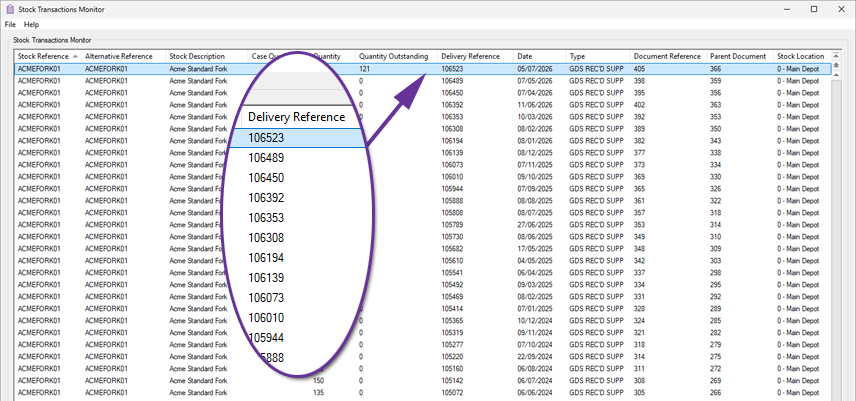
A new Delivery Reference column has been added to Stock Transactions tabs in Monitors. This is available for applicable purchase order and goods received transactions and provides a direct link between the stock receipt transaction and the associated Purchase Delivery Advice.
By using the new column with the standard sorting, filtering and export facilities, it is now easier to group and analyse transactions relating to a particular purchase delivery.
Transfer Cost Price from Sales Order to Purchase Order
Available to all customers with axis diplomat 2026 or above
Release Date: 15/10/2026 Call Reference: 861737
Sales Order Maintenance has been modified to add a new option to the Purchase Ordering and Delivery Details tab in item entry/amendment for 'Use sales order cost'.
This option can be used to set the purchase order unit price for the item to the unit cost from the sales order when back-to-back ordering or creating purchase requirements from sales orders.
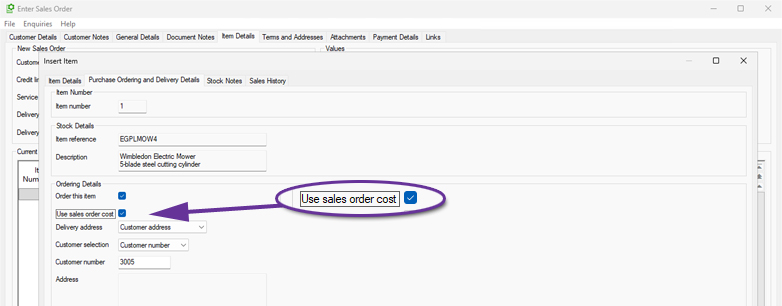
This is most useful for items that are quoted by suppliers on a Price On Application (POA) basis and from which the selling price has been calculated rather than using a fixed selling price from the stock record or customer price list.
Document Substitutions in Email Templates
Available to Software Assurance customers with axis diplomat 2024 or above
Release Date: 13/11/2025 Call Reference: 861464
Document substitutions that were previously only supported in sales document emails are now supported in purchase ledger and purchase order processing emails as well.
This means that any email that is generated by the system to deliver a document to a supplier can now include substitutions for any of the fields relating to the document, such as the document number, as well as the contact details for the person sending the document.
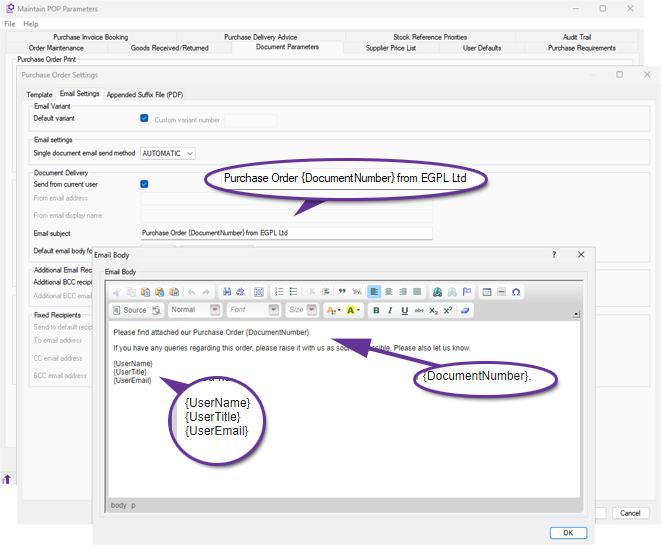
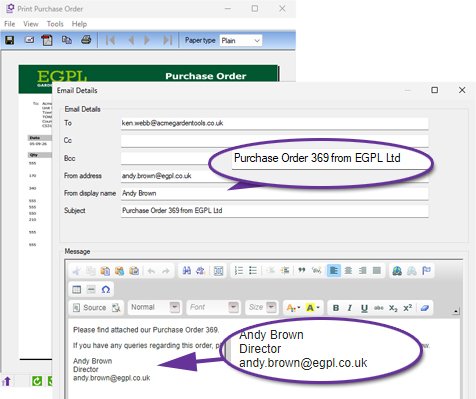
Show Date and Time Supplier Price Last Updated
Available to all customers with axis diplomat 2026 or above
Release Date: 15/10/2026 Call Reference: 859723
Supplier price lists now record the time as well as the date that the price and supplier stock levels were last updated, providing further clarity on how up-to-date the information is. This is especially useful on systems with automated price feeds running multiple times each day.
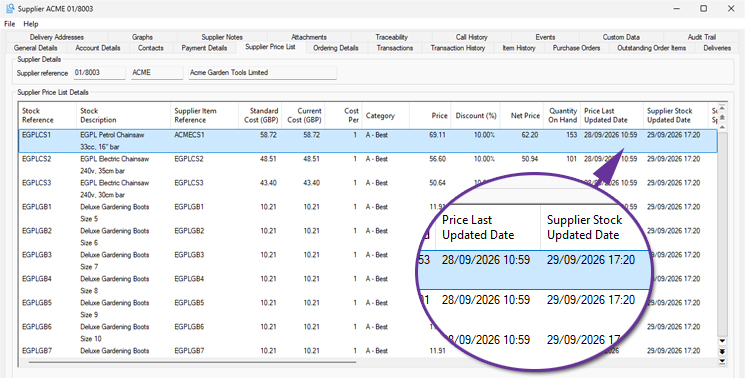
Document Designer Goods Received and Return Notes
Available to Software Assurance customers with axis diplomat 2024 or above
Release Date: 30/10/2025 Call Reference: 856470
Document Designer versions of the Goods Received Note and Goods Returned Note documents are now available. These new templates allow users to fully customise the layout, wording, and fields shown on each document, providing flexibility to match internal processes and corporate branding.
Both templates are available from:
Maintain POP Parameters > Document Parameters tab > Goods Received / Returned Print
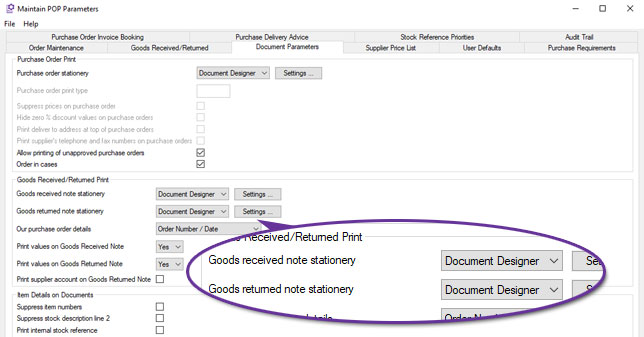
Selecting Document Designer enables the Settings button, allowing users to view available merge fields, edit the design, and control document appearance through the familiar Document Designer interface.
When printed, both documents automatically create an audit trail event, recording the user, date, and time of printing for complete traceability.
This enhancement brings Goods Received and Goods Returned documentation in line with other purchasing and stock-related stationery, allowing a consistent, familiar design across the purchasing workflow.
Additional Domains in Supplier Search
Available to Software Assurance customers with axis diplomat 2024 or above and the GFI Archiver Interface module
Release Date: 29/05/2026 Call Reference: 863968
The Supplier Search function has been extended to support searching by additional domain names associated with suppliers. This allows users to locate suppliers that use multiple website or email domains.
This is particularly useful when dealing with organisations that have a trading name that is different to their business name or have multiple trading identities.
When a supplier account is found through an additional domain, the search results now indicate this by displaying a Match Type of Domain.

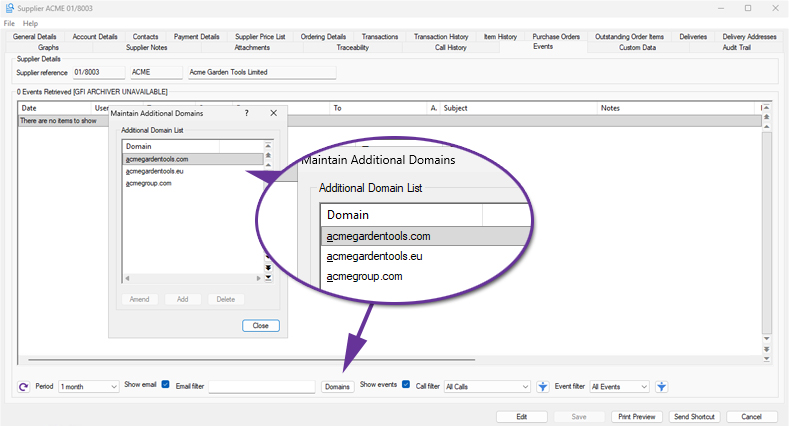
Stock Ledger, Bill of Materials & MRP
Improved Load Speed for Stock Enquiry
Available to all customers with axis diplomat 2026 or above
Release Date: 15/10/2026 Call Reference: 862181
The Stock Enquiry function has been enhanced to improve performance on systems with large volumes of historical transactions or traceability data. Several data-intensive tabs now retrieve information in the background, allowing users to begin working with a stock item immediately whilst additional information continues to load behind the scenes.
This applies to the following Stock Enquiry tabs:
- Transactions
- Traceability
- Location Details
- Stock Bins
For organisations with significant stock transactions, particularly when they are concentrated on particular stock items, these enhancements help improve day-to-day efficiency by allowing users to access stock information more quickly.
Transfer All Location Stock
Available to Software Assurance customers with axis diplomat 2024 or above
Release Date: 25/07/2025 Call Reference: 851245
An all-new Supervisor function has been added, 'Transfer All Location Stock'. This enables the efficient and controlled movement of all stock, including traceable items, between locations whilst maintaining full transaction history.
The function automates key checks, including identifying open documents, such as outstanding sales or purchase orders, that may prevent transfers and ensures valid bin assignments at the receiving location. It also handles locked records without interrupting the batch process, making it a true multi-user function. Furthermore, if a stock item is not active at the destination, it is automatically activated. Users can also assign adjustment reasons, enter batch references for traceability, and generate detailed reports for audit and review using the existing functionality of a stock transactions monitor.
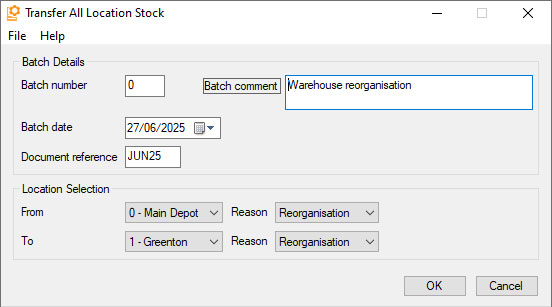
This functionality is particularly useful in operational scenarios such as full warehouse moves, site closures, or warehouse reorganisation projects where large volumes of stock need to be relocated. It ensures that transfers are processed accurately, with minimal manual intervention and a clear audit trail.
For more information, please refer to the function help Transfer All Location Stock
Move Whole Bin Contents within Location
Available to Software Assurance customers with axis diplomat 2024 or above and the Multi Location Multi Bin Stock module
Release Date: 11/06/2025 Call Reference: 780205
The function Stock Movement Between Locations has been extended to include a new option.
The Whole Bin Contents option supports the movement of all stock items from one bin to another within the same stock location. This option is triggered when the selected ‘From’ and ‘To’ locations match, making it ideal for internal warehouse reorganisation, such as adjusting pick paths due to seasonal changes or stock turnover patterns. The batch interface enables users to initiate a session, scan or enter the source bin, and confirm quantities for transfer in a single action, with optional document reference updates. The process validates bin-level stock availability, enforces same-location constraints, and supports barcode scanning, including composite Location/Bin labels.
Delivery Reference Column in Stock Transactions Monitor
Available to Software Assurance customers with axis diplomat 2024 or above and the Purchase Delivery Advice module
Release Date: 12/08/2025 Call Reference: 832585
On systems with the Purchase Delivery Advice module, Stock Transactions monitor tabs now include an additional column showing the Delivery Reference (for Goods Received from Supplier transactions):
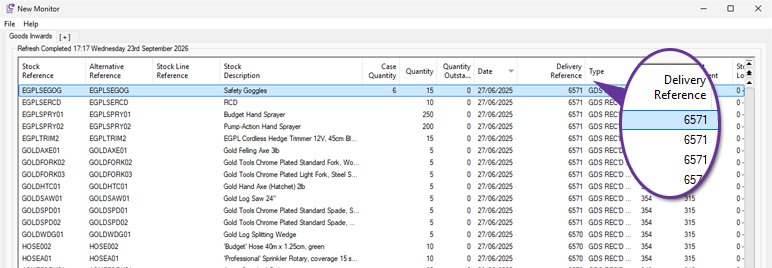
Filtering Monitors by Customer or Supplier Prices
Available to Software Assurance customers with axis diplomat 2024 or above
Release Date: 08/05/2025 Call Reference: 846730
Two new filter options have been made added to all monitor tab types that can be filtered by Stock. The new filters, Price Exists For Customer and Price Exists For Supplier, allow you to enter an account number and view only stock items that have a matching price list entry. By combining this with other filters you could, for example, produce a monitor listing all of the items for which a specific customer has special pricing but which are not published to your website (and which they therefore could not purchase online).
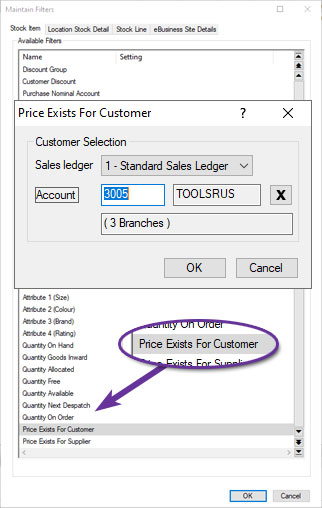
Delivery Note Column in Stock Enquiry
Available to Software Assurance customers with axis diplomat 2024 or above
Release Date: 16/07/2025 Call Reference: 853332
The Transactions tab within Stock Enquiry now includes a dedicated Delivery Number column specifically for GRN (Goods Received Note) transactions. This addition allows you to quickly reference the supplier’s delivery note number directly from the Stock Transactions tab without the need to open individual transaction records.
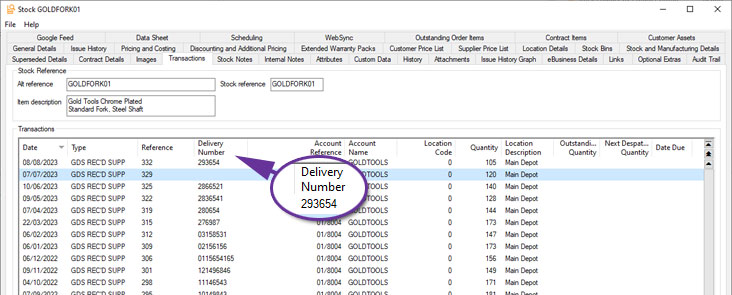
Import Stock Custom Data Schemas
Available to Software Assurance customers with axis diplomat 2024 or above
Release Date: 27/11/2025 Call Reference: 843693
Custom Data Schemas are especially useful for Stock items, where it is possible to have hundreds of custom data fields across many different product types.
Creating all of these data fields is now potentially much easier by allowing import from a file, either an Excel spreadsheet or a comma-separated (CSV) or tab-separated (TSV) text file.
This facility has also been made available on all other forms of custom data, including Customer, Supplier, Nominal and, for those with the appropriate module, Customer Assets.
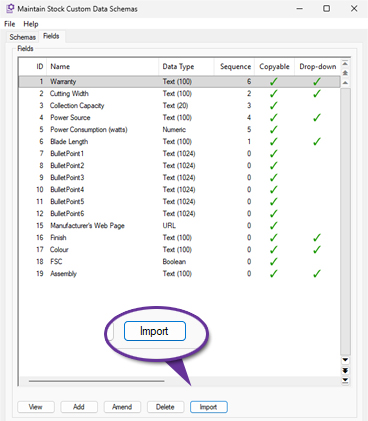
Import Stock Details from CSV Profiles
Available to Software Assurance customers with axis diplomat 2024 or above
Release Date: 10/03/2025 Call Reference: 836729
The function to import stock records from CSV files has been extended to support profiles.
Profiles allow you to save all of the field matching for future use. If, for example, you regularly get an updated product file from a supplier, you can set up the criteria to map that supplier's file to the axis diplomat stock record fields once and save as a profile. That means that you never need to specify all of the selection criteria again unless the supplier changes the format of their file.
Furthermore, the profiles are shared across all users so that, once set up, the profile can be used to import that format file by anyone.
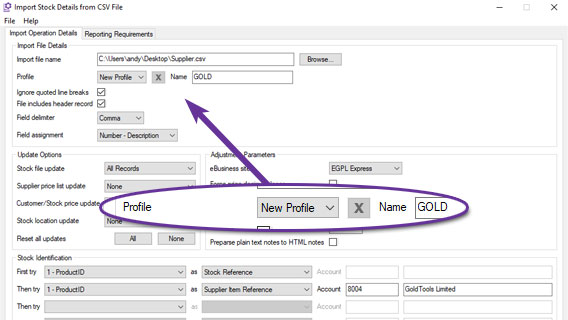
This example shows creating a new profile called "GOLD" that can be used in the future to import updated product files in the same format.
Additional Reference Matching in Import Stock Details from CSV
Available to Software Assurance customers with axis diplomat 2024 or above
Release Date: 10/03/2025 Call Reference: 839855
In addition to matching items in the file to existing stock items by Stock Reference, Alternative Reference and Supplier's Reference, the Import Stock Details from CSV function also supports matching by Manufacturer's Reference and any of the Barcodes that can be held against a stock item.
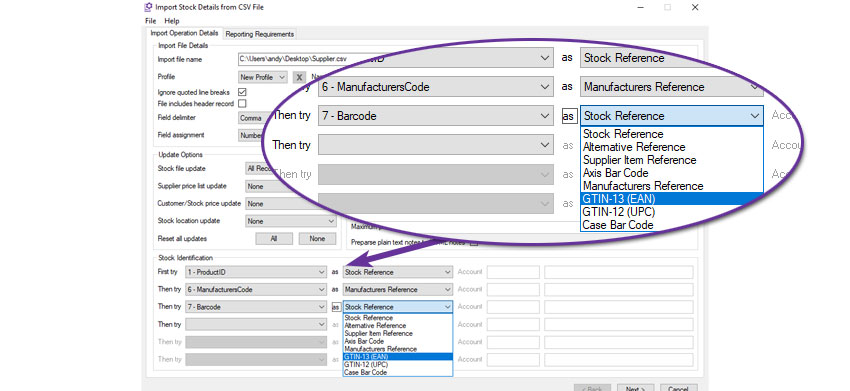
For example, this import will attempt to match column 1, the ProductID, to an existing stock record's Stock Reference. If it does not find one, it will attempt to match column 6 to a stock record's Manufacturer's Reference. If it does not match an item it will then attempt to match the barcode from column 7 of the import file. Only if it then fails to find a match will it create a new stock record.
Supplier Stock in Stock Monitor
Available to Software Assurance customers with axis diplomat 2024 or above
Release Date: 01/06/2026 Call Reference: 862378
The Stock Items monitor tab has been extended to include the following fields:
- Supplier Stock Quantity
- Supplier Expected Stock Quantity
- Supplier Stock Expected Date
These fields provide immediate visibility of supplier-held stock alongside existing stock information, making it easier to assess product availability and make informed purchasing, sales and fulfilment decisions.
The supplier stock figures shown exclude quantities held against supplier records that are considered out of date according to the standard supplier stock age calculation. This helps to ensure that displayed stock levels remain relevant and reliable.
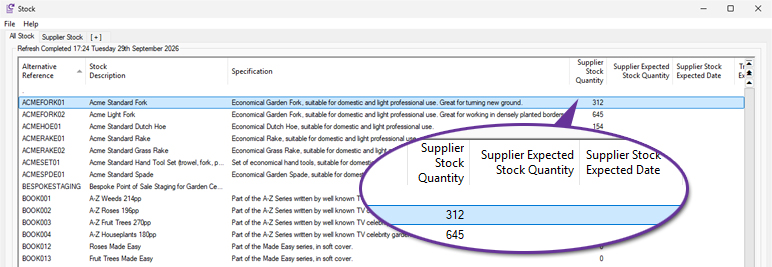
Stock Record Block Amendment
Available to Software Assurance customers with axis diplomat 2024 or above
Release Date: 15/01/2025 Call Reference: 842175
The Stock Record Block Amendment function has been modified to include an additional field for "Delivery Item".
The Delivery Item is a checkbox seen on the Pricing and Costing tab of a Stock Record and is used to indicate items used as delivery charges that can be zero VAT-rated for orders consisting entirely of zero VAT-rated items. This option is only available for items classified as either a service or a directly related service and so items classified as goods will not be updated.
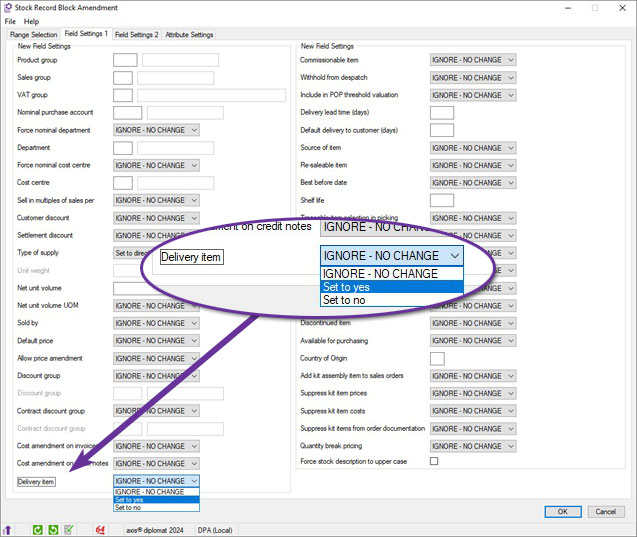
Purchase Delivery Information in Stock Enquiry
Available to Software Assurance customers with axis diplomat 2024 or above and the Purchase Delivery Advice module
Release Date: 12/08/2025 Call Reference: 832585
The Transactions tab within Stock Enquiry has been enhanced to provide clearer links between goods receipt transactions and the associated Purchase Delivery Advice. A Delivery Reference column is available for applicable purchase order and goods received transactions.
A new Purchase Delivery Enquiry option is also available from the right-click context menu. This allows users to open the associated Purchase Delivery Advice directly from a relevant transaction without having to locate the delivery separately.
The supplier’s delivery note reference is shown separately as the Delivery Note Number, making it clear which value identifies the supplier’s document and which identifies the Purchase Delivery Advice within axis diplomat.
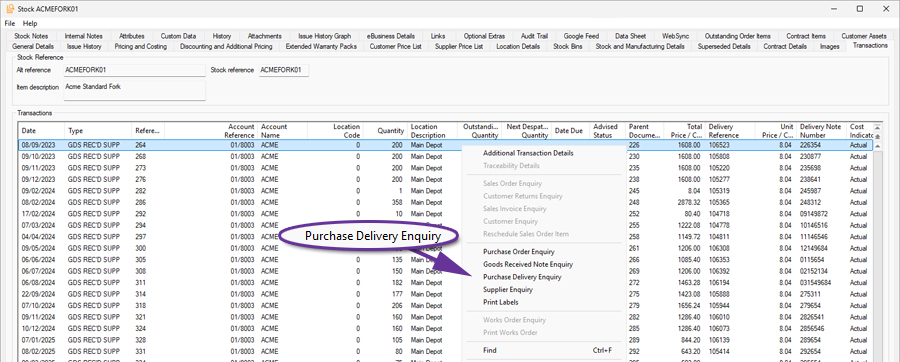
Discontinued Column in Where Used tab
Available to Software Assurance customers with axis diplomat 2024 or above and the Bill of Materials module
Release Date: 24/03/2026 Call Reference: 869177
The Stock Enquiry function has been extended to include a Discontinued column.
.jpg)
This can help identify components that may no longer be required because the assemblies that they are used in are now discontinued.
Assembly Audit Trail
Available to Software Assurance customers with axis diplomat 2024 or above and the Bill of Materials module
Release Date: 13/12/2024 Call Reference: 144085
When an assembly record is edited, an Audit Trail event is now created which can be viewed on the Audit Trail tab within the Assembly Enquiry function.
You are able to edit a sub-assembly whilst working on a higher-level assembly. For example, if you modify component EGPLACC2, within the context of the assembly EGPLPTK01, the Audit Trail will record an event "Amended component EGPLACC2 whilst maintaining EGPLPTK01." This feature makes it easy to track how and when changes were made.
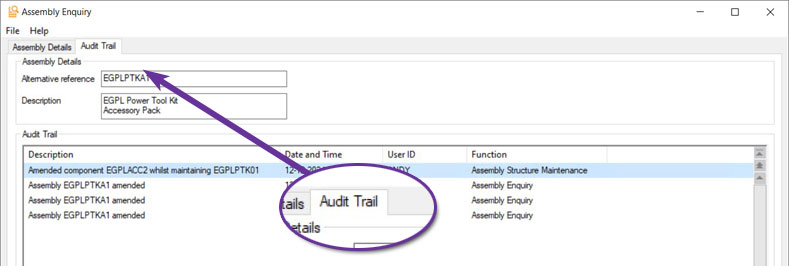
Auto Schedule Sales Order
Available to all customers with axis diplomat 2026 or above and the Compact MRP module
Release Date: 15/10/2026 Call Reference: 860034
A new mode of operation has been added to Compact MRP to automatically schedule sales orders.
The setting is configured via the function Maintain MRP Parameters:
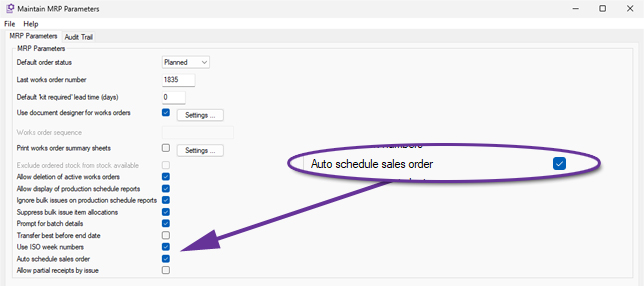
Note that the option is only available when the default order status is Planned.
Once enabled, axis diplomat will automatically create and schedule Works Orders for manufactured items as Sales Orders are filed. This removes the need for users to manually run Schedule Planned Orders after filing each sales order.
As well as forming part of the entry of new Sales Orders and the conversion of Quotations into Sales Orders, additional manufactured items added to existing Sales Orders will also be scheduled automatically.
Printing Works Order Document Status Codes on Documents
Available to Software Assurance customers with axis diplomat 2024 or above and the Compact MRP module
Release Date: 19/05/2026 Call Reference: 860034
The Works Order Document Status (description and/or code) is now available to incorporate into works order documents within the template designer.
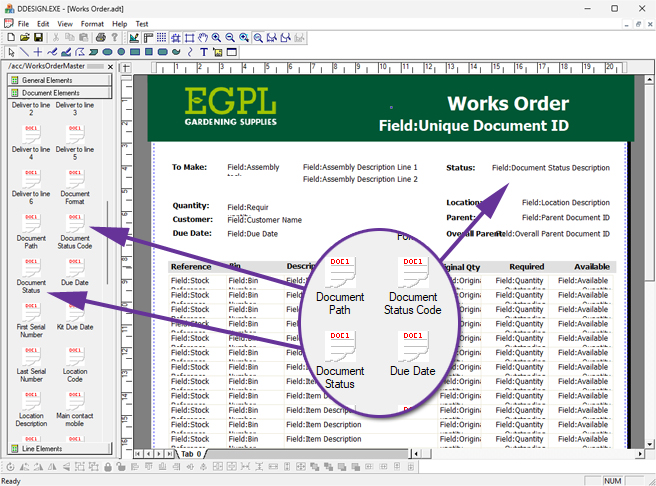
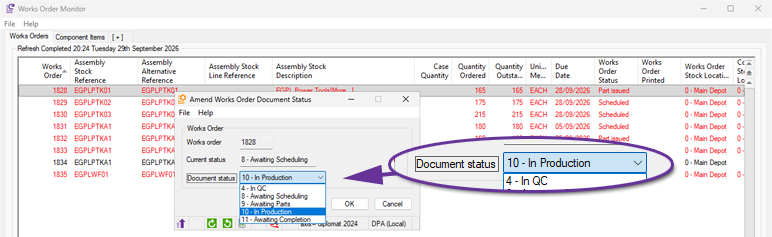
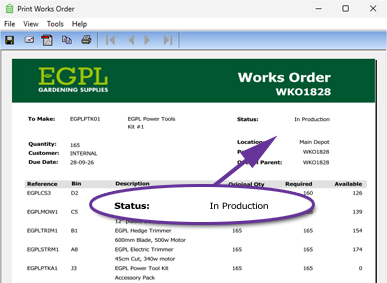
Scripts can also be used to switch between different document templates, depending on the current status of the Works Order. This would mean, for example, that there could be a completely different layout for Works Orders that have a status of "In QC", perhaps including boxes for recording test results and a signature for the tester.
Master Batch Component Transfer
Available to all customers with axis diplomat 2026 or above and the Compact MRP module
Release Date: 15/10/2026 Call Reference: 856483
Compact MRP has been enhanced, when used in conjunction with Stock Traceability, to support finished goods that inherit key batch details from a designated master component within the Bill of Materials.
The specific component is marked as the master traceable component:
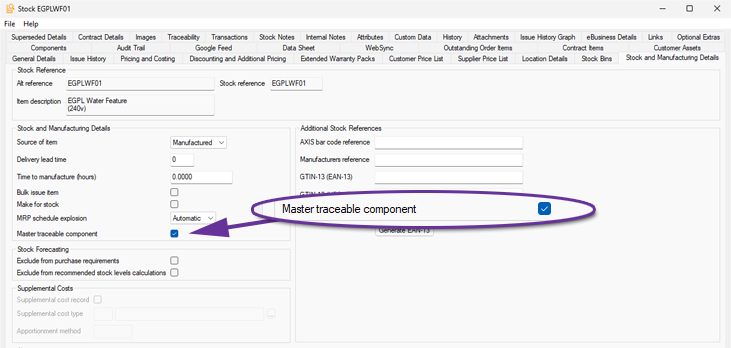
When goods are received from works, the system can then identify the defined master component and transfer its batch reference and Best Before Date onto the finished goods batch. This is particularly useful where the finished product’s traceability is driven by a primary ingredient or component rather than by a newly generated production batch reference.
Where more than one batch of the master component has been issued to the Works Order, the system determines which batch should drive the finished goods details. If Best Before Date control applies, the earliest Best Before Date is used. Where Best Before Date is not applicable, standard FIFO logic is used.
This helps to reduce manual entry and ensure that finished goods retain the correct traceability back to the component batch used in manufacture. Typical applications include where the manufacturing process is essentially re-packaging, decanting or supplementing one core item.
Return Unused Components from Works Order Monitor
Available to Software Assurance customers with axis diplomat 2024 or above and the Compact MRP module
Release Date: 07/11/2025 Call Reference: 861000
A new right-click option has been added to the Works Order Monitor, allowing users to return unused materials without first opening the individual Works Order.
This provides a quicker and more convenient method of handling excess components during production by reducing the number of steps required to update stock levels.
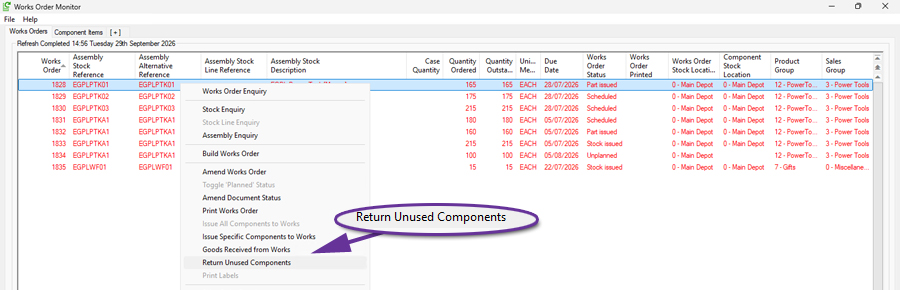
Partial Goods Received from Works by Issued Components
Available to all customers with axis diplomat 2026 or above and the Compact MRP module
Release Date: 15/10/2026 Call Reference: 862460
A new parameter-controlled enhancement has been introduced to allow finished goods to be received from Works Orders based on the quantity that can be built from components already issued to the Works Order. This provides greater flexibility when assemblies are produced in batches or when not all components have been issued at the point some of the goods need to be received.
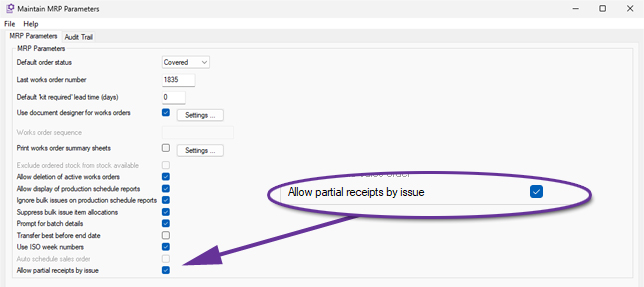
When enabled, axis diplomat automatically calculates the maximum quantity that can be received based on the issued component quantities and the Works Order's Bill of Materials. The same calculation is applied consistently throughout the Goods Received from Works process, ensuring receipt quantities remain aligned with the materials that have been issued.
This enhancement allows users to receive only the quantity that has physically been completed, rather than requiring the full Works Order quantity to be available before any receipt can take place. Any remaining quantity stays on the Works Order and can be received later as additional components are issued and production progresses.
This is particularly beneficial for businesses that manufacture or assemble products in multiple stages, allowing completed stock to become available sooner for allocation and despatch.
Works Order Column for Master Traceable Batch
Available to Software Assurance customers with axis diplomat 2024 or above and the Stock Transaction Traceability module
Release Date: 12/12/2025 Call Reference: 863072
For those with both the Compact MRP and Stock Transaction Traceability modules, the Works Order Monitor has been enhanced with a new Batch / Serial No column, providing immediate visibility of the traceability information associated with a Works Order.
The new column displays the relevant batch or serial number information throughout the lifecycle of a Works Order, including reservations, picks and issues. Where material is associated with multiple batches, all applicable values can be displayed using the monitor's multiline functionality.
By making traceability information available directly within the monitor, users can review production requirements, identify the batches allocated to a Works Order and build production-focused monitor views without the need to open additional enquiries.
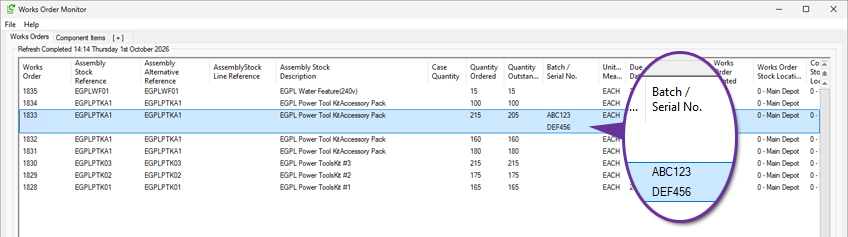
Suppress Custom Build Items from Documents
Available to Software Assurance customers with axis diplomat 2024 or above and the Custom Build Assemblies module
Release Date: 30/12/2025 Call Reference: 858793
A new option, configurable on an assembly-by-assembly basis, allows control over whether the custom build option list items themselves will appear on sales documents such as quotations, sales orders and invoices. When set, only the individual components which comprise the custom build will be shown on documents.
Warehouse Management
Delivery Note Scanning for Goods on Account
Available to Software Assurance customers with axis diplomat 2024 or above and the Despatch & Delivery Management module
Release Date: 20/11/2025 Call Reference: 852810
The Attach Documents function has been enhanced to support Goods on Account (GOA) Delivery Notes, extending the document scanning and processing capabilities previously available for Sales Orders. Users can now automatically attach scanned Proof of Delivery (POD) documents to GOA deliveries and, where appropriate, generate invoices directly from the associated GOA booking.
The function monitors a user-defined folder for scanned PDF documents and identifies the relevant delivery using information contained within the document filename. Once identified, the scanned document is automatically attached to the corresponding GOA delivery record, removing the need for manual document filing and retrieval.
For customers who do not use consolidated invoicing, the attached delivery notes can be used to automatically initiate the invoice creation process from the associated GOA booking. This helps streamline the transition from proof of delivery to invoicing, reducing manual administration and accelerating billing activities.
This enhancement extends the benefits of delivery note scanning beyond Sales Orders, providing a streamlined and efficient process for businesses using Goods on Account deliveries.
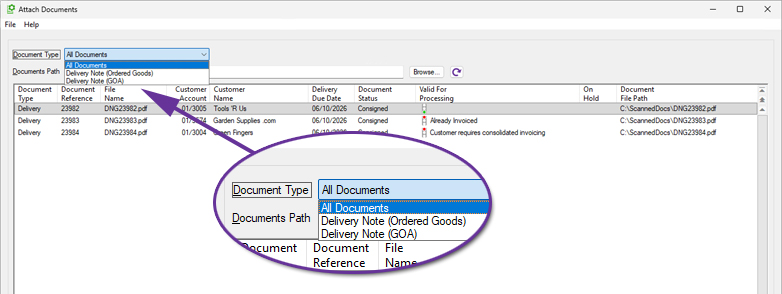
Scan Delivery Note during Despatch
Available to Software Assurance customers with axis diplomat 2024 or above with Warehouse Management
Release Date: 31/10/2024 Call Reference: 800292
A new system parameter has been added to force scanning of the Delivery Note printed as part of the despatch process once a Delivery has been picked.
This is designed to ensure that the user packs the correct Delivery Note with goods as they are despatched when in a busy warehouse environment where printers may be shared between multiple pickers.
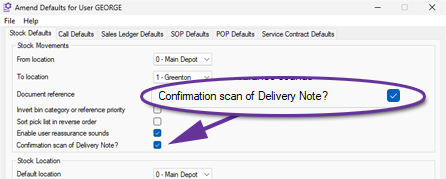
The parameter can be set on a user-by-user basis using the Stock tab of the Amend User Defaults function.
Pick sales orders directly from Customer Enquiry
Available to Software Assurance customers with axis diplomat 2024 or above and the Warehouse Paper-based Sales Order Picking module
Release Date: 10/02/2026 Call Reference: 764606
A new context menu (right-click) option has been added to make it easier to pick sales orders directly from Customer Enquiry. When you highlight an order on the Orders tab, or an individual line on the Outstanding Order Items tab, you can now use the new Pick Sales Order option.
Whether you are preparing a delivery for picking by consolidating items from multiple sales orders for the warehouse to pick using a paper Delivery Note, or mirroring annotated paperwork that has come back from a warehouse, the system can be configured to suit your requirements using SOP Parameters.
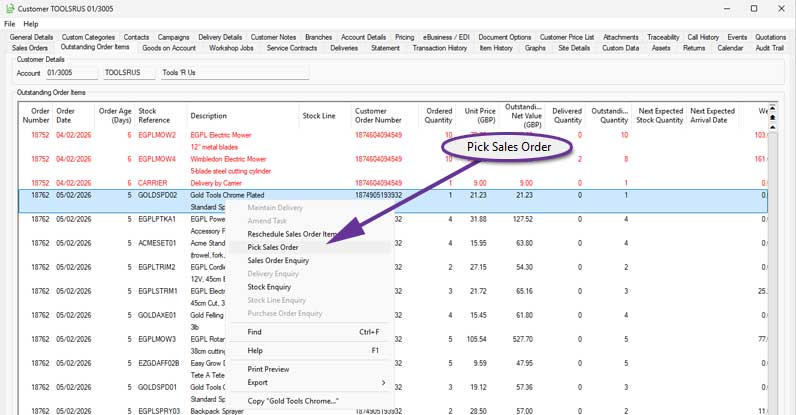
Auto pick sales order for faster paper-based picking
Available to Software Assurance customers with axis diplomat 2024 or above and the Warehouse Paper-based Sales Order Picking module
Release Date: 10/02/2026 Call Reference: 764606
A new parameter, Auto pick sales order, speeds up paper-based picking by automatically picking eligible items as soon as you enter the picking function. When this option is enabled, all non-traceable items on the selected order are automatically picked on entry, so the user can go straight to printing paperwork or reviewing exceptions instead of picking each line manually.
This is ideal where the majority of items do not require serial or batch tracking and where the picking team works from printed documents. It reduces keying effort, helps keep picking consistent and supports higher throughput in busy warehouses.
The Auto pick sales order parameter is available for locations that are not multi bin. For multi bin warehouses, standard picking controls remain in place and items continue to be picked manually through the existing process.
Age Restricted Products
Available to Software Assurance customers with axis diplomat 2024 or above and the Despatch & Delivery Management module
Release Date: 15/07/2026 Call Reference: 774037
For systems with Despatch & Delivery Management, the ability to flag a stock item for 'Age restricted sales' has been added.
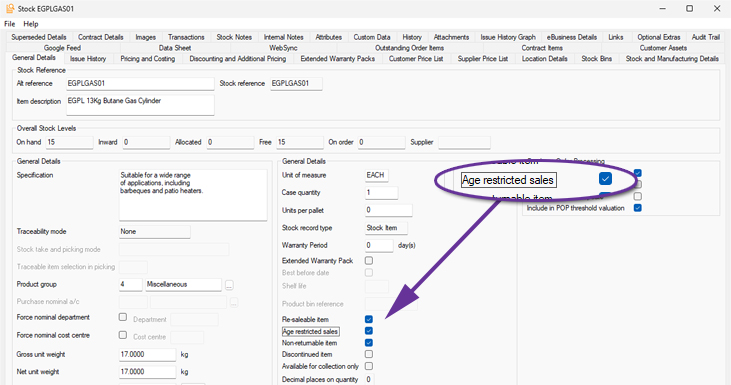
This ensures that deliveries containing these items can only be consigned using services that provide age verification at the point of delivery.
Functions which provide delivery method selection (such as Import eBusiness Orders, Sales document maintenance functions, Delivery creation, Picking/Pack & Despatch and Consignment, including ‘best’ calculations), filter Delivery Methods according to age verification requirement. If any stock item on the order or delivery is flagged as requiring age verification then only Delivery Methods mapped to services which support verification will be available.
New Shipping Containers Monitor
Available to Software Assurance customers with axis diplomat 2024 or above and the Shipping Containers module
Release Date: 24/12/2024 Call Reference: 815791
The Shipping Containers option extends the information recorded for each delivery that you send to a customer by capturing detail on each individual container (package) within the delivery. Typically, containers are added during the picking and/or packing process - either automatically, based on the Delivery Service, or through scanning, allowing items to be picked and scanned directly into their respective containers.
A new monitor tab, 'Shipping Containers', enables you to view, manage, and organise container-related information, including Delivery Methods and Delivery Addresses, within a single list. The right-click context menu provides quick access to further details, such as Delivery Enquiries, Container specifics, Stock levels, or Customer Enquiries. Additionally, it allows you to modify settings or input any missing information highlighted by the monitor.
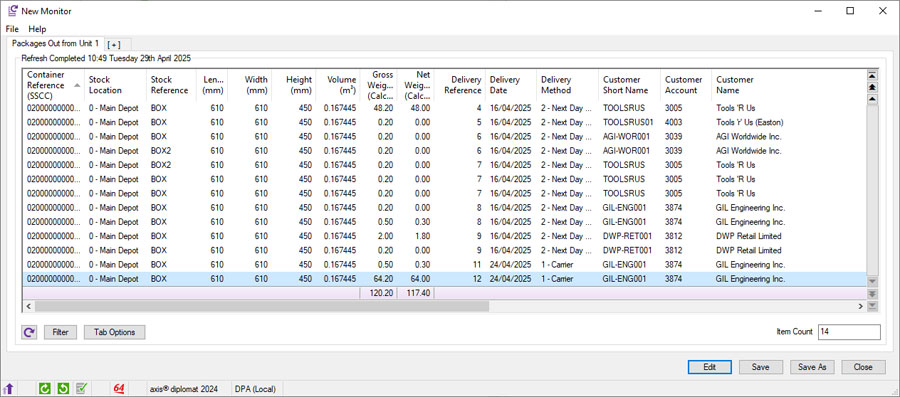
Confirm Shipping Labels and Delivery Documentation
Available to Software Assurance customers with axis diplomat 2024 or above and the Delivery Service Provider Interfaces Foundation module
Release Date: 24/01/2025 Call Reference: 800325
An enhancement to Delivery Service Provider (DSP) interfaces adds the option of including a prompt for users to re-scan delivery labels during the consignment process to verify that the correct labels have been used. This helps to reduce the risk of picking up incorrect labels, particularly when using shared printers.
A prompt requests that the user scans the barcode from the Delivery/Picking Note:
This then displays the expected number of labels, prompting the user to scan the shipping label barcodes:
Verification against the shipping details occurs in real-time, providing auditory feedback for mismatched or confirmed labels. This process is specifically designed for multi-package consignments involving shipping containers.
The setting, Enforce scan of package/pallet label, can be set for specific Delivery Methods using the function Maintain Delivery Methods.
Additional Information in Delivery Enquiry
Available to Software Assurance customers with axis diplomat 2024 or above and the Delivery Service Provider Interfaces Foundation module
Release Date: 19/05/2026 Call Reference: 850526
A number of additional columns have been made available within the Delivery Items tab of Delivery Enquiry. This improves the visibility of customs, dangerous goods, and VAT-related information.
The following columns have been added:
- Country of Origin Code ISO 3166-1
Displays the two-character Country of Origin ISO code alongside the existing Country of Origin description. - Customs Group Description
Displays the description from the Customs Group file where available. - Customs Group Code
Added as a separate column and hidden by default. - UN Number
Displays the UN Number (on systems that also have the Dangerous Goods module). - VAT %
Displays the VAT percentage based on the stock item's VAT group.
This enhancement gives users faster access to key delivery item information without needing to move between multiple functions and is especially useful for businesses handling export, customs, dangerous goods, or VAT-sensitive goods.
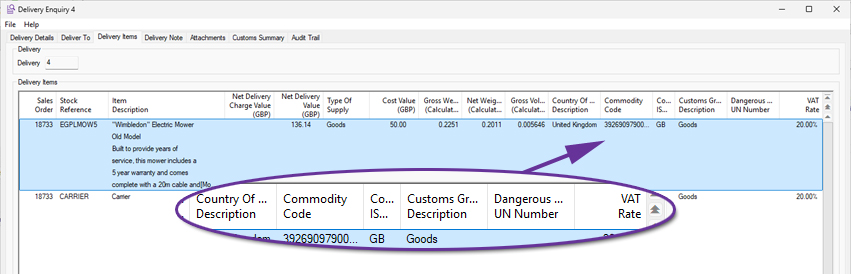
Customs Summary Tab for Delivery Enquiry
Available to Software Assurance customers with axis diplomat 2024 or above and the Despatch & Delivery Management module
Release Date: 10/02/2026 Call Reference: 764606
A new summary tab has been introduced to the Delivery Enquiry showing the quantities, values, weights, and volumes of items in the delivery, grouped by Country of Origin and Commodity Code/TARIC Code.
This gives users an at-a-glance, consolidated view, removing the need to analyse data line-by-line when preparing customs, compliance, or management reports.
.jpg)
Net Value now in Delivery Enquiry Containers Tab
Available to Software Assurance customers with axis diplomat 2024 or above and the Shipping Containers module
Release Date: 24/12/2024 Call Reference: 837411
A new column for Net Value has been added to the scrolling data list within the Containers tab of a Delivery Enquiry.
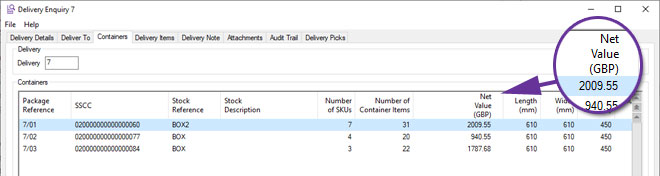
Service Contract Management
Projected Revenue for Service Contracts and Service Contract Requests
Available to Software Assurance customers with axis diplomat 2024 or above and the Service Contract Management module
Release Date: 16/01/2025 Call Reference: 838147
Whenever a Service Contract or Service Contract Request is created or modified, the system will now automatically calculate and record two years' of projected (future) revenue (one projected transaction for each billing period e.g. monthly, quarterly etc.). The projections will take account of the start and end dates on individual contract lines and so illustrate how a contract's revenue is expected to change over time.
These projections can be shown on the Transactions tab of a Service Contract (or Service Contract Request) Enquiry by ticking the option "Include Projected Invoicing."
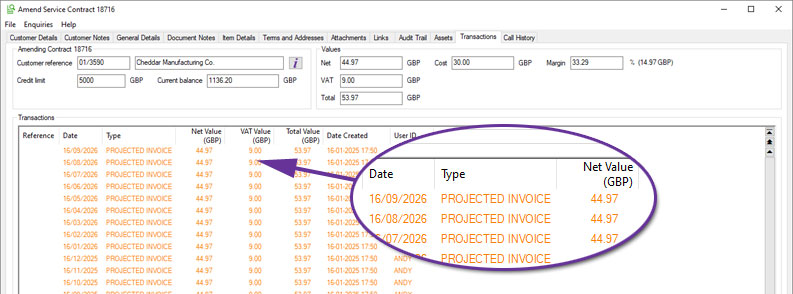
Projected Invoices will also take account of future price changes when Date Specific Service Contract Pricing is in use.
Override Special Instructions in Create Invoices for Contracts
Available to Software Assurance customers with axis diplomat 2024 or above and the Service Contract Management module
Release Date: 19/05/2026 Call Reference: 844660
A new option has been added to the Create Invoices for Contracts function to override Special Instructions. When selected, this text replaces any existing special instructions held against the individual contracts on all of the generated invoices.
This provides a useful mechanism for adding temporary or release-specific customer messages, such as reminding customers of up-coming price changes, revised terms, or other important service information.
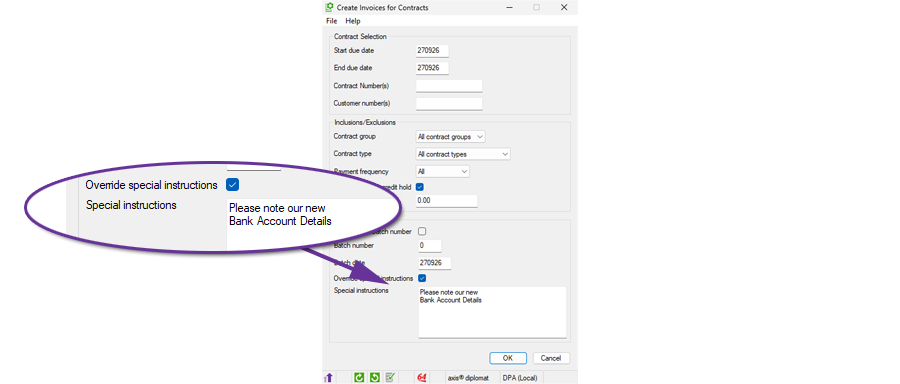
Additional Options when Creating Invoices for Service Contracts
Available to Software Assurance customers with axis diplomat 2024 or above with Service Contract Management
Release Date: 02/06/2025 Call Reference: 844660
The function Create Invoices for Contracts has been extended to add additional filtering, allowing an invoice run to create just those invoices for contracts in a specific Contract Group and/or a specific Contract Type.
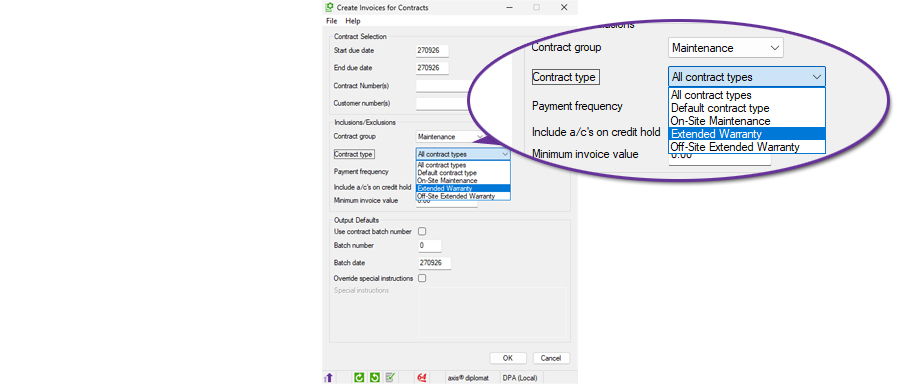
This is particularly useful in conjunction with the ability to override special instructions since it allows one-off messages to be added to the invoices for a specific type of contract.
Additional Filters in Service Contract and Service Contract Items Monitors
Available to Software Assurance customers with axis diplomat 2024 or above and the Service Contract Management module
Release Date: 01/01/2025 Call Reference: 829753
The monitors tabs for 'Service Contracts' and 'Service Contract Items' now have an additional filter to allow the analysis of Deleted Contract Lines and Deleted Contracts. This is particularly useful in conjunction with two other new axis diplomat 2024 Service Contract Monitor features:
Create Deleted Contract Items - Used to analyse archived transactions from the past 25 periods and recreate critical historical data related to deleted contract lines and service contracts.
Calculate Projected Revenue - The projected revenue takes into account both existing and planned future invoicing to give a complete picture of the expected income from service contracts.
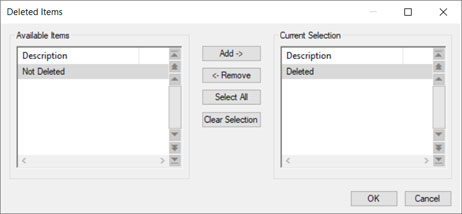
Workshop Job Management
Auto-Pick Product items at Create Invoice for Job
Available to Software Assurance customers with axis diplomat 2024 or above and the Workshop Job Picking module
Release Date: 11/12/2025 Call Reference: 857376
A new parameter helps streamline the point at which a Workshop Job is invoiced. When enabled, any product (non-stocked) items that have been added to the job but not yet picked will be automatically picked at the moment you raise the invoice.
This allows the workflow to keep moving without forcing the user to stop, open extra screens or reconcile missing picks at the end of the process. It is especially helpful in busy workshops where physical parts are added and picked for the job and then labour and subcontract work are added in stages while the job progresses.
In many workshops, staff add the physical parts first, then add labour using product codes for analysis. With the new auto-pick option, admin time is reduced and the need for subsequent invoices for missed items is also reduced.
New Notes Column in Workshop Job Monitor
Available to Software Assurance customers with axis diplomat 2024 or above and the Workshop Job Management module
Release Date: 29/04/2025 Call Reference: 835543
A new column has been added to Workshop Job monitor tabs to display the content of each Workshop Job's Notes.
To view the full content, simply hover over the entry. Alternatively, use the ‘More’ option from the context menu (by right-clicking on the header) to expand the display and reveal additional lines of text and save your view settings:
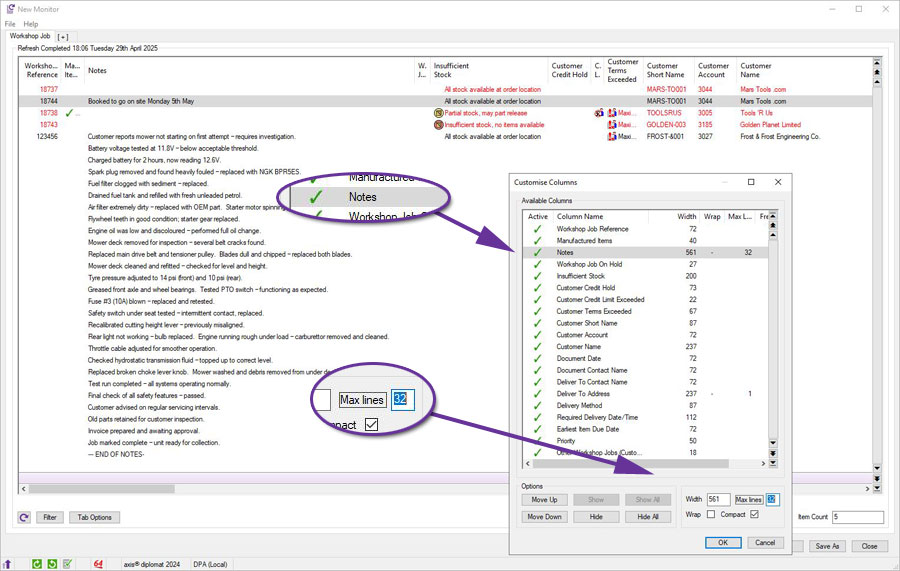
axis payroll
Director's Status
Available to all customers with axis payroll 2026 or above
Release Date: 15/10/2026 Call Reference: 873947
The 'NIC and Tax' tab in Amend Employee Details and in Employee Enquiry display two new indicators in the 'National Insurance Contributions' group area to provide visibility of an employee's director status.
The first field is 'Director' which will be ticked if the employee is flagged as a director. The second field is 'NIC on account' which will show as set if the director is set to make NIC contributions on account.
As these cannot be amended from the employee record, prompt help directs the user to use the 'Amend Director's Details' function to amend these settings.
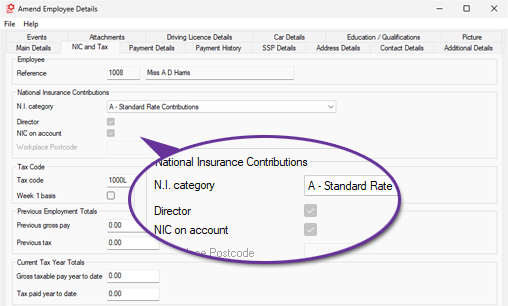
Additional columns have also been provided within the Employee Monitor and HR Monitor functions to show this information as well:

Amend Driving Licence Details
Available to Software Assurance customers with axis payroll 2024 or above
Release Date: 11/12/2024 Call Reference: 839704
To assist with the HR task of maintaining records of employee’s driving licences, a new maintenance function is now available to allow the details to be updated without using the general Amend Employee Details function:
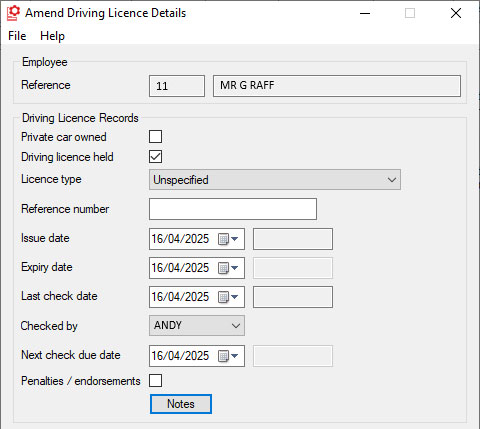
This allows you to take advantage of function-level privacy and security settings to restrict access to the more powerful functions so that the job of updating driving licence records can be delegated to more junior members of staff.
For more information:
https://documentation.axisfirst.co.uk/Amend-Driving-licence-details/article/146568
Job Title Attachments
Available to all customers with axis payroll 2026 or above
Release Date: 15/10/2026 Call Reference: 618030
Job Titles within the axis payroll now support attachments. The attachments tab, visible when amending a Job Title in the Maintain Payroll Descriptions function, can be used to attach any documents relevant to specific roles (for example a document containing the full description or text to be used when recruiting).
HR Monitor Qualifications Tab
Available to all customers with axis payroll 2026 or above
Release Date: 15/10/2026 Call Reference: 610042
A new tab has been added to the HR Monitor, listing employees' qualifications. All recorded employee qualifications will be listed and can be sorted in any way required.
Qualifications that have expired are highlighted in red and, along with a column showing the number of days until a current qualification expires, this provides a useful tool for keeping track of professional re-validation.
